Maintenance Best Practices for Cloud Services
Maintaining the latest features and enhancements of your Oracle Utilities Cloud services requires proactive planning and management of maintenance updates to ensure you receive the most current and secure versions.
This article walks you through scheduling Oracle Utilities maintenance.
This article applies to all Oracle Utilities Cloud services except Oracle Field Service (OFS) and Customer Experience for Utilities (CX4U).
Understanding maintenance basics
The Oracle Utilities Cloud Service Update Policy Guide explains the maintenance process.
Oracle Utilities Cloud service offers two Saturday maintenance windows a month for performing application updates. Additional windows are offered for hot fix releases on Thursday nights. Please see details Oracle Utilities Release Schedule for actual dates.
Important:
Oracle Utilities Cloud service offers two Saturday maintenance windows a month for performing application updates. Additional windows are offered for hot fix releases on Thursday nights. Please see details Oracle Utilities Release Schedule for actual dates.
Important:
- During implementation and before go-live, Oracle may schedule once a month updates.
- Environments that remain on a release beyond the end-of-life (EOL) date, will be scheduled for update by Oracle.
- Maintenance pack release notes are published on Tuesdays and available on My Oracle Support (MOS). (MOS account required to view link.) We also encourage you to review release readiness materials.
- You can sign up for maintenance notification emails to stay informed on maintenance windows through Status Page.
Planning and scheduling maintenance
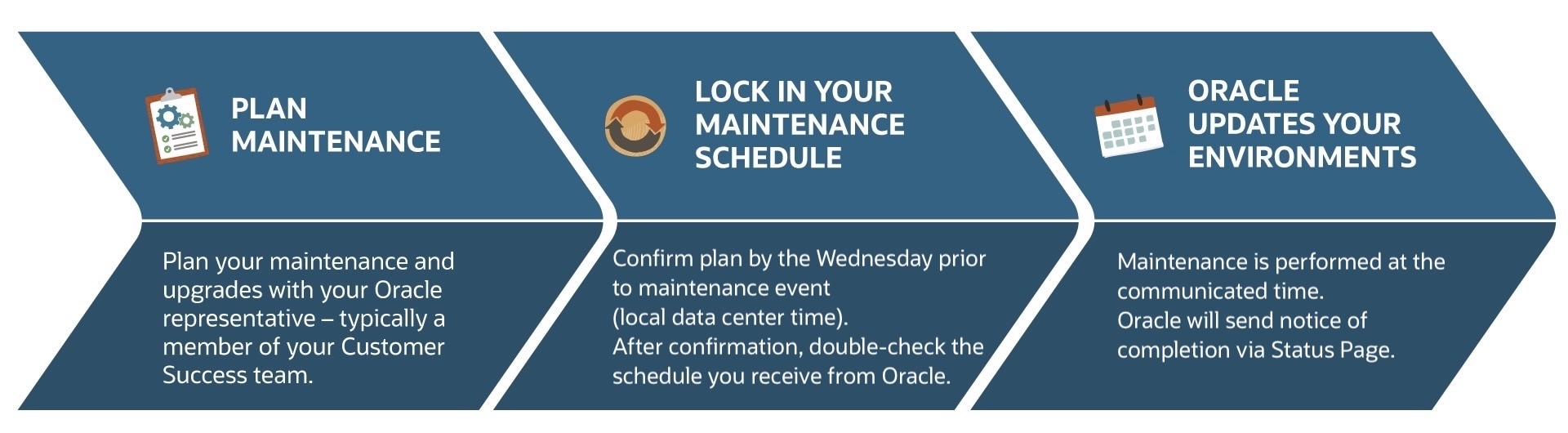
Prior to maintenance, your Oracle representative, typically a member of your Customer Success team, is available to review your maintenance plan with you. You’ll need to actively participate in the scheduling process by completing the following steps before each maintenance event:
- Provide feedback and confirm your maintenance plan by the communicated deadline.
- After you confirm your plan, review the schedule Oracle sends you for accuracy.
- If any errors are identified, promptly report them so they can be corrected.
- Changes to the maintenance schedule are not possible after the communicated deadline.
- By default, patching will happen automatically. Oracle can work with you on a patching schedule.
Maintenance Best Practices
By adopting these best practices, you’ll position your organization for a dependable and consistent maintenance process.
Stay informed on upcoming maintenance
Stay informed on upcoming maintenance
- Keep yourself informed by reviewing the Maintenance pack release notes and release readiness materials.
- Ensure your organization’s relevant stakeholders understand the Oracle maintenance process and schedule.
- If you're unsure how the maintenance event will impact your environments, submit a Service Request (SR) in My Oracle Support (MOS), or contact a member of your Customer Success team.
- After each maintenance window, perform regression testing on your environments to ensure that recent updates have not introduced new issues or affected existing functionality.
- Review the list of known issues and workarounds (available through MOS).
- Should you identify any new issues, log a Service Request (SR) through MOS for investigation and resolution.
By following these best practices, you’ll help ensure a smooth and efficient maintenance process for your Oracle Utilities Cloud service(s). For further details, visit the Frequently Asked Questions (FAQ) page.