 Articles
Server and Storage Administration
Articles
Server and Storage Administration
Oracle Solarisゾーン・クラスタへのOracle RAC 11.2.0.3の配置方法
Vinh Tran著
Oracle Solarisゾーン・クラスタを作成し、ゾーン・クラスタ内でOracle Grid Infrastructure 11.2.0.3およびOracle Real Application Clusters 11.2.0.3のインストールと構成を行い、Oracle RAC向けのOracle Solaris Cluster リソースを作成する方法について説明します。
2012年6月公開
|
プロセスの概要
前提条件
cfgファイルを使用したゾーン・クラスタの作成ゾーン・クラスタ向けのOracle RACフレームワーク・リソースの作成
ローカル・ゾーン・クラスタ
z11gr2Aでのルート環境のセットアップOracle Softwareのユーザーおよびグループの作成
Oracle Solarisゾーン・クラスタ・ノード内でのOracle Grid Infrastructure 11.2.0.3のインストール
Oracle Database 11.2.0.3のインストールとデータベースの作成
Oracle Solaris Clusterリソースの作成
参考情報
著者について
3つの記事で、それぞれ異なるバージョンのソフトウェアを使用して同じ手順を実行する方法を説明しており、この記事はそのうちの1つです。次の表にこの3つの記事についてまとめます。
| 記事 | Oracle RACバージョン | Solarisバージョン | Clusterバージョン |
|---|---|---|---|
| Oracle Solarisゾーン・クラスタへのOracle RAC 11.2.0.2の配置方法 | 11.2.0.2 | 10 | 3.3 |
| Oracle Solarisゾーン・クラスタへのOracle RAC 11.2.0.3の配置方法 | 11.2.0.3 | 10 | 3.3 |
| Oracle Solaris 11ゾーン・クラスタへのOracle RAC 11.2.0.3の配置方法 | 11.2.0.3 | 11 | 4.0 |
はじめに
Oracle Solaris Cluster 3.3には、高可用性ゾーン・クラスタの作成機能が備わっています。 1つのゾーン・クラスタは複数のOracle Solarisゾーンで構成され、それぞれのゾーンは個別の専用サーバー上で稼働します。クラスタを構成するゾーンは関連付けられ、1つの仮想クラスタを形成します。 それぞれのゾーン・クラスタは互いに分離されているため、セキュリティが向上します。 また、ゾーンがクラスタ化されているため、ホストされるアプリケーションの高可用性が実現します。
ゾーン・クラスタ内部にOracle RACをインストールすることによって、Oracle Databaseの複数のインスタンスを同時に運用できます。 そのため、同じデータベースの異なるバージョンや配置(たとえば、本番環境用の配置と開発環境用の配置)の共存が可能です。 このようなアーキテクチャを使用して、多層ソリューションのさまざまな構成要素を、それぞれ別の仮想ゾーン・クラスタに配置することもできます。 たとえば、Oracle RACとアプリケーション・サーバーを、同じクラスタのそれぞれ異なるゾーンに配置できます。 このアプローチによって、それぞれの層および管理ドメインを分離しながら、Oracle Solaris Clusterの簡素化された管理機能を利用できます。
ゾーン・クラスタへのOracle RACの配置に使用できるさまざまな構成については、ホワイト・ペーパーRunning Oracle Real Application Clusters on Oracle Solaris Zone Clustersを参照してください。
注: 本書は、パフォーマンスのベスト・プラクティスを紹介するガイドではなく、次のトピックについては対象外です。
- Oracle Solaris OSのインストール
- ストレージ構成
- ネットワーク構成
- Oracle Solaris Clusterのインストール
プロセスの概要
本記事では、Oracle Automatic Storage Managementを使用して、Oracle Solaris Clusterの4ノードのゾーン・クラスタ構成内でOracle RACをセットアップする方法について説明します(図1を参照)。
おもに次の3つの手順を実行する必要があります。
- ゾーン・クラスタを作成し、このゾーン・クラスタ内で特定のOracle RACインフラストラクチャを作成する
- 環境を準備し、Oracle Grid InfrastructureおよびOracle Databaseのインストールと構成を行う
- Oracle Solaris Clusterリソースを作成し、リソース同士を関連付け、オンラインにする
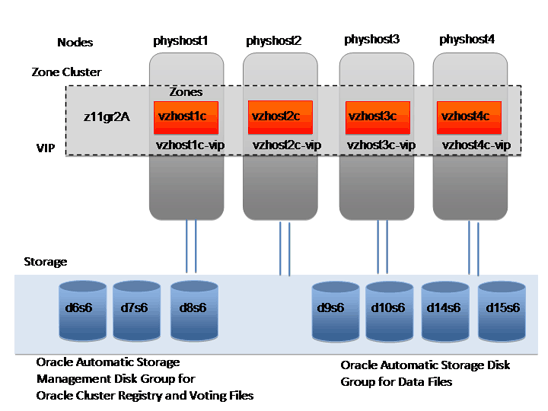
図1. 4ノードのゾーン・クラスタ構成
前提条件
次の前提条件を満たしていることを確認してください。
- Oracle Solaris 10 9/10以降、およびOracle Solaris Cluster 3.3 5/11のインストールと構成を完了していること
- Oracle Solaris 10カーネル・パラメータを、大域ゾーン内の
/etc/systemファイルに構成していること。 推奨値の例は次のとおりです。
shmsys:shminfo_shmmax 4294967295
- 共有ディスク(
/dev/did/rdskデバイスとも言う)を認識していること。 リスト1に、クラスタ・ノードの大域ゾーンから共有ディスクを識別する方法の例を示します。
phyhost1# cldev status

=== Cluster DID Devices ===

Device Instance              Node               Status
---------------              ----               ------
/dev/did/rdsk/d1             phyhost1           Ok

/dev/did/rdsk/d10            phyhost1           Ok
                             phyhost2           Ok
                             phyhost3           Ok
                             phyhost4           Ok

/dev/did/rdsk/d14            phyhost1           Ok
                             phyhost2           Ok
                             phyhost3           Ok
                             phyhost4           Ok

/dev/did/rdsk/d15            phyhost1           Ok
                             phyhost2           Ok
                             phyhost3           Ok
                             phyhost4           Ok

/dev/did/rdsk/d16            phyhost1           Ok
                             phyhost2           Ok
                             phyhost3           Ok
                             phyhost4           Ok

/dev/did/rdsk/d17            phyhost1           Ok
                             phyhost2           Ok
                             phyhost3           Ok
                             phyhost4           Ok

/dev/did/rdsk/d18            phyhost1           Ok
                             phyhost2           Ok
                             phyhost3           Ok
                             phyhost4           Ok

/dev/did/rdsk/d19            phyhost2           Ok

/dev/did/rdsk/d2             phyhost1           Ok

/dev/did/rdsk/d20            phyhost2           Ok

/dev/did/rdsk/d21            phyhost3           Ok

/dev/did/rdsk/d22            phyhost3           Ok

/dev/did/rdsk/d23            phyhost4           Ok

/dev/did/rdsk/d24            phyhost4           Ok

/dev/did/rdsk/d6             phyhost1           Ok
                             phyhost2           Ok
                             phyhost3           Ok
                             phyhost4           Ok

/dev/did/rdsk/d7             phyhost1           Ok
                             phyhost2           Ok
                             phyhost3           Ok
                             phyhost4           Ok

/dev/did/rdsk/d8             phyhost1           Ok
                             phyhost2           Ok
                             phyhost3           Ok
                             phyhost4           Ok

/dev/did/rdsk/d9             phyhost1           Ok
                             phyhost2           Ok
                             phyhost3           Ok
                             phyhost4           Ok
リスト1. 共有ディスクの識別
この出力は、ディスク
d6、d7、d8、d9、d10、d14、d15、d16、d17、d18が、phyhost1、phyhost2、phyhost3、phyhost4によって共有されていることを示しています。 - 次の共有ディスクは、Oracle Automatic Storage Managementディスク・グループでOracle Cluster Registryおよび投票ファイルを保存するために使用されます。
/dev/did/rdsk/d6s6
/dev/did/rdsk/d7s6
/dev/did/rdsk/d8s6
- 次の共有ディスクは、Oracle Automatic Storage Managementディスク・グループでデータ・ファイルを保存するために使用されます。
/dev/did/rdsk/d9s6
/dev/did/rdsk/d10s6
/dev/did/rdsk/d14s6
/dev/did/rdsk/d15s6
この例では、スライス6は102GBです。 ディスク・サイズ要件については、Oracle Grid Infrastructure Installation Guideを確認してください。
- Oracle仮想IP(VIP)およびSingle Client Access Name(SCAN)IPの各要件がセットアップされています。たとえば、次のとおりです。
vzhost1d(IPアドレス10.134.35.99)は、SCAN IPとして使用される。vzhost1c-vip(IPアドレス10.134.35.100)は、vzhost1cのVIPとして使用される。vzhost2c-vip(IPアドレス10.134.35.101)は、vzhost2cのVIPとして使用される。vzhost3c-vip(IPアドレス10.134.35.102)は、vzhost3cのVIPとして使用される。vzhost4c-vip(IPアドレス10.134.35.103)は、vzhost4cのVIPとして使用される。
- パブリック・ネットワークのIPMPグループ(アクティブ・インタフェースを1つ、スタンバイ・インタフェースを1つ)を構成します。
/etc/hostname.e1000g0および/etc/hostname.e1000g1を、大域ゾーンからSC_ipmp0というIPMPグループ向けに設定する例を次に示します。
cat /etc/hostname.e1000g0
phyhost1 netmask + broadcast + group sc_ipmp0 up

cat /etc/hostname.e1000g1
group sc_ipmp0 standby up
cfgファイルを使用したゾーン・クラスタの作成
次の手順で、Oracle Solarisゾーン・クラスタを作成します。
- リスト2の内容を含む
zone.cfgという名前のファイルを作成します。
cat /var/tmp/zone.cfg

create
set zonepath=/export/zones/z11gR2A
add sysid
set name_service="NIS{domain_name=solaris.us.oracle.com}"
set root_password=passwd
end
set limitpriv ="default,proc_priocntl,proc_clock_highres,sys_time"
add dedicated-cpu
set ncpus=16
end
add capped-memory
set physical=12g
set swap=12g
set locked=12g
end
add node
set physical-host=phyhost1
set hostname=vzhost1c
add net
set address=vzhost1c
set physical=e1000g0
end
end
add node
set physical-host=phyhost2
set hostname=vzhost2c
add net
set address=vzhost2c
set physical=e1000g0
end
end
add node
set physical-host=phyhost3
set hostname=vzhost3c
add net
set address=vzhost3c
set physical=e1000g0
end
end
add node
set physical-host=phyhost4
set hostname=vzhost4c
add net
set address=vzhost4c
set physical=e1000g0
end
end
add net
set address=vzhost1d
end
add net
set address=vzhost1c-vip
end
add net
set address=vzhost2c-vip
end
add net
set address=vzhost3c-vip
end
add net
set address=vzhost4c-vip
end
add device
set match="/dev/did/rdsk/d6s6"
end
add device
set match="/dev/did/rdsk/d7s6"
end
add device
set match="/dev/did/rdsk/d8s6"
end
add device
set match="/dev/did/rdsk/d9s6"
end
add device
set match="/dev/did/rdsk/d10s6"
end
add device
set match="/dev/did/rdsk/d14s6"
end
add device
set match="/dev/did/rdsk/d15s6"
end
add device
set match="/dev/did/rdks/d16s6"
end
add device
set match="/dev/did/rdsk/d17s6"
end
add device
set match="/dev/did/rdsk/d18s6"
end
リスト2.
cfgファイルの作成 - SCANホスト名
vzhost1dが複数のIPアドレスに解決される場合は、SCANホスト名が解決されるそれぞれのIPアドレスに対して個別の大域ネット・リソースを構成します。 たとえば、SCANが3つのIPアドレス(10.134.35.97、10.134.35.98、10.134.35.99)に解決される場合、zone.cfgファイルに次の大域ネット・リソースを追加します。
add net
set address=10.134.35.97
end
add net
set address=10.134.35.98
end
add net
set address=10.134.35.99
end
rootとして、リスト3に示すコマンドを1つのノードから実行し、クラスタを作成します。
# clzonecluster configure -f /var/tmp/zone.cfg z11gr2a

# clzonecluster install z11gr2A

# clzonecluster status

=== Zone Clusters ===

--- Zone Cluster Status ---

Name     Node Name   Zone HostName   Status    Zone Status
----     ---------   -------------   ------    -----------
z11gr2A  phyhost1       vzhost1c     Offline   Installed
         phyhost2       vzhost2c     Offline   Installed
         phyhost3       vzhost3c     Offline   Installed
         phyhost4       vzhost4c     Offline   Installed

# clzc boot z11gr2A

# clzc status

=== Zone Clusters ===

--- Zone Cluster Status ---

Name     Node Name   Zone HostName   Status   Zone Status
----     ---------   -------------   ------   -----------
z11gr2A  phyhost1    vzhost1c        Online   Running
         phyhost2    vzhost2c        Online   Running
         phyhost3    vzhost3c        Online   Running
         phyhost4    vzhost4c        Online   Running
リスト3. Oracle Solarisゾーン・クラスタの作成
ゾーン・クラスタ向けのOracle RACフレームワーク・リソースの作成
1つのノードから次の手順を実行し、Oracle RACフレームワークを作成します。
rootとして、1つの大域ゾーン・クラスタ・ノードからclsetupを実行します(リスト4を参照)。
# /usr/cluster/bin/clsetup
*** Main Menu ***

  Please select from one of the following options:

        1) Quorum
        2) Resource groups
        3) Data Services
        4) Cluster interconnect
        5) Device groups and volumes
        6) Private hostnames
        7) New nodes
        8) Other cluster tasks

        ?) Help with menu options
        q) Quit

    Option:  3

 *** Data Services Menu ***

    Please select from one of the following options:

     * 1) Apache Web Server
     * 2) Oracle
     * 3) NFS
     * 4) Oracle Real Application Clusters
     * 5) SAP Web Application Server
     * 6) Highly Available Storage
     * 7) Logical Hostname
     * 8) Shared Address

     * ?) Help
     * q) Return to the Main Menu

    Option:  4

  *** Oracle Solaris Cluster Support for Oracle RAC ***

    Oracle Solaris Cluster provides a support layer for running Oracle
    Real Application Clusters (RAC) database instances. This option allows
    you to create the RAC framework resource group, storage resources,
    database resources and administer them, for managing the Oracle
    Solaris Cluster support for Oracle RAC.

    After the RAC framework resource group has been created, you can use
    the Oracle Solaris Cluster system administration tools to administer a
    RAC framework resource group that is configured on a global cluster.
    To administer a RAC framework resource group that is configured on a
    zone cluster, instead use the appropriate Oracle Solaris Cluster
    command.

    Is it okay to continue (yes/no) [yes]?

    Please select from one of the following options:

        1)  Oracle RAC Create Configuration
        2)  Oracle RAC Ongoing Administration

        q)  Return to the Data Services Menu

    Option:  1

  >>> Select Oracle Real Application Clusters Location <<<

    Oracle Real Application Clusters Location:

        1) Global Cluster
        2) Zone Cluster

    Option [2]:  2

   >>> Select Zone Cluster <<<

    From the list of zone clusters, select the zone cluster where you would like to
    configure Oracle Real Application Clusters.

        1) z11gr2A

        ?) Help
        d) Done

    Selected:  [z11gr2A]

   >>> Select Oracle Real Application Clusters Components to Configure <<<

    Select the component of Oracle Real Application Clusters that you are configuring:

        1) RAC Framework Resource Group
        2) Storage Resources for Oracle Files
        3) Oracle Clusterware Framework Resource
        4) Oracle Automatic Storage Management (ASM)
        5) Resources for Oracle Real Application Clusters Database Instances

    Option [1]: 1

   >>> Verify Prerequisites <<<


    This wizard guides you through the creation and configuration of the Real Application
    Clusters (RAC) framework resource group.

    Before you use this wizard, ensure that the following prerequisites are met:


    * All pre-installation tasks for Oracle Real Application Clusters are completed.

    * The Oracle Solaris Cluster nodes are prepared.

    * The data services packages are installed.

    * All storage management software that you intend to use is installed and configured
    on all nodes where Oracle Real Application Clusters is to run.


    Press RETURN to continue

   >>> Select Nodes <<<

    Specify, in order of preference, a list of names of nodes where Oracle Real
    Application Clusters is to run. If you do not explicitly specify a list, the list
    defaults to all nodes in an arbitrary order.


    The following nodes are available on the zone cluster z11skgxn:

        1) vzhost1c
        2) vzhost2c
        3) vzhost3c
        4) vzhost4c

        r) Refresh and Clear All
        a) All
        ?) Help
        d) Done

    Selected:  [vzhost1c, vzhost2c, vzhost3c, vzhost4c]
    Options:  d

   >>> Select Clusterware Support <<<


    Select the vendor clusterware support that you would like to use.

        1) Native
        2) UDLM based

    Option [1]: 1

   >>> Review Oracle Solaris Cluster Objects <<<


    The following Oracle Solaris Cluster objects will be created.

    Select the value you are changing:

          Property Name               Current Setting
          =============               ===============
        1) Resource Group Name        rac-framework-rg
        2) RAC Framework Resource N...rac-framework-rs

        d) Done
        ?) Help

    Option:  d

   >>> Review Configuration of RAC Framework Resource Group <<<


    The following Oracle Solaris Cluster configuration will be created.

    To view the details for an option, select the option.

                   Name                         Value
                   ====                         =====
        1) Resource Group Name        rac-framework-rg
        2) RAC Framework Resource N...rac-framework-rs

        c) Create Configuration
        ?) Help

    Option:  c
リスト4.
clsetupの実行- 1つの大域ゾーン・クラスタ・ノードからOracle RACフレームワーク・リソースを確認します。
# clrs status -Z z11gr2A

=== Cluster Resources ===

Resource Name         Node Name      State      Status Message
-------------         ---------      -----      --------------
rac-framework-rs       vzhost1c      Online     Online
                       vzhost2c      Online     Online
                       vzhost3c      Online     Online
                       vzhost4c      Online     Online
ローカル・ゾーン・クラスタz11gr2Aでのルート環境のセットアップ
それぞれの大域ゾーン・クラスタ・ノード(phyhost1、phyhost2、phyhost3、phyhost4)から、次の手順を実行します。
- ローカル・ゾーン・ノードにログインし、
rootとして次のコマンドを実行します。
# /usr/sbin/zlogin z11gr2A
[Connected to zone 'z11gr2A' pts/2]
Last login: Thu Aug 25 17:30:14 on pts/2
Oracle Corporation      SunOS 5.10      Generic Patch   January 2005
- (オプション)rootのシェルをbashに変更します。
# passwd -e
Old shell: /sbin/sh
New shell: bash
passwd: password information changed for root
.bash_profileに次のパスを追加します。/u01/grid/product/11.2.0.3/bin /usr/cluster/bin
Oracleソフトウェアのユーザーおよびグループの作成
rootとして、それぞれのノードから次のコマンドを実行します。
# groupadd -g 300 oinstall
# groupadd -g 301 dba
# useradd -g 300 -G 301 -u 302 -d /u01/ora_home -s /usr/bin/bash ouser
# mkdir -p /u01/ora_home
# chown ouser:oinstall /u01/ora_home
# mkdir /u01/oracle
# chown ouser:oinstall /u01/oracle
# mkdir /u01/grid
# chown ouser:oinstall /u01/grid
# mkdir /u01/oraInventory
# chown ouser:oinstall /u01/oraInventory
- ソフトウェア所有者
ouserのパスワードを作成します。
# passwd ouser
New Password:
Re-enter new Password:
passwd: password successfully changed for ouser
bash-3.00#
- Oracleソフトウェアの所有者の環境に対して、ソフトウェア所有者
ouserとして、それぞれのノードからSSHをセットアップします。
$ mkdir .ssh
$ chmod 700 .ssh
$ cd .ssh
$ ssh-keygen -t rsa
Generating public/private rsa key pair.
Enter file in which to save the key (/u01/ora_home/.ssh/id_rsa):
Enter passphrase (empty for no passphrase):
Enter same passphrase again:
Your identification has been saved in /u01/ora_home/.ssh/id_rsa.
Your public key has been saved in /u01/ora_home/.ssh/id_rsa.pub.
The key fingerprint is:
e6:63:c9:71:fe:d1:8f:71:77:70:97:25:2a:ee:a9:33 local1@vzhost1c
$
$ pwd
/u01/ora_home/.ssh
- 1つ目のノード
vzhost1cから、次のコマンドを実行します。
$ cat id_rsa.pub >> authorized_keys
$ chmod 600 authorized_keys
$ scp authorized_keys vzhost2c:/u01/ora_home/.ssh
- 2つ目のノード
vzhost2cから、次のコマンドを実行します。
$ cd /u01/ora_home/.ssh
$ cat id_rsa.pub >> authorized_keys
$ scp authorized_keys vzhost3c:/u01/ora_home/.ssh
- 3つ目のノード
vzhost3cから、次のコマンドを実行します。
$ cd /u01/ora_home/.ssh
$ cat id_rsa.pub >> authorized_keys
$ scp authorized_keys vzhost4c:/u01/ora_home/.ssh
- 4つ目のノード
vzhost4cから、次のコマンドを実行します。
$ cd /u01/ora_home/.ssh
$ cat id_rsa.pub >> authorized_keys
$ scp authorized_keys vzhost1c:/u01/ora_home/.ssh
- 1つ目のノード
vzhost1cから、次のコマンドを実行します。
$ cd /u01/ora_home/.ssh
$ scp authorized_keys vzhost2c:/u01/ora_home/.ssh
$ scp authorized_keys vzhost3c:/u01/ora_home/.ssh
- それぞれのノードから、SSHセットアップをテストします。
$ ssh vzhost1c date
$ ssh vzhost2c date
$ ssh vzhost3c date
$ ssh vzhost4c date
- それぞれのローカル・ゾーン・クラスタ・ノードから、
rootとして、Oracle Automatic Storage Management候補ディスクをセットアップします。
# for i in 6 7 8 9 10 14 15 > do > chown ouser:oinstall /dev/did/rdsk/d${i}s6 > chmod 660 /dev/did/rdsk/d${i}s6 > done - ローカル・ゾーン・クラスタで、ソフトウェア所有者として、1つのノードから次のコマンドを実行します。
$ for i in 6 7 8 9 10 14 15
> do
> dd if=/dev/zero of=/dev/did/rdsk/d${i}s6 bs=1024k count=200
> done
Oracle Solarisゾーン・クラスタ・ノード内でのOracle Grid Infrastructure 11.2.0.3のインストール
- ソフトウェア所有者として、1つのノード上で次のコマンドを実行します。
$ bash
$ export DISPLAY=<hostname>:<n>
$ cd <PATH to 11.2.0.3-based software image>/grid/
$ ./runInstaller
- Oracle Universal Installerに対して次の入力を行います。
- Select Installation Optionページで、「Install and Configure Oracle Grid Infrastructure for a Cluster」を選択します。
- Select Installation Typeページで、「Advanced Installation」を選択します。
- Select Product Languagesページで、適切な言語を選択します。
- Grid Plug and Play Informationページで、図2に示すとおり、次の情報を指定します。
- Cluster Nameに対して「vzhost-cluster」を選択します。
- SCAN Nameに対して「vzhost1d」を選択します。
- SCAN Portに対して「1521」を選択します。
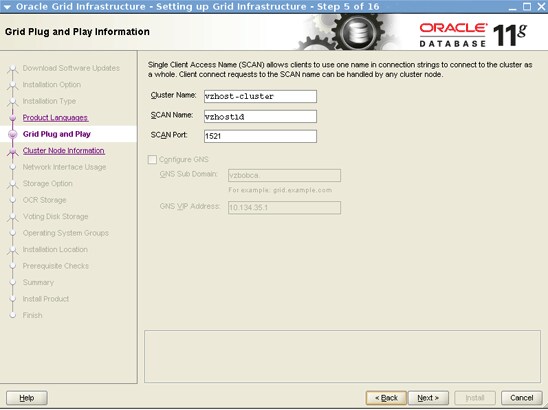
図2. Grid Plug and Play Informationページ
- Cluster Node Informationページで、図3に示すとおり、次の情報を指定します。
Public Hostname  Virtual Hostname
vzhost1c         vzhost1c-vip
vzhost2c         vzhost2c-vip
vzhost3c         vzhost3c-vip
vzhost4c         vzhost4c-vip
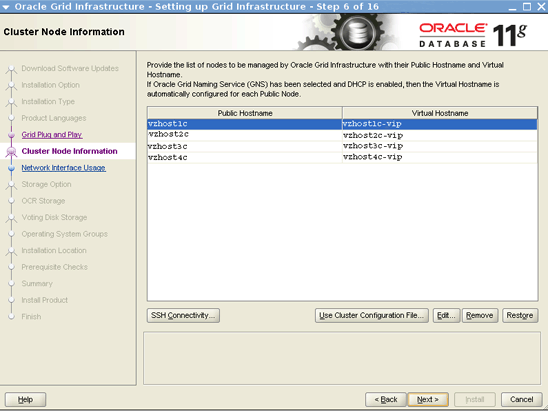
図3. Cluster Node Informationページ
- Specify Network Interface Usageページで、デフォルト設定を受け入れます。
- Storage Option Informationページで、「Oracle Automatic Storage Management」オプションを選択します。
- Create ASM Disk Groupページで、図4に示すとおり、次の手順を実行します。
- 「Change Discovery Path」をクリックします。
- Change Discovery Pathダイアログ・ボックスで、検出パスに「/dev/did/rdsk/d*s6」を指定します。
- Disk Group Nameに対して「crsdg」を指定します。
- Candidate Disksで、「/dev/did/rdsk/d6s6」、「/dev/did/rdsk/d7s6」、「/dev/did/rdsk/d8s6」を選択します。
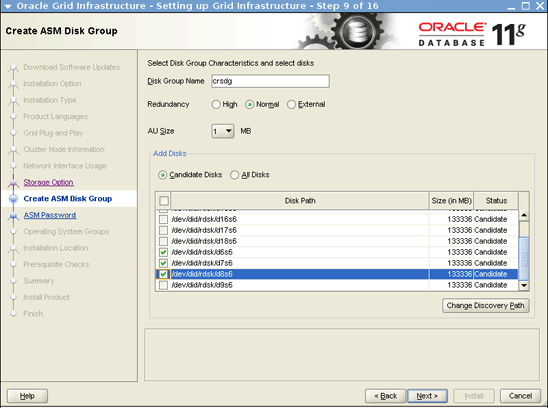
図4. Create ASM Disk Groupページ
- Specify ASM Passwordページで、図5に示すとおり、SYSアカウントおよびASMSNMPアカウントのユーザー名とパスワードを指定します。
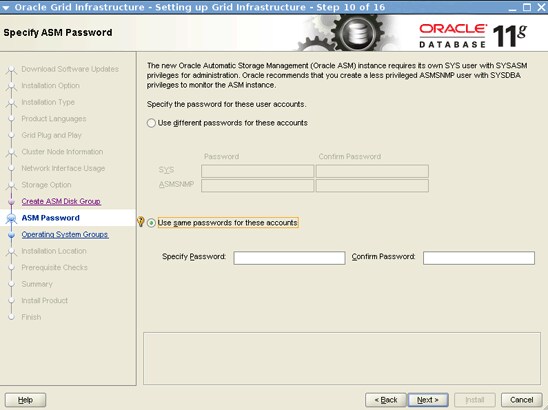
図5. ASM Passwordページ
- Privileged Operating System Groupsページで、次の情報を選択します。
- Oracle ASM DBA (OSDBA for ASM) Groupに対して、「oinstall」を選択します。
- (オプション)Oracle ASM Operator (OSOPER for ASM) Group (Optional)に対して、1つのグループを選択します。
- Oracle ASM Administrator (OSASM) Groupに対して、「oinstall」を選択します。
- Specify Installation Locationページで、次の情報を指定します。
- Oracle Baseに対して「/u01/oracle」を指定します。
- Software Locationに対して「/u01/grid/product/11.2.0.3」を指定します。
- Create Inventoryページで、Inventory Directoryに対して「/u01/oraInventory」を選択します。
- Perform Prerequisite Checksページで、図6に示すとおり、「Ignore All」を選択します。
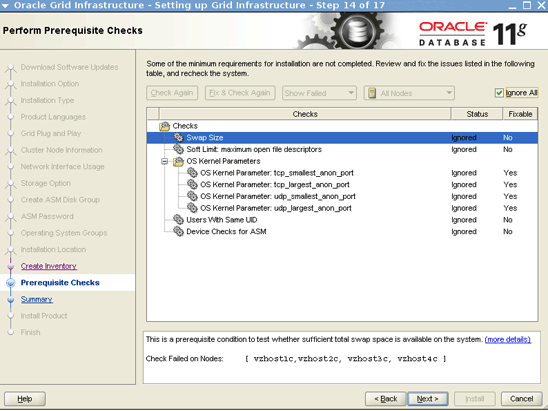
図6. Perform Prerequisite Checksページ
- Summaryページで、「Install」をクリックし、ソフトウェアのインストールを開始します。
図7に示すとおり、Execute Configuration Scriptsダイアログ・ボックスに、
rootとして/u01/oraInventory/orainstRoot.shスクリプトと/u01/grid/product/11.2.0.3/root.shスクリプトを実行する必要があるというメッセージが表示されます。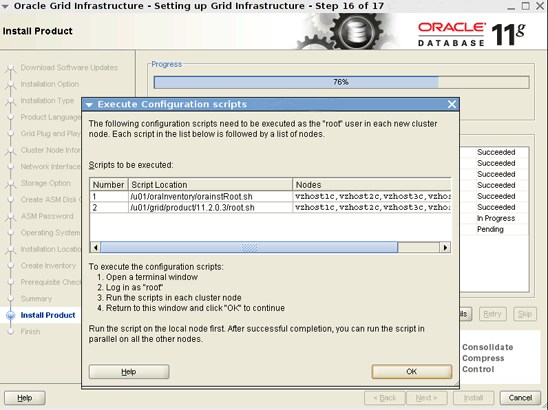
図7. Execute Configuration Scriptsダイアログ・ボックス
- リスト5に示すとおり、ターミナル・ウィンドウを開き、それぞれのノード上でスクリプトを実行します。
# /u01/oraInventory/orainstRoot.sh
Changing permissions of /u01/oraInventory.
Adding read,write permissions for group.
Removing read,write,execute permissions for world.

Changing groupname of /u01/oraInventory to oinstall.
The execution of the script is complete.

# /u01/grid/product/11.2.0.3/root.sh
Performing root user operation for Oracle 11g

The following environment variables are set as:
    ORACLE_OWNER= ouser
    ORACLE_HOME=  /u01/grid/product/11.2.0.3

Enter the full pathname of the local bin directory: [/usr/local/bin]: /opt/local
/bin
Creating /opt/local/bin directory...
   Copying dbhome to /opt/local/bin ...
   Copying oraenv to /opt/local/bin ...
   Copying coraenv to /opt/local/bin ...


Creating /var/opt/oracle/oratab file...
Entries will be added to the /var/opt/oracle/oratab file as needed by
Database Configuration Assistant when a database is created
Finished running generic part of root script.
Now product-specific root actions will be performed.
Using configuration parameter file: /u01/grid/product/11.2.0.3/crs/install/crsconfig_params
Creating trace directory
User ignored Prerequisites during installation
OLR initialization - successful
  root wallet
  root wallet cert
  root cert export
  peer wallet
  profile reader wallet
  pa wallet
  peer wallet keys
  pa wallet keys
  peer cert request
  pa cert request
  peer cert
  pa cert
  peer root cert TP
  profile reader root cert TP
  pa root cert TP
  peer pa cert TP
  pa peer cert TP
  profile reader pa cert TP
  profile reader peer cert TP
  peer user cert
  pa user cert
Adding Clusterware entries to inittab
CRS-2672: Attempting to start 'ora.mdnsd' on 'vzhost1c'
CRS-2676: Start of 'ora.mdnsd' on 'vzhost1c' succeeded
CRS-2672: Attempting to start 'ora.gpnpd' on 'vzhost1c'
CRS-2676: Start of 'ora.gpnpd' on 'vzhost1c' succeeded
CRS-2672: Attempting to start 'ora.cssdmonitor' on 'vzhost1c'
CRS-2672: Attempting to start 'ora.gipcd' on 'vzhost1c'
CRS-2676: Start of 'ora.cssdmonitor' on 'vzhost1c' succeeded
CRS-2676: Start of 'ora.gipcd' on 'vzhost1c' succeeded
CRS-2672: Attempting to start 'ora.cssd' on 'vzhost1c'
CRS-2672: Attempting to start 'ora.diskmon' on 'vzhost1c'
CRS-2676: Start of 'ora.diskmon' on 'vzhost1c' succeeded
CRS-2676: Start of 'ora.cssd' on 'vzhost1c' succeeded

ASM created and started successfully.

Disk Group crsdg created successfully.

clscfg: -install mode specified
Successfully accumulated necessary OCR keys.
Creating OCR keys for user 'root', privgrp 'root'..
Operation successful.
CRS-4256: Updating the profile
Successful addition of voting disk 621725b80bf24f53bfc8c56f8eaf3457.
Successful addition of voting disk 630c40e735134f2bbf78571ea35bb856.
Successful addition of voting disk 4a78fd6ce8564fdbbfceac0f0e9d7c37.
Successfully replaced voting disk group with +crsdg.
CRS-4256: Updating the profile
CRS-4266: Voting file(s) successfully replaced
##  STATE    File Universal Id                File Name Disk group
--  -----    -----------------                --------- ---------
 1. ONLINE   621725b80bf24f53bfc8c56f8eaf3457 (/dev/did/rdsk/d6s6) [CRSDG]
 2. ONLINE   630c40e735134f2bbf78571ea35bb856 (/dev/did/rdsk/d7s6) [CRSDG]
 3. ONLINE   4a78fd6ce8564fdbbfceac0f0e9d7c37 (/dev/did/rdsk/d8s6) [CRSDG]
Located 3 voting disk(s).

CRS-2672: Attempting to start 'ora.asm' on 'vzhost1c'
CRS-2676: Start of 'ora.asm' on 'vzhost1c' succeeded
CRS-2672: Attempting to start 'ora.CRSDG.dg' on 'vzhost1c'
CRS-2676: Start of 'ora.CRSDG.dg' on 'vzhost1c' succeeded
Configure Oracle Grid Infrastructure for a Cluster ... succeeded
リスト5. スクリプトの実行
- 両方のスクリプトを実行した後、GUIの「OK」をクリックして次に進みます。
クラスタでDNSネットワーク・クライアント・サービスを使用していない場合、図8に示すとおり、エラー・メッセージ
[INS-20802] Oracle Cluster Verification Utility failedが表示されます。このエラーは無視してかまいません。oraInstallログにも、Cluster Verification UtilityでSCAN名を解決できないことを示すメッセージが記録されます。INFO: Checking Single Client Access Name (SCAN)... INFO: Checking TCP connectivity to SCAN Listeners... INFO: TCP connectivity to SCAN Listeners exists on all cluster nodes INFO: Checking name resolution setup for "vzhost1d"... INFO: ERROR: INFO: PRVG-1101 : SCAN name "vzhost1d" failed to resolve INFO: ERROR: INFO: PRVF-4657 : Name resolution setup check for "vzhost1d" (IP address: 10.134. 35.99) failed INFO: ERROR: INFO: PRVF-4663 : Found configuration issue with the 'hosts' entry in the /etc/n sswitch.conf file INFO: Verification of SCAN VIP and Listener setup failed
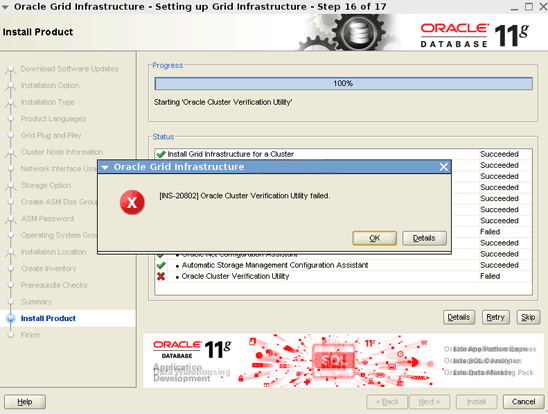
図8. エラー・メッセージ
- 次に進むには、「OK」、「Skip」、「Next」の順にクリックします。
図9に示すとおり、別のエラー・メッセージが表示されます。
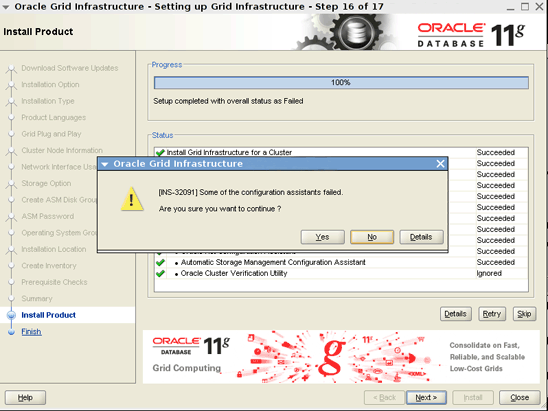
図9. 別のエラー・メッセージ
- 「Yes」をクリックして次に進みます。
Oracle Grid Infrastructure 11.2.0.3のインストールはこれで完了です。
- 任意のノードから、リスト6に示すとおり、Oracle Grid Infrastructureリソースのステータスを確認します。
# /u01/grid/product/11.2.0.3/bin/crsctl status res -t
--------------------------------------------------------------------------------
NAME           TARGET  STATE        SERVER                   STATE_DETAILS
--------------------------------------------------------------------------------
Local Resources
--------------------------------------------------------------------------------
ora.CRSDG.dg
               ONLINE  ONLINE       vzhost1c
               ONLINE  ONLINE       vzhost2c
               ONLINE  ONLINE       vzhost3c
               ONLINE  ONLINE       vzhost4c
ora.LISTENER.lsnr
               ONLINE  ONLINE       vzhost1c
               ONLINE  ONLINE       vzhost2c
               ONLINE  ONLINE       vzhost3c
               ONLINE  ONLINE       vzhost4c
ora.asm
               ONLINE  ONLINE       vzhost1c               Started
               ONLINE  ONLINE       vzhost2c               Started
               ONLINE  ONLINE       vzhost3c               Started
               ONLINE  ONLINE       vzhost4c               Started
ora.gsd
               OFFLINE OFFLINE      vzhost1c
               OFFLINE OFFLINE      vzhost2c
               OFFLINE OFFLINE      vzhost3c
               OFFLINE OFFLINE      vzhost4c
ora.net1.network
               ONLINE  ONLINE       vzhost1c
               ONLINE  ONLINE       vzhost2c
               ONLINE  ONLINE       vzhost3c
               ONLINE  ONLINE       vzhost4c
ora.ons
               ONLINE  ONLINE       vzhost1c
               ONLINE  ONLINE       vzhost2c
               ONLINE  ONLINE       vzhost3c
               ONLINE  ONLINE       vzhost4c
--------------------------------------------------------------------------------
Cluster Resources
--------------------------------------------------------------------------------
ora.LISTENER_SCAN1.lsnr
      1        ONLINE  ONLINE       vzhost1c
ora.cvu

      1        ONLINE  ONLINE       vzhost2c
ora.oc4j
      1        ONLINE  ONLINE       vzhost3c
ora.scan1.vip
      1        ONLINE  ONLINE       vzhost4c
ora.vzhost1c.vip
      1        ONLINE  ONLINE       vzhost1c
ora.vzhost2c.vip
      1        ONLINE  ONLINE       vzhost2c
ora.vzhost3c.vip
      1        ONLINE  ONLINE       vzhost3c
ora.vzhost4c.vip
      1        ONLINE  ONLINE       vzhost4c
リスト6. リソースのステータスの確認
Oracle Database 11.2.0.3のインストールとデータベースの作成
- 次のコマンドを実行して、図10に示すOracle ASM Configuration Assistantを起動します。
$ export DISPLAY=<hostname>:<n>
$ /u01/grid/product/11.2.0.3/bin/asmca
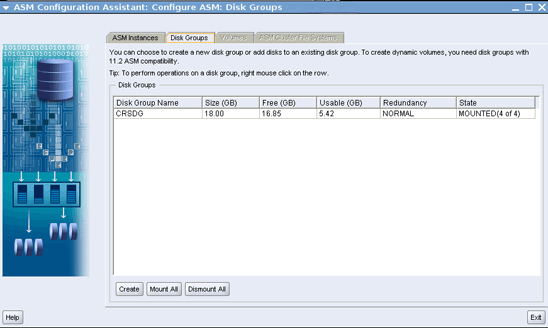
図10. ASM Configuration Assistantページ
- Oracle ASM Configuration Assistantで、次の手順を実行します。
- Disk Groupsタブで、「Create」をクリックします。
- Create Disk Groupページ(図11を参照)で次の手順を実行し、データベースを作成するための
swbdgというOracle Automatic Storage Managementディスク・グループを作成します。
- Disk Group Nameに対して「swbdg」を指定します。
- 「/dev/did/rdsk/d9s6」、「/dev/did/rdsk/d10s6」、「/dev/did/rdsk/d14s6」、「/dev/did/rdsk/d15s6」を選択します。
- Failure Groupで、/dev/did/rdsk/d9s6および/dev/did/rdsk/d10s6に対して「fgr1」を指定します。
- Failure Groupで、/dev/did/rdsk/d14s6および/dev/did/rdsk/d15s6に対して「fgr2」を指定します。
- 「OK」をクリックし、ディスク・グループを作成します。
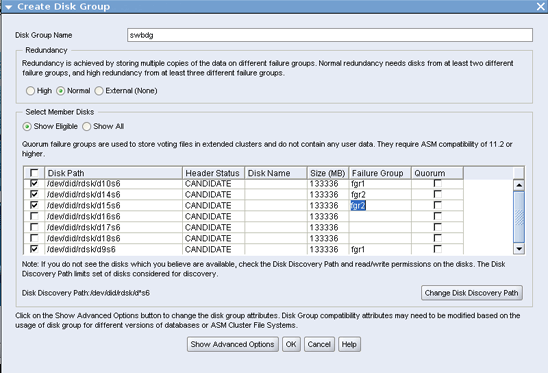
図11. Create Disk Groupページ
swbdgディスク・グループの作成が完了した後、「Exit」をクリックしてOracle ASM Configuration Assistantを閉じます。
- 1つのノードから、次のコマンドを実行して、Oracle Universal InstallerでOracle Databaseをインストールします。
$ export DISPLAY=<hostname>:<n>
$ cd  <PATH to 11.2.0.3 based software image>/database
$ ./runInstaller
- Oracle Universal Installerに対して次の入力を行います。
- Configure Security UpdatesページとDownload Software Updatesページで、必要な情報を入力します。
- Select Installation Optionページで、「Create and configure a database」を選択します。
- System Classページで、「Server Class」を選択します。
- 図12に示すとおり、Grid Installation Optionsページで、次の手順を実行します。
- 「Oracle Real Application Clusters database installation」を選択します。
- すべてのノードが選択済みであることを確認します。
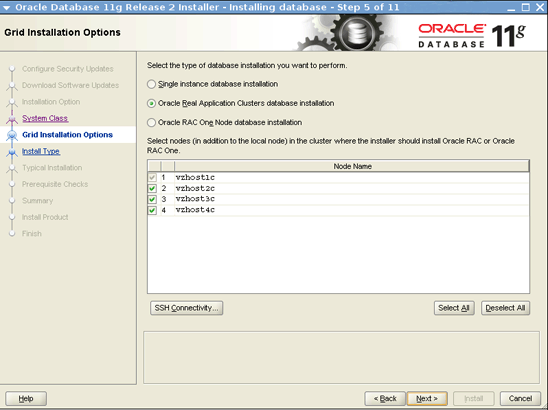
図12. Oracle Grid Infrastructure Installation Optionsページ
- Select Install Typeページで、「Advanced install」を選択します。
- Select Product Languagesページで、デフォルト値を使用します。
- Select Database Editionページで、「Enterprise Edition」を選択します。
- Specify Installation Locationページで、次の情報を指定します。
- Oracle Baseに対して「/u01/oracle」を選択します。
- Software Locationに対して「/u01/oracle/product/11.2.0.3」を選択します。
- Select Configuration Typeページで、「General Purpose/Transaction Processing」を選択します。
- Specify Database Identifiersページで、次の情報を指定します。
- Global Database Nameに対して「swb」を指定します。
- Oracle Service Identifierに対して「swb」を指定します。
- 図13に示すSpecify Configuration Optionsページで、デフォルト設定を使用します。
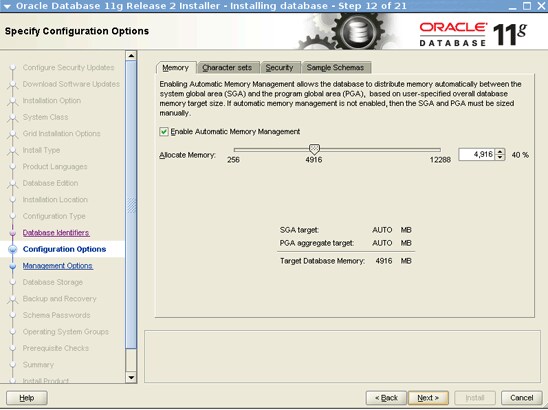
図13. Specify Configuration Optionsページ
- Specify Management Optionsページで、デフォルト設定を使用します。
- Specify Database Storage Optionsページで、「Oracle Automatic Storage Management」を選択し、ASMSNMPユーザーのパスワードを指定します。
- Specify Recovery Optionsページで、「Do not enable automated backups」を選択します。
- 図14に示すとおり、Select ASM Disk Groupページで、ディスク・グループ名として「SWBDG」を選択します。
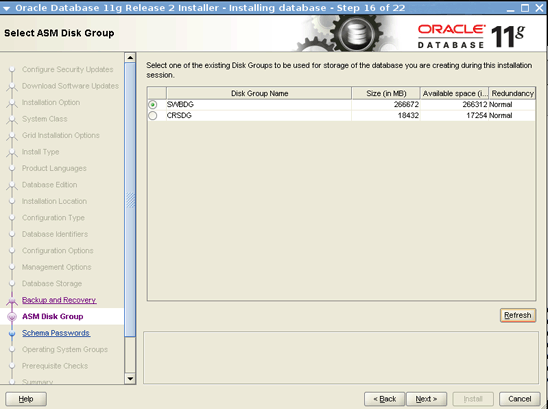
図14. Select Disk Group Nameページ
- Specify Schema Passwordsページで、SYS、SYSTEM、SYSMAN、DBSNMPの各アカウントのパスワードを指定します。
- Privileged Operating System Groupsページで、次の情報を指定します。
- Database Administrator (OSDBA) Groupに対して「dba」を選択します。
- Database Operator (OSOPER) Group (Optional)に対して「oinstall」を選択します。
- Perform Prerequisite Checksページで、図15に示すとおり、「Ignore All」を選択します。
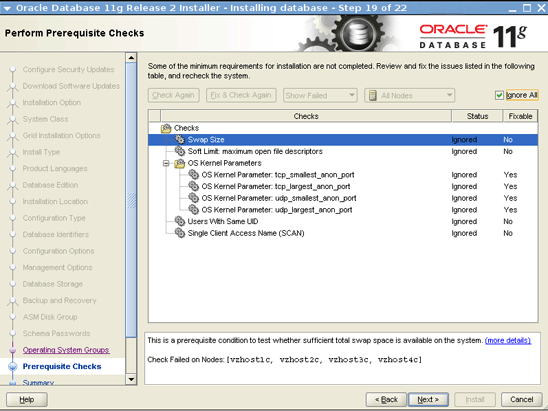
図15. Perform Prerequisite Checksページ
図16に示すとおり、エラー・メッセージINS-13016が表示されます。
- 「Yes」を選択して次に進みます。
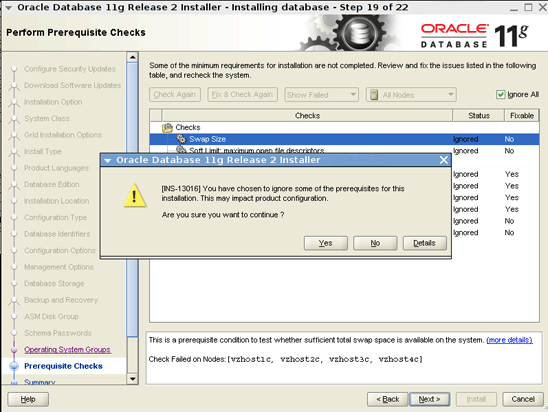
図16. Message During Prerequisite Checksページ
- 図17に示すSummaryページで、「Install」をクリックします。
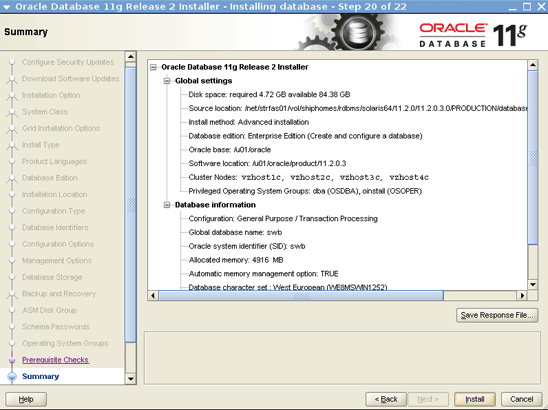
図17. Summaryページ
- 図18に示すとおり、Database Configuration Assistantダイアログ・ボックスで、「OK」をクリックして次に進みます。
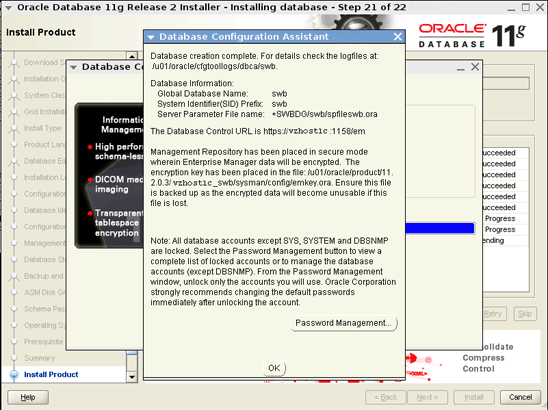
図18. Database Configuration Assistantダイアログ・ボックス
- 図19に示すとおり、Execute Configuration Scriptsダイアログ・ボックスに、それぞれのノード上で
root.shを実行する必要があるというメッセージが表示されます。
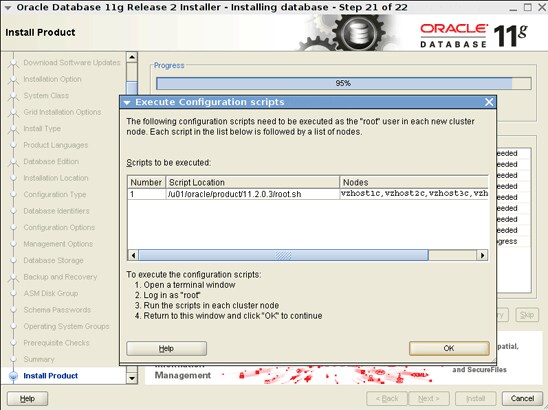
図19. Execute Configuration Scriptsダイアログ・ボックス
- 最後のノードで
root.shスクリプトを実行した後、「OK」をクリックして次に進みます。 図20に示すとおり、Finishページで、Oracle Databaseのインストールと構成が完了したことが示されます。
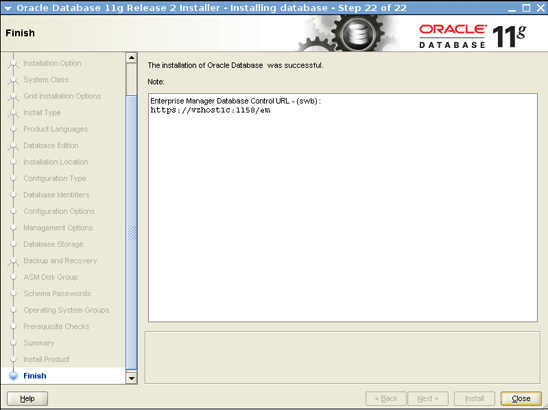
図20. Finishページ
Oracle Solaris Clusterリソースの作成
次の手順で、Oracle Solaris Clusterリソースを作成します。 または、clsetupウィザードを使用することもできます。
- 1つのゾーン・クラスタ・ノードから、次のコマンドを実行して、ゾーン・クラスタ内に
SUNW.crs_frameworkリソース・タイプを登録します。
# clrt register SUNW.crs_framework
SUNW.crs_frameworkリソース・タイプのインスタンスを、Oracle RACフレームワークのリソース・グループに追加します。
# clresource create -t SUNW.crs_framework \
-g rac-framework-rg \
-p resource_dependencies=rac-framework-rs \
crs-framework-rs
- スケーラブルなOracle Automatic Storage Managementインスタンス・プロキシ・リソース・タイプを登録します。
# clresourcetype register SUNW.scalable_asm_instance_proxy
- Oracle Automatic Storage Managementディスク・グループ・リソース・タイプを登録します。
# clresourcetype register SUNW.scalable_asm_diskgroup_proxy
- リソース・グループ
asm-inst-rgとasm-dg-rgを作成します。
# clresourcegroup create -S asm-inst-rg asm-dg-rg
asm-inst-rgによるrac-fmwk-rgに対する強い肯定的なアフィニティを設定します。
# clresourcegroup set -p rg_affinities=++rac-framework-rg asm-inst-rg
asm-dg-rgによるasm-inst-rgに対する強い肯定的なアフィニティを設定します。
# clresourcegroup set -p rg_affinities=++asm-inst-rg asm-dg-rg
SUNW.scalable_asm_instance_proxyリソースを作成し、リソースの依存性を設定します。
# clresource create asm-inst-rg \ -t SUNW.scalable_asm_instance_proxy \ -p ORACLE_HOME=/u01/grid/product/11.2.0.3 \ -p CRS_HOME=/u01/grid/product/11.2.0.3 \ -p "ORACLE_SID{vzhost1c}"=+ASM1 \ -p "ORACLE_SID{vzhost2c}"=+ASM2 \ -p "ORACLE_SID{vzhost3c}"=+ASM3 \ -p "ORACLE_SID{vzhost4c}"=+ASM4 \ -p resource_dependencies_offline_restart=crs-framework-rs \ -d asm-inst-rs- Oracle Automatic Storage Managementディスク・グループ・リソース・タイプを、
asm-dg-rgリソース・グループに追加します。
# clresource create -g asm-dg-rg -t SUNW.scalable_asm_diskgroup_proxy \
-p asm_diskgroups=CRSDG,SWBDG \
-p resource_dependencies_offline_restart=asm-inst-rs \
-d asm-dg-rs
- 1つのクラスタ・ノードで、管理状態にある
asm-inst-rgリソース・グループをオンラインにします。
# clresourcegroup online -eM asm-inst-rg
- 1つのクラスタ・ノードで、管理状態にある
asm-dg-rgリソース・グループをオンラインにします。
# clresourcegroup online -eM asm-dg-rg
- Oracle RACデータベース・サーバーのプロキシ・リソースを含むスケーラブルなリソース・グループを作成します。
# clresourcegroup create -S \
-p rg_affinities=++rac-framework-rg,++asm-dg-rg \
rac-swbdb-rg
SUNW.scalable_rac_server_proxyリソース・タイプを登録します。
# clresourcetype register SUNW.scalable_rac_server_proxy
- データベース・リソースをこのリソース・グループに追加します。
# clresource create -g rac-swbdb-rg \ -t SUNW.scalable_rac_server_proxy \ -p resource_dependencies=rac-framework-rs \ -p resource_dependencies_offline_restart=crs-framework-rs,asm-dg-rs \ -p oracle_home=/u01/oracle/product/11.2.0.3 \ -p crs_home=/u01/grid/product/11.2.0.3 \ -p db_name=swb \ -p "oracle_sid{vzhost1c}"=swb1 \ -p "oracle_sid{vzhost2c}"=swb2 \ -p "oracle_sid{vzhost3c}"=swb3 \ -p "oracle_sid{vzhost4c}"=swb4 \ -d rac-swb-srvr-proxy-rs - リソース・グループをオンラインにします。
# clresourcegroup online -emM rac-swbdb-rg
- リスト7に示すとおり、クラスタ・リソースのステータスを確認します。
# clrs status

=== Cluster Resources ===

Resource Name             Node Name         State       Status Message
-------------             ---------          -----      ---------------
crs_framework-rs           vzhost1c         Online      Online
                           vzhost2c         Online      Online
                           vzhost3c         Online      Online
                           vzhost4c         Online      Online

rac-framework-rs           vzhost1c         Online      Online
                           vzhost2c         Online      Online
                           vzhost3c         Online      Online
                           vzhost4c         Online      Online

asm-inst-rs                vzhost1c         Online      Online - +ASM1 is UP and ENABLED
                           vzhost2c         Online      Online - +ASM2 is UP and ENABLED
                           vzhost3c         Online      Online - +ASM3 is UP and ENABLED
                           vzhost4c         Online      Online - +ASM4 is UP and ENABLED

asm-dg-rs                  vzhost1c         Online      Online - Mounted: SWBDG
                           vzhost2c         Online      Online - Mounted: SWBDG
                           vzhost3c         Online      Online - Mounted: SWBDG
                           vzhost4c         Online      Online - Mounted: SWBDG

rac-swb-srvr-proxy-rs      vzhost1c         Online      Online - Oracle instance UP
                           vzhost2c         Online      Online - Oracle instance UP
                           vzhost3c         Online      Online - Oracle instance UP
                           vzhost4c         Online      Online - Oracle instance UP
参考情報
次のような追加のリソースがあります。
- Running Oracle RAC Application Clusters on Oracle Solaris Zone Clustersホワイト・ペーパー: http://www.oracle.com/technetwork/articles/servers-storage-admin/o11-062-rac-solariszonescluster-429206.pdf
- ゾーン・クラスタへのOracle RAC 11.2.0.2の配置方法: http://www.oracle.com/technetwork/articles/servers-storage-admin/rac-zone-cluster-1631291.html
- Oracle Solaris Cluster 3.3ドキュメント・ライブラリ: http://www.oracle.com/technetwork/server-storage/solaris-cluster/documentation/index.html
- Oracle Solaris Clusterの全テクニカル・リソース: http://www.oracle.com/technetwork/server-storage/solaris-cluster/documentation/cluster-how-to-1389544.html
- Oracle Solaris Cluster 3.3 リリース・ノート: http://docs.oracle.com/cd/E18728_01/html/E22274/index.html
- Oracle Solarisのパッチおよび更新プログラム: http://www.oracle.com/technetwork/server-storage/solaris-cluster/downloads/cluster-archive-168201.html
- Oracle Solaris Clusterのダウンロード: http://www.oracle.com/technetwork/server-storage/solaris-cluster/downloads/index.html
- Oracle Solaris Clusterのトレーニング: http://www.oracle.com/technetwork/server-storage/solaris-cluster/training/index.html
著者について
Vinh TranはOracle Solaris Cluster GroupのQuality Engineerです。 Oracle Solaris Cluster上でのOracle RACの認証や適格性検査などを担当しています。
| リビジョン1.0、2012/06/26 |
オラクルのすべてのテクノロジーに関するシステム管理関連のコンテンツについては、OTN SystemsのFacebookとTwitterをフォローして確認してください。

 Printer View