Customizing Security for Oracle WebLogic Server MBeans
By Peter Bower
Published February 2010
A quick tour of your options for ensuring security for JMX operations in Oracle WebLogic Server
Java Management Extensions (JMX) clients are used to both update the Oracle WebLogic Server configuration and monitor the running Oracle WebLogic Server domain. Oracle WebLogic Server provides a variety of configuration options and APIs to allow you to ensure security for your JMX operations.
In this article, I will explore the various security features of Oracle WebLogic Server, concentrating on how these features can be used with JMX. This includes
- An overview of how authorization and auditing are performed for JMX requests, including a description of default policies and Java 2 Platform, Standard Edition (J2SE) security interaction
- A set of simple use cases that demonstrate how you customize security for JMX MBeans
- Links to reference materials for more information
With these use cases, I will demonstrate
- How to configure the system to use the Oracle WebLogic Server security service for JMX MBean authorization
- How to enable configuration auditing
- How to add your own custom policies for JMX MBean authorization
- How to write your own security providers to further customize authorization and auditing for JMX MBeans
Oracle WebLogic Server Security Features
The tasks outlined above require using the following Oracle WebLogic Server features:
- Oracle WebLogic Server security service
- Oracle WebLogic Server auditing security provider
- Oracle WebLogic Server authorization security provider
- Configuration auditing
- JMXResource auditing
For more information on these features, refer to Understanding Security for Oracle WebLogic Server documentation. Brief definitions from the documentation are included below:
The Oracle WebLogic Server security serviceis a comprehensive infrastructure that provides end-to-end security for Oracle WebLogic Server applications. The Oracle WebLogic Server security service is a framework for security providers that provides authentication, role mapping, authorization, credential mapping, certificate support, and auditing. Default Oracle WebLogic Server security providers allow for a working security implementation out of the box, but customers can also use third-party or custom providers that implement the security service provider interfaces and replace the Oracle WebLogic Server default providers.
Auditing is the process whereby information about requests and the outcome of those requests is collected, stored, and distributed for the purposes of nonrepudiation. Auditing provides an electronic trail of computer activity. In the Oracle WebLogic Server security architecture, an auditing security provider is used to provide auditing services.
Authorization is the process whereby a user’s access to a resource is permitted or denied.In the Oracle WebLogic Server security architecture, an authorization security provider controls access to Oracle WebLogic Server resources based on the user’s security role and the security policy assigned to the requested Oracle WebLogic Server resource.
In the Oracle WebLogic Server security architecture, a Resource object represents entities that are accessible from Oracle WebLogic Server, such as servlets, JDBC connection pools, Java Message Service (JMS) destinations, JNDI contexts, MBeans, and so on. A JMXResource object represents a JMX MBean.
Configuration auditing records audit information about changes made to the Oracle WebLogic Server configuration. Audit information can be either written to the server log or sent to the auditing provider. This information includes additions, deletions, and modifications to configuration elements.
JMXResource auditing records audit information about operations evaluated on the MBean resource. This includes authorization and role mapping. The auditing provider processes the audit events and writes them to the audit log maintained by the provider.
Overview of Security for JMX Operations
In this section, I provide an overview of the major components of Oracle WebLogic Server security that are used in ensuring security for JMX requests. This includes a summary of
- A sample JMX request as it flows through the Oracle WebLogic Server security components
- The default policies for Oracle WebLogic Server MBeans
- How Oracle WebLogic Server and J2SE MBean security interact
JMX Request Flow
A client invokes on a JMX MBean. This request goes across the network and is processed by Oracle WebLogic Server, and the result is returned to the client. As this request flows through the system, Oracle WebLogic Server performs various security checks and security operations. Figure 1 provides an overview of the request flow and the major security components used:

Figure 1 Security and JMX
In Figure 1, a remote JMX client is invoking an MBean contained within an Oracle WebLogic server. The client has created an MBeanServerConnection to the server specifying the weblogic username and associated credentials. The weblogic user is a member of the Administrators group and has the Admin role
Figure 1 also lists the steps required to process a JMX request:
- The client performs a setAttribute call on the ListenPort attribute on the Server MBean.
- The JMX layer on the server side receives the request and performs authorization to ensure that the weblogic user is authorized to set the ListenPort attribute. It checks to see whether the user has configured the security realm to utilize the Oracle WebLogic Server security service to perform JMX MBean authorizations.
If not, then the JMX subsystem performs the authorization using the static authorization component. This component determines if the user is authorized to perform this operation based on the user roles, the target MBean and attribute, and a set of static default policies. If authorized, then the request moves to Step 6, the invoke on the MBean.
If the realm is configured to use the security service, then the JMX subsystem calls the Oracle WebLogic Server security service to see if the user is allowed access to this MBean. The Oracle WebLogic Server security service calls the role mapper (Step 3) and authorization provider (Step 4) to determine if the user can access the MBean. The security service then calls the auditing provider (Step 5) to audit this decision.
- The role mapper provider maps the current user identity to its allowed roles. The Oracle WebLogic Server default role mapper provider evaluates the role mapper policies and determines the roles for this caller. This is done by evaluating the groups for this user and retrieving the corresponding roles.
- The authorization provider utilizes the user roles and evaluates the authorization policies to determine if the user is allowed access to this MBean operation or attribute. The Oracle WebLogic Server Default Authorization provider evaluates the JMX policies (both default and customer specified) to determine if access is allowed.
- The auditing provider audits the results of the “is access allowed” decision.
- The JMX layer invokes on the MBean contained in the Oracle WebLogic Server MBean server. If J2SE security is enabled, then the MBean server subsystem evaluates the MBeanPermissions for this MBean. If allowed, then the MBean implementation is called.
- The MBean implementation processes the set attribute request and return.
- The request flows back to the JMX layer. The JMX layer calls the Configuration component to perform configuration auditing. If log auditing is enabled, then a log message is created and sent to the logging subsystem. If audit event auditing is enabled, then the configuration auditing subsystem generates an audit event and sends it to the security service.
- The security service determines if any auditing providers are configured and if so, dispatches the audit event to each provider.
- The auditing provider determines if the audit event should be logged to the audit trail.
After these steps are performed, the request result is returned to the client.
A client can also be running as local code within a server; for example, a ServletContextListener implementation may invoke an MBean. In this case, the client utilizes an MBeanServer object and the JMX request and response are not sent across the network, but the steps involved in processing the request are the same.
Static Authorization Versus Security Service Authorization
As described in Figure 1, the Oracle WebLogic Server JMX layer either performs authorization at the JMX layer or calls into the security service. The JMX layer performs the authorization using the roles for the current user and a set of default policies. This authorization is static; there is no way to override the default policies with your own custom policies. The authorization performed at the security service layer is dynamic because you can define custom policies that override the default policies
Prior to Oracle WebLogic Server 9.2, MBean authorization was performed only at the JMX layer. Oracle WebLogic Server 9.2 added support for the JMXResource to the security service. For compatibility reasons with older custom security providers, by default Oracle WebLogic Server continues to perform authorization statically at the JMX layer. You can use the DelegateMBeanAuthorization attribute of the Realm MBean to configure Oracle WebLogic Server to use the security service for JMX authorization.
Security Service
The security service provides a framework of security providers that supply authentication, role mapping, authorization, credential mapping, certificate support, and auditing. The main components of the security service that are used in JMX security are
- Authentication providers. These providers are used when authenticating the credentials specified when creating the JMX connection to the Oracle WebLogic Server server.
- Subject. The authentication providers populate the subject with the user and group principals for the authenticated user associated with the JMX connection.
- Role mapping providers. These providers utilize the current subject and evaluate the security role policies to determine the roles for the user.
- Authorization providers. These providers utilize the current roles when evaluating the security authorization policies to determine if the current user is allowed access to the target MBean operation or attribute.
- Auditing providers. These providers audit the configuration change events and the processing of JMXResource objects during MBean authorization.
Auditing
Auditing of JMX operations can occur at two levels: configuration auditing and JMXResource auditing.
Configuration auditing results in log messages and/or audit events when the configuration is changed. This includes adding, deleting, or changing elements in the configuration.
A JMXResource is used when performing authorization checks in an Oracle WebLogic Server security provider. JMXResource auditing results in low-level audit events each time a JMXResource authorization check is performed. This auditing is performed by the Oracle WebLogic Server auditing security provider.
Default Security Policies
Oracle WebLogic Server defines a set of default policies for JMX authorization. Default policies are defined at both the global and individual MBean scopes. These policies are based on the JMX operation and the target of the operation.
Table 1 summarizes the global security policies for the JMX MBeanServerConnection operations:
| JMX Operation | Target | Default Policy |
|---|---|---|
|
createMBean(…) |
All users can create MBeans. |
|
|
getAttribute(…) |
Nonencrypted |
All users can get a nonencrypted attribute. |
|
getAttribute(…) |
Encrypted |
Only users with the Admin role can get an encrypted attribute. |
|
getAttributes(...) |
Each attribute is checked using the default policies for getAttribute(). |
|
|
invoke(…) |
Lookup operation |
All users can invoke on a lookup operation. |
|
invoke(…) |
Nonlookup operation |
Only users with the Admin role can invoke on a nonlookup operation |
|
setAttribute(…) |
Only users with the Admin role can set an attribute. |
|
|
unregisterMBean(…) |
Only users with the Admin role can unregister an MBean. |
|
|
All other methods in MBeanServerConnection |
No authorization is performed by Oracle WebLogic Server. |
Table 1: Default Global Policies
Oracle WebLogic Server also defines policies that are specific to individual MBeans. For example, a user with the Deployer role may need access to an operation on an MBean used during deployment. To allow access, Oracle WebLogic Server defines a default policy on the MBean. These policies can be defined either for the entire MBean or for a particular attribute or operation contained in the MBean.
To determine if a particular JMX operation will be authorized, follow these steps:
- Determine the roles for the user performing the JMX operation. Oracle WebLogic Server Security provides a set of predefined roles (Admin, Deployer, Operator, and Monitor).
- Determine the default global policy that applies to the JMX operation and target you are performing (see Table 1).
- Check the Default Security Policies for MBeans reference documentation to see if the target MBean contains an MBean-specific default policy that overrides the global default policy.
- Determine if the default policy allows for access with the roles defined for the user.
Custom MBeans
You can register your own Custom MBeans in the Oracle WebLogic Server runtime or domain runtime MBean servers. Oracle WebLogic Server will perform authorization for any MBean that contains a Type=type key/value pair in the JMX object name. Authorization for custom MBeans that contain a Type key will use the default policies as described in Table 1.
Note: the Type= is case sensitive. If you define a custom MBean with a lowercase type=type key/value pair, then no authorization will be performed by Oracle WebLogic Server and any user can invoke the MBean.
J2SE Security Overview
As shown in Figure 1, Oracle WebLogic Server security is performed before invoking the MBean in the MBean server. If you have configured a J2SE security manager, then the security manager will enforce access control to the MBean implementation. The security manager uses the Java security policy file, the current subject, and the target MBean information to determine if the caller is allowed access to the MBean attribute or operation.
A Java security policy contains MBeanPermission elements that define the permissions that control access to the MBean server operations. See javax.management.MBeanPermission for more information. The MBeanPermission defines the MBean server action, MBean class name, member, and object name.
Use Cases
Now I’ll explore using Oracle WebLogic Server security for the following scenarios:
- Auditing configuration changes via the server log and auditing provider log
- Controlling access to an encrypted attribute by defining a custom security policy
- Further customizing auditing by developing an auditing provider
- Further customizing authorization by developing an authorization provider
In doing so, I will demonstrate the following tasks:
- Using the console and WebLogic Scripting Tool (WLST) to configure JMX authorization via the security service
- Enabling configuration auditing
- Using the console and WLST to configure JMX policies
- Writing your own auditing provider that provides further customization over JMX audit events selected for auditing
- Writing your own security authorization provider that provides further control over the configuration of a specific cluster instance
These tasks are described in the subsequent sections.
Sample Domain Setup
The examples in this article were run on a domain created with the Configuration wizard. To create a similar domain, perform the following steps:
- Start the Configuration Wizard using the menu item WebLogic 11gR1 -> Tools -> Configuration Wizard or via the command script
<WL_HOME>/wlserver_10.3/common/bin/config.sh - Create a domain using all the defaults. Specify the following:
- Domain name = base_domain
- User name = weblogic
- User password = welcome1
Configuring Oracle WebLogic Server to Use the Security Service for JMX
By default, Oracle WebLogic Server performs authorization for JMX invocations using the static authorization model. In order to customize the roles and policies for JMX authorization, you must configure Oracle WebLogic Server to use the security service for JMX authorization. This step is a prerequisite for all of the use cases in this article.
The use of the security service for JMX authorization is controlled by the DelegateMBeanAuthorization attribute of the Realm MBean. To change this attribute using the console, perform the following steps:
- Navigate to the Configuration/General tab for the current realm
Home -> Summary of Security Realms -> myrealm - Enable the Use Authorization Providers to Protect JMX Access attribute (see Figure 2).
- Click Save and restart the server.
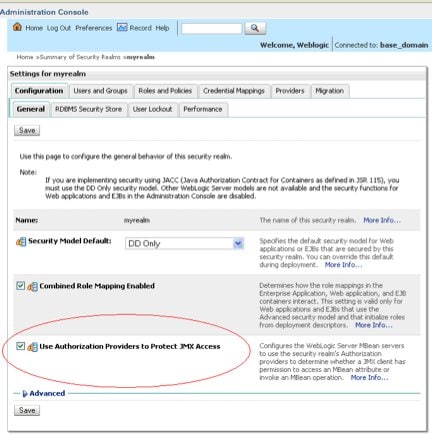
Figure 2 Configuring the Use Authorization Providers to Protect JMX Access Attribute
To change this attribute using WLST, enter the commands below in WLST and then restart your server:
connect()
edit()
startEdit()
cd ("SecurityConfiguration/base_domain/DefaultRealm/myrealm")
cmo.setDelegateMBeanAuthorization(true)
activate()
Activating all your changes, this may take a while ...
The edit lock associated with this edit session is released
once the activation is completed.

The following non-dynamic attribute(s) have been changed on MBeans
that require server re-start:
MBean Changed : Security:Name=myrealm
Attributes changed : DelegateMBeanAuthorization

Activation completed
Once this attribute is enabled, Oracle WebLogic Server will use the security framework to authorize all JMX MBean operations.
Configuring Oracle WebLogic Server to Perform Auditing for JMX
Use Case
A customer has a security requirement to track all changes to the configuration.
This can be accomplished by enabling auditing in Oracle WebLogic Server. For configuration changes, a user can choose two different mechanisms for auditing configuration changes:
- Enabling configuration auditing
- Enabling the auditing provider so JMXResource operations are audited
Each is described in more detail in the following sections.
Configuration Auditing
Configuration auditing is not enabled by default in Oracle WebLogic Server. Auditing is controlled by the ConfigurationAuditType attribute of the Domain MBean. To change this attribute using the console, do the following:
- Navigate to the Configuration/General/Advanced tab for the domain
Home -> base_domain. - Select the desired value from the Configuration Audit Typedrop-down menu.
- Click Save.
To change this attribute using WLST, enter these commands:
edit()
startEdit()
cmo.setConfigurationAuditType("logaudit")
activate()
When configuration auditing is enabled to the server log, Oracle WebLogic Server logs messages for configuration changes. Example log messages from creating a server and setting the listen port for the server are shown below:
 <Info>  <Configuration Audit> <AdminServer>  <weblogic> <BEA-159909>
      <USER weblogic, Configuration Auditing is  enabled>
  <Info>  <Configuration Audit> <AdminServer>  <weblogic> <BEA-159907>
      <USER weblogic INVOKED ON  com.bea:Name=ConfigurationManager,
      Type=weblogic.management.mbeanservers.edit.ConfigurationManagerMBean
      METHOD startEdit PARAMS 0; -1; false>
  <Info>  <Configuration Audit> <AdminServer>  <weblogic> <BEA-159900>
      <USER weblogic CREATED  base_domain:Name=s2,Type=Server>
  <Info>  <Configuration Audit> <AdminServer>  <weblogic> <BEA-159904>
      <USER weblogic MODIFIED  com.bea:Name=s2,Type=Server ATTRIBUTE ListenPort FROM 7001 TO 7201>
  <Info>  <Configuration Audit> <AdminServer>  <weblogic> <BEA-159907>
      <USER weblogic INVOKED ON  com.bea:Name=ConfigurationManager,
      Type=weblogic.management.mbeanservers.edit.ConfigurationManagerMBean  METHOD save PARAMS >
  <Info>  <Configuration Audit> <AdminServer>  <weblogic> <BEA-159907>
      <USER weblogic INVOKED ON  com.bea:Name=ConfigurationManager,
      Type=weblogic.management.mbeanservers.edit.ConfigurationManagerMBean  METHOD activate PARAMS 300000>
When configuration auditing is enabled for audit events, then the Oracle WebLogic Server auditing provider log contains the configuration audit events. Example events from creating a server and setting the listen port are shown below
#### Audit  Record Begin <Severity =SUCCESS>   <<<Event Type = Invoke Configuration Audit Event>
  <Subject = Subject: 2
      Principal = class  weblogic.security.principal.WLSUserImpl("weblogic")
      Principal = class weblogic.security.principal.WLSGroupImpl("Administrators")
  ><Object =  com.bea:Name=ConfigurationManager,Type=
   weblogic.management.mbeanservers.edit.ConfigurationManagerMBean><Operation  = startEdit>
  <Parameters = 0; -1; false>>>
Audit Record  End ####
#### Audit  Record Begin <Severity =SUCCESS>   <<<Event Type = Create Configuration Audit Event>
  <Subject = Subject: 2
  Principal = class  weblogic.security.principal.WLSUserImpl("weblogic")
  Principal = class  weblogic.security.principal.WLSGroupImpl("Administrators")
  ><Object =  base_domain:Name=s3,Type=Server>>>
  Audit Record  End ####
#### Audit  Record Begin <Severity =SUCCESS>   <<<Event Type =
SetAttribute Configuration Audit  Event><Subject = Subject: 2
  Principal = class  weblogic.security.principal.WLSUserImpl("weblogic")
  Principal = class  weblogic.security.principal.WLSGroupImpl("Administrators")
  ><Object =  com.bea:Name=s3,Type=Server><Attribute = ListenPort><From =  7001><To = 7301>>>
  Audit Record  End ####
#### Audit  Record Begin <Severity =SUCCESS>  <<<Event Type = Invoke Configuration Audit Event>
  <Subject = Subject: 2
  Principal = class  weblogic.security.principal.WLSUserImpl("weblogic")
  Principal = class  weblogic.security.principal.WLSGroupImpl("Administrators")
  ><Object = com.bea:Name=ConfigurationManager,Type=
  weblogic.management.mbeanservers.edit.ConfigurationManagerMBean><Operation
  =  save><Parameters = >>>
  Audit Record  End ####
For more information on configuration auditing log messages and audit events, refer to the documentation Configuring the WebLogic Auditing Provider.
JMXResource Auditing
In addition to auditing configuration change events, Oracle WebLogic Server can audit low-level operations on the JMXResource object. To enable auditing of JMXResource objects, you must enable an auditing provider because one is not configured by default. This can be either the Oracle WebLogic Server default auditing provider, a custom developer-written auditing provider, or a third-party auditing provider. To configure the Oracle WebLogic Server default auditing provider, do the following:
- Navigate to the Home > myrealm > Providers / Audit tab.
- Click on New, name the provider, and select Default Auditor.
- Click on the provider Configuration/Provider Specific tag to configure the options for the Oracle WebLogic Server default auditing provider.
Example JMXResource audit events from creating a server and setting the listen port are shown below:
#### Audit  Record Begin <Severity =INFORMATION>
  <<<Event Type = RoleManager Audit  Event ><Subject: 2
      Principal = class  weblogic.security.principal.WLSUserImpl("Weblogic")
      Principal = class  weblogic.security.principal.WLSGroupImpl("Administrators")
  ><<jmx>><type=<jmx>,  operation=invoke, application=,
     mbeanType=weblogic.management.configuration.DomainMBean,  target=createServer><>>>
Audit  Record End ####
#### Audit  Record Begin <Severity =SUCCESS>
  <<<Event Type = Authorization Audit  Event V2 ><Subject: 2
  Principal = class  weblogic.security.principal.WLSUserImpl("Weblogic")
  Principal = class  weblogic.security.principal.WLSGroupImpl("Administrators")
  ><ONCE><<jmx>><type=<jmx>,  operation=invoke, application=,
  mbeanType=weblogic.management.configuration.DomainMBean,  target=createServer>>>
  Audit Record  End ####
#### Audit  Record Begin <Severity =INFORMATION>
  <<<Event Type = RoleManager Audit  Event ><Subject: 2
  Principal = class  weblogic.security.principal.WLSUserImpl("Weblogic")
  Principal = class  weblogic.security.principal.WLSGroupImpl("Administrators")
  ><<jmx>><type=<jmx>,  operation=set, application=,
  mbeanType=weblogic.management.configuration.ServerMBean,  target=ListenAddress><>>>
  Audit Record  End ####
#### Audit  Record Begin <Severity =INFORMATION>
  <<<Event Type = RoleManager Audit  Event ><Subject: 2
  Principal = class  weblogic.security.principal.WLSUserImpl("Weblogic")
  Principal = class  weblogic.security.principal.WLSGroupImpl("Administrators")
  ><<jmx>><type=<jmx>,  operation=set, application=,
  mbeanType=weblogic.management.configuration.ServerMBean,  target=ListenPort><>>>
  Audit Record  End ####
#### Audit  Record Begin <Severity =SUCCESS>
  <<<Event Type = Authorization Audit  Event V2 ><Subject: 2
  Principal = class  weblogic.security.principal.WLSUserImpl("Weblogic")
  Principal = class  weblogic.security.principal.WLSGroupImpl("Administrators")
  ><ONCE><<jmx>><type=jmx>,  operation=set, application=,
  mbeanType=weblogic.management.configuration.ServerBean,
  target=ListenPort>>
  Audit Record  End ####
As shown above, the JMXResource auditing generates log entries for low-level events, including get and lookup operations. This can result in a large number of audit events and a large audit log.
Customizing MBean Policies Using the Console
Use Case
A customer has a large domain with two different administrators. Only one administrator is allowed to manage the security user and group data. Because the default policies for Oracle WebLogic Server allow anyone with the Admin role to manage the security data (adding users or groups), the customer needs to define custom policies that allow access only to the security administrator.
The steps include:
- Creating a new SecurityAdministrators group and the SecurityAdmin role
- Modifying the security administrator username to contain the SecurityAdministrators group
- Creating policies for any security operations that manage users and groups
- Creating a policy for the Credential attribute in the Embedded LDAP MBean
Instructions for creating the Embedded LDAP MBean Credential attribute policy are described in the next section
Embedded LDAP MBean Credential Attribute Policy
The Embedded LDAP MBean contains a Credential attribute. This attribute is used to determine the password for the cn=Admin user, and LDAP can be used to add or modify users in the Oracle WebLogic Server default authentication provider database.
In the customer environment, there are two different administrators, each with the Admin role. However, the customer wants only the security administrator to be able to modify user, group, and role information.
Because LDAP can also be used to add users and groups, the user needs to define a custom policy that controls who can update the Credential attribute in the EmbeddedLDAP MBean. This policy will allow only users with role SecurityAdmin to update the Credential.
To add this policy using the console, perform the following steps:
- Navigate to the JMX Policy Editor as follows:
Summary of Security Realms -> myrealm -> Realm Roles -> Realm Policies -> JMX Policy Editor. - Select Global Scope.
- Expand weblogic.management.configuration.
- Expand Encrypted Attributes: Permission to Write.
- Select the Credential attribute and then Create Policy.
- Select the Role Predicate List.
- Enter the SecurityAdmin role and then click Finish to create the policy.
See Figure 3 for the console JMX Policy Editor:

Figure 3 JMX Policy Editor
The same policy should also be defined for the CredentialEncrypted attribute. Once these policies are defined, a user must have the SecurityAdmin role in order to update the Credential attribute.
Even if a user has the Admin role, an attempt to update the Credential attribute will fail with an Access not Allowed error:
Access not allowed for subject: principals=[Weblogic, Administrators],
on Resource weblogic.management.configuration.EmbeddedLDAPMBean Operation: setEncrypted , Target: Credential
WLST Export and Import
If you want to set up a new domain security configuration using scripts instead of using the console, there are two options:
- Export and import the entire Oracle WebLogic Server Default Authorization provider security data. Use the exportData operation from the ExportMBean. This is implemented by the Oracle WebLogic Server Default Authorization provider. Import the data using the importData operation.
- Export and import individual policies. Use the listPoliciesByResourceType and advance operations to list all the JMX policies. The getPolicyExpression operation can be used to get the policy expression; this can then be written to a file. The expression can then be read from the file and imported into the Oracle WebLogic Server Default Authorization provider in the new domain. Use the createPolicy operation.
Writing Your Own Auditing Provider
Use Case
The security administrator wants to create an audit log strictly for Security MBean–related operations. Because the Oracle WebLogic Server Default Auditor logs all operations, the administrator decides to use a custom auditing provider to keep the auditing overhead as minimal as possible.
Sample Code
Oracle WebLogic Server provides a set of sample providers to demonstrate how to write your own custom security providers. These examples can be used as a starting point for your custom provider.
Custom Auditing Provider
The steps to create a prototype of a custom auditing provider are as follows:
- Download and build the sample security providers.
- Replace the writeEvent method with the implementation from Figure 9.
- Rebuild the providers.
- Navigate to the myrealm -> Providers -> Audit tab and add a new auditor to the domain. Use the SimpleSampleAuditor type.
- Rebuild and restart your domain. Auditing should now be limited to Security MBean operations.<
/ Only output set calls for WLS Default providers
    if (!(event instanceof AuditAtzEvent))
      return;

    AuditAtzEvent atzEvent = (AuditAtzEvent)event;
    Resource res = atzEvent.getResource();

    if (!(res instanceof JMXResource))
      return;
    JMXResource jmxResource = (JMXResource) res;

    String[] vals = jmxResource.getValues();
    String[] keys = jmxResource.getKeys();

    for (int i = 0; i < keys.length; i++) {
      String val = vals[i];
      if (val == null) continue;

      if ("operation".equals(keys[i])) {
        if (val.equals(JMXResource.GET) || val.equals(JMXResource.GET_ENCRYPTED) ||
            val.equals(JMXResource.FIND))
          return;
      }

      if ("mbeanType".equals(keys[i])) {
        if (val.indexOf("weblogic.security.providers.authentication") == -1)
          return;
      }

      if ("target".equals(keys[i])) {
        if (!(val.startsWith("create") || val.startsWith("remove") ||
              val.startsWith("set") || val.startsWith("add")))
          return;
      }
    }

    // write the event out to the simple sample auditor's
    // log file using the event's "toString" method.
    log.println(event);
Writing Your Own Authorization Provider
Use Case
The customer domain has a large domain with several different clusters. The administrator wants to ensure that the Payroll cluster configuration is changed only by an administrator with the PayrollAdmin role. The administrator decides to use a custom authorization provider to ensure that this requirement is enforced.
The administrator performs the following steps:
- Creates a new PayrollAdministrators group and the PayrollAdmin role
- Modifies the Payroll administrator username to contain the PayrollAdministrators group
- Creates an authorization provider to enforce the PayrollAdmin requirement
- Enables the Oracle WebLogic Server Adjudicator to allow both the Oracle WebLogic Server Default Authorization provider and the custom authorization provider to participate in authorization decisions
Sample Code
Oracle WebLogic Server provides a set of sample providers to demonstrate how to write your own custom security providers. These examples can be used as a starting point for your custom provider.
Custom Authorization Provider
The steps to create a prototype of a custom authorization provider are as follows:
- Download and build the sample security providers.
- Replace the implementation of SimpleSampleAuthorizationProviderImpl.java with the implementation from Figure 10.
- Rebuild the providers.
- Navigate to the myrealm -> Providers -> Authorization tab and add a new authorization provider to the domain. Use the SimpleSampleAuthorization type.
- Configure the Oracle WebLogic Server Default Adjudicator to ensure that both the Oracle WebLogic Server Default Authorization provider and the custom authorization provider can participate in authorization decisions. Deselect Require Unanimous Permit.
Restart the servers in your domain. Changes to the PayrollCluster should now require the PayrollAdmin role:
public final class SimpleSampleAuthorizationProviderImpl
  implements AuthorizationProvider, AccessDecision
…
  public Result
    isAccessAllowed(Subject  subject, Map roles, Resource  resource, ContextHandler handler,
      Direction      direction
    )   {

    // Require PayrollAdmin role if a change is being made to the Payroll cluster
    if (!isPayrollClusterChange(resource, handler))
      return Result.ABSTAIN;

    if (roles.containsKey("PayrollAdmin"))
      return Result.PERMIT;
    else
      return Result.DENY;
  }

  public boolean isProtectedResource(Subject subject, Resource resource
    ) throws InvalidPrincipalException  {
    if (resource instanceof JMXResource)
      return true;
    else
      return false;
  }

  private boolean isPayrollClusterChange(Resource resource, ContextHandler handler) {

    if (!(resource instanceof JMXResource)) return false;
    JMXResource jmxResource = (JMXResource) resource;

    String[] vals = jmxResource.getValues();
    String[] keys = jmxResource.getKeys();

    for (int i = 0; i < keys.length; i++) {
      String val = vals[i];
      if (val == null) continue;

      // Check to see if this change is being made to the Payroll cluster
      if ("operation".equals(keys[i])) {
        if (val.equals(JMXResource.SET) ||
            val.equals(JMXResource.SET_ENCRYPTED)) {

          String shortName = (handler == null) ? null :
            (String) handler.getValue("com.bea.contextelement.jmx.ShortName");
          System.out.println("JMX resource object name = " + shortName);
          if (shortName != null && shortName.indexOf("Payroll") != -1)
            return true;
        }
      }
    }
    return false;
  }
Conclusion
Oracle WebLogic Server provides a variety of configuration options and APIs to allow you to ensure security for your JMX operations. Many customers find Oracle WebLogic Server’s default security providers and default security policies to be sufficient for their needs. But for those customers with more-specialized requirements, Oracle WebLogic Server security provides powerful features to allow you to enable auditing, override the default security policies, and even customize further how auditing and authorization are performed for your JMX operations.
In this article, we provided a brief overview of these features with some very simple use cases. For more-detailed information, see the “References” section.
References
- Oracle WebLogic Server 10.3.2 documentation
- Default Security Policies for MBeans
- WLST Documentation
- Security Topics
- Developing Security Providers
- Configuring the WebLogic Auditing Provider
- JMXResource API Reference
- PolicyConsumer API Reference
- Java Security Overview
- JMX Tutorial - Security
- MBeanPermission API Reference
Peter Bower is currently the technical lead for the WebLogic Server configuration and deployment team with Oracle. Previously, he was the lead for the WebLogic Server security team.