Oracle Autonomous AI Lakehouse Data Studio
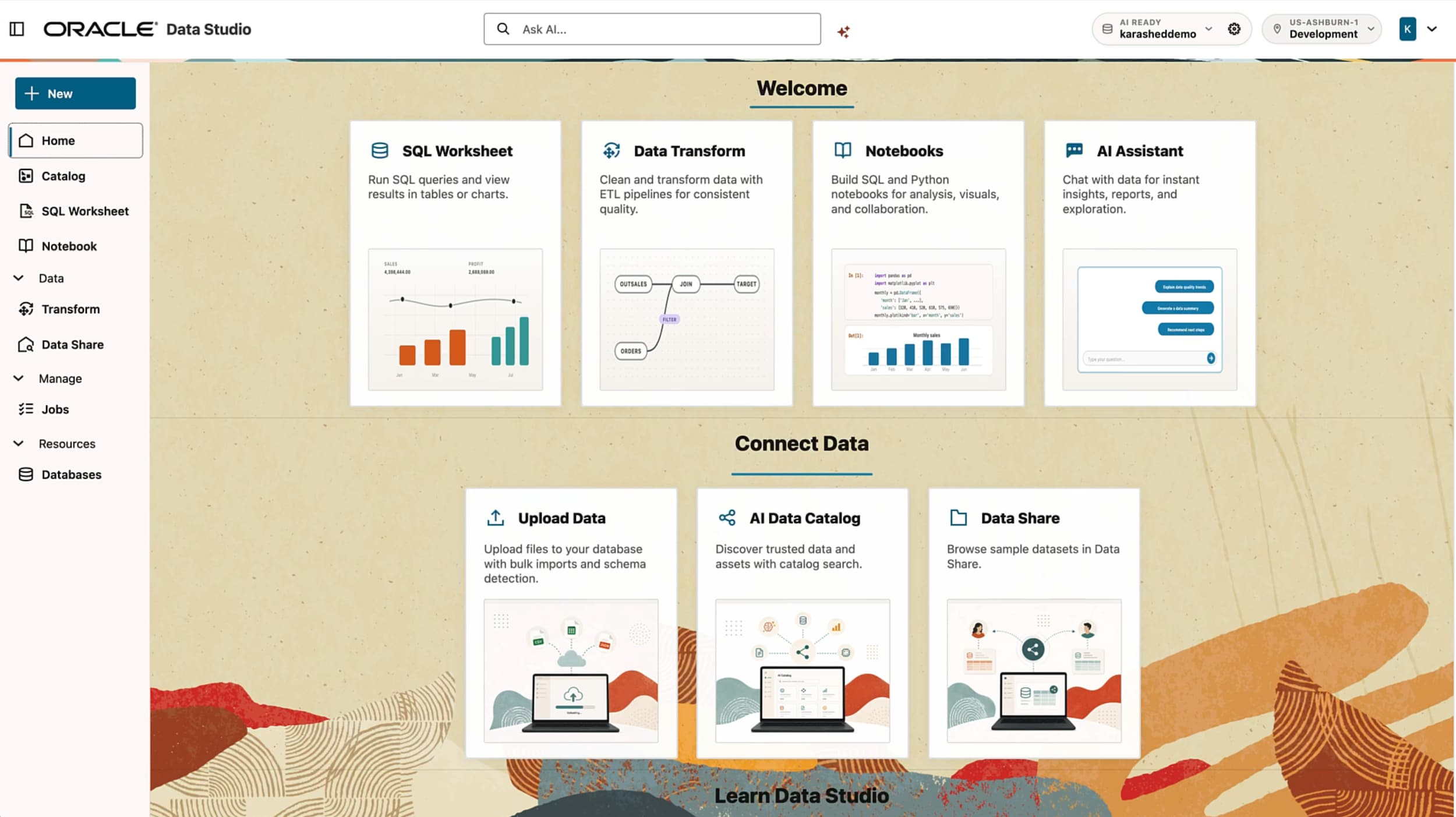
Data Studio is the native interface for Oracle Autonomous AI Lakehouse, bringing data engineering, analytics, and AI into one governed workspace to, query, analyze, and prepare data for AI.
Why Autonomous AI Lakehouse Data Studio?
Data teams lose hours moving between tools: a query editor, a notebook, a separate ETL product, a BI tool, a spreadsheet, and now an AI assistant that doesn't know their data. As the native interface for Oracle Autonomous AI Lakehouse, Data Studio brings data engineering, analysis, and AI into one workspace, connected to a shared catalog, so users and AI agents work from the same governed context.

Start in your browser
Data Studio is a standalone web app. Sign in and work directly against the Oracle AI Data Catalog and the sources already registered in it. You don't need to go through the OCI console or provision a database first.
Every tool your team needs, in one unified interface
Natural language, SQL, Python notebooks, visualization, and the Excel and Google Sheets add-ins all use the same workspace, data, and permissions. There are no exports and no copies drifting out of governance.
Ask in plain language, get explainable answers
The native chatbot combines NL2SQL, retrieval-augmented generation (RAG), and MCP. It turns plain-language questions into results you can inspect, including the SQL behind every answer.
One shared catalog for all your data
The Oracle AI Data Catalog keeps metadata, semantic information, project context, resource management, and provisioning in one place, across every data source and workflow.
Pipelines at lakehouse scale
Data Transforms delivers declarative, federated ELT through drag-and-drop tools or the Python SDK. It adds scale-out orchestration and native AI and vector operations.
Built for AI agents
More than 200 MCP tools span Analytic Views, SQL, Data Transforms, and Essbase. AI clients can use them to build dataflows and analytic models, run queries, manage workflows and connections, and generate insights.
Built for everyone who works with data
Data Studio gives every role a familiar way to work, and the shared catalog keeps them all working from the same data.
| Role | What Data Studio does for them |
|---|---|
| Data engineers | Build federated ELT pipelines visually or in Python, orchestrate them at scale, and add AI and vector steps without leaving the workspace. |
| Data analysts | Query in SQL or plain language, build Analytic Views and semantic models, and visualize results in the same session. |
| Data scientists | Run Python notebooks against cataloged lakehouse data, with vector and AI operations close to the data. |
| Business users | Ask questions in natural language and get answers in Excel or Google Sheets, with no SQL required. |
| AI developers | Connect any MCP-compatible AI client to 200+ tools for data analysis and lakehouse operations. |
| Data stewards and admins | Govern metadata, semantics, access, and lineage centrally in the Oracle AI Data Catalog, across every source. |
Data Studio Features
Ask, explain, and act in plain language
The built-in Data Studio chatbot combines
NL2SQL, RAG, and MCP in one conversational interface. Ask a business question
and get a result you can trust: the chatbot shows the SQL it generated, grounds
its answers in your catalog's semantic context, and can take action through MCP
tools.
- Turn natural-language questions into explainable SQL results
- Ground answers in catalog metadata and business semantics with RAG
- Act across Data Studio through MCP: run queries, build models, manage workflows
- Stay in context, with no switching between tools
One shared catalog at the center of every workflow
The Oracle AI Data Catalog is the foundation of Data Studio. It brings together metadata, semantic information, project context, resource management, and provisioning across your data sources and workflows. Anything registered in the catalog can be queried right away with standard SQL, with no extra integrations and no data movement, so people and AI agents work from the same governed view of your data.
- Register Oracle and non-Oracle sources once and query live data with no extra setup
- Mount an external catalog once to query thousands of tables
- Capture semantics and business context that power accurate NL2SQL and RAG
- Manage projects, resources, and provisioning from one place
Declarative, federated ELT at lakehouse scale
Design pipelines with drag-and-drop tools or code them with the Python SDK. Data Transforms is built into AI Lakehouse. It pushes transformation logic down to your data sources to create analytics- and AI-ready tables, runs on scale-out orchestration, and supports AI and vector operations. You build AI-ready datasets in the same tool you use for classic ELT.
- Drag-and-drop dataflow designer, or the Python SDK for pipelines as code
- Federated ELT across 100+ Oracle and non-Oracle sources, including Oracle Fusion Applications
- Pushdown processing to sources, with scale-out orchestration and workflow management
- Built-in AI and vector operations, such as embeddings for RAG
Code your way, against governed data
Write SQL or Python in notebooks that connect directly to the Oracle AI Data Catalog. Explore data, prototype models, and automate loading and analysis without managing connections or copying data out of the lakehouse.
- SQL worksheets and Python notebooks in one workspace
- Direct access to cataloged lakehouse and Iceberg data
- Python API for automating data loading and analysis
Build business-ready models and see the answer
Create Analytic Views that define business hierarchies, measures, and calculations once and reuse them everywhere, in SQL, in the chatbot, in spreadsheets, and in BI tools. Visualize results right where you work.
- Semantic Analytic Views with hierarchies and calculated measures
- Built-in visualization of query and model results
- Consistent business logic across every tool and AI client
Lakehouse answers in the spreadsheet you already use
Business users can ask questions in natural language and get governed results straight into Excel or Google Sheets, with no SQL required. Analytic Views keep the numbers consistent with everything else in the business.
- Natural-language queries from inside Excel and Google Sheets
- Pivot and analyze Analytic Views directly
- Same governance and permissions as the rest of Data Studio
Get data in, get it ready, and share it openly
Load data from files, cloud storage, and 100+ Oracle and non-Oracle sources. Prepare it with natural language using Data Studio AI Assist. Share it securely through the open Delta Sharing protocol with Power BI, Tableau, Databricks, and other consumers, without copying it.
- Self-service loading from files, object storage, and 100+ connectors
- AI Assist for natural-language data preparation
- Open, bidirectional data sharing with Delta Sharing
- Query Ready Buckets and Table Hyperlink for fast, simple access
200+ MCP tools that put your lakehouse to work for AI
Data Studio makes its capabilities available to AI clients through more than 200 MCP tools spanning Analytic Views, SQL, Data Transforms, and Essbase. AI agents can build dataflows and analytic models, run queries, manage workflows and connections, and generate insights, for both data analysis and lakehouse operations.
- Analytic Views tools: build and query semantic models
- SQL tools: run and explain queries
- Data Transforms tools: create dataflows, manage workflows and connections
- Essbase tools: multidimensional analysis
Get Started
Try for Free
Get started with Oracle AI Lakehouse to run AI and analytics across your existing data estate.
Contact Us
Connect with an Oracle expert to discuss your analytics and AI requirements and how Oracle AI Lakehouse can help you connect data across your enterprise.