Oracle Private AI Services Container
The Oracle Private AI Services Container gives Oracle AI Database customers a private, air-gap-capable, OpenAI-style inference layer that keeps embedding work off the database server while still fitting naturally into Oracle-native workflows. Protect Oracle AI Database performance and keep AI inference inside your security boundary.

Why Oracle Private AI Services Container?
Database Offload
Offload expensive AI computation, such as vector embedding generation or vector index creation. This computation offload can free up compute resources on the Oracle AI Database server.
Data Privacy
Your AI data never leaves your realm. You do not need to send your AI data to a 3rd party. Do not give away your business data for convenience.
Secure AI Infrastructure
Secure local AI services are enabled by applying security best practices and leveraging industry-standard technologies.
Simple Web Services
Developers use the popular OpenAI API REST protocol for AI operations. Existing OpenAI SDK clients can use the Private AI Services Container.
Key Features of Oracle Private AI Services Container
Air Gap Enabled
The Private AI Services Container is a set of web services which are designed to be deployed in your data center. There is no dependency on public clouds or the internet. This design enables the container to run in air gapped environments.
Open-weight LLMs
Run the open-weight LLM that best fits your needs. The Private Large Language Model Service supports many of today's most popular open-weight models through the vLLM and llama.cpp inference runtimes. The largest open-weight models can run on CPU-based Linux servers, provided they have enough system memory.
Embedding Models
Six popular vector embedding models ship with the container. This means that customers can have a system that can be deployed without the extra effort of creating and download other embedding models. If needed, customers can also create and download additional vector embedding models.
Security
All REST traffic is secured with TLS 1.3. Passwords are encrypted and kept in a PKCS12 keystore. Authentication and authorization use API keys. Enforcing mode SE Linux is supported. User data is not stored in the container.
Performance
The Vector Embedding Service uses the ONNX Runtime with multi-threading, enabling better throughput and lower latency on multi-core CPUs. The Vector Index Service uses GPUs to accelerate the creation of vector indexes. The LLM Service can use GPUs or multi-core CPUs for faster inference.
REST APIs
The web services are implemented as a set of REST APIs. These REST APIs implement the OpenAI API to enable common AI operations. Existing OpenAI SDK clients can work with the container, you just need to change the REST endpoint and API key.
Containerized
Podman, Kubernetes or OpenShift can be used to manage the container. For small deployments, Podman can be used. For larger deployments, Kubernetes or OpenShift can be used.
Available Services
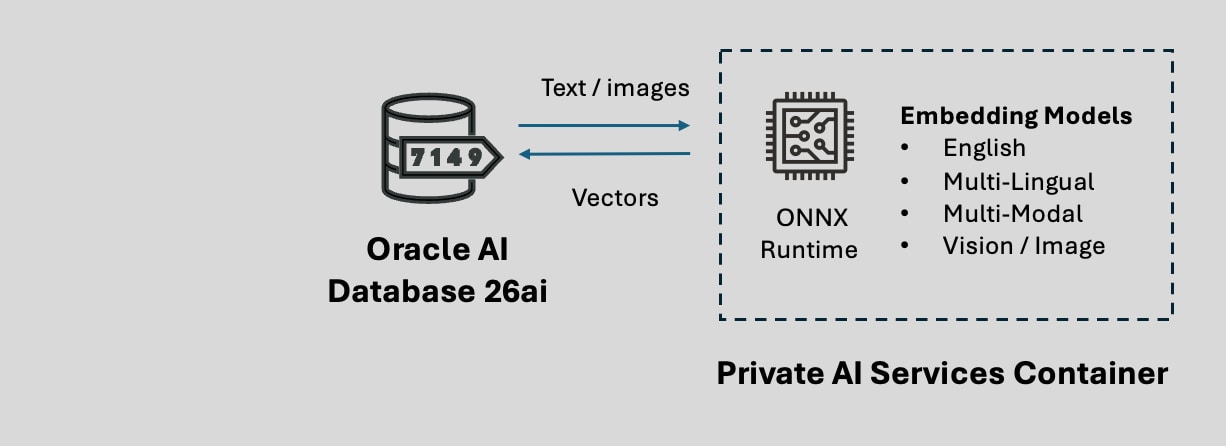
Remote CPU offload
The Private AI Services Container Vector Embedding Service generates vector embeddings.
The vectors are created on a container which runs on a remote Linux machine. This architecture offloads the CPU cost of creating vectors from Oracle AI Database server.
The container is a REST server which implements the OpenAI API protocol to create vectors for the /v1/embeddings endpoint.
The endpoint and model name determine the type of vectors that will be created.
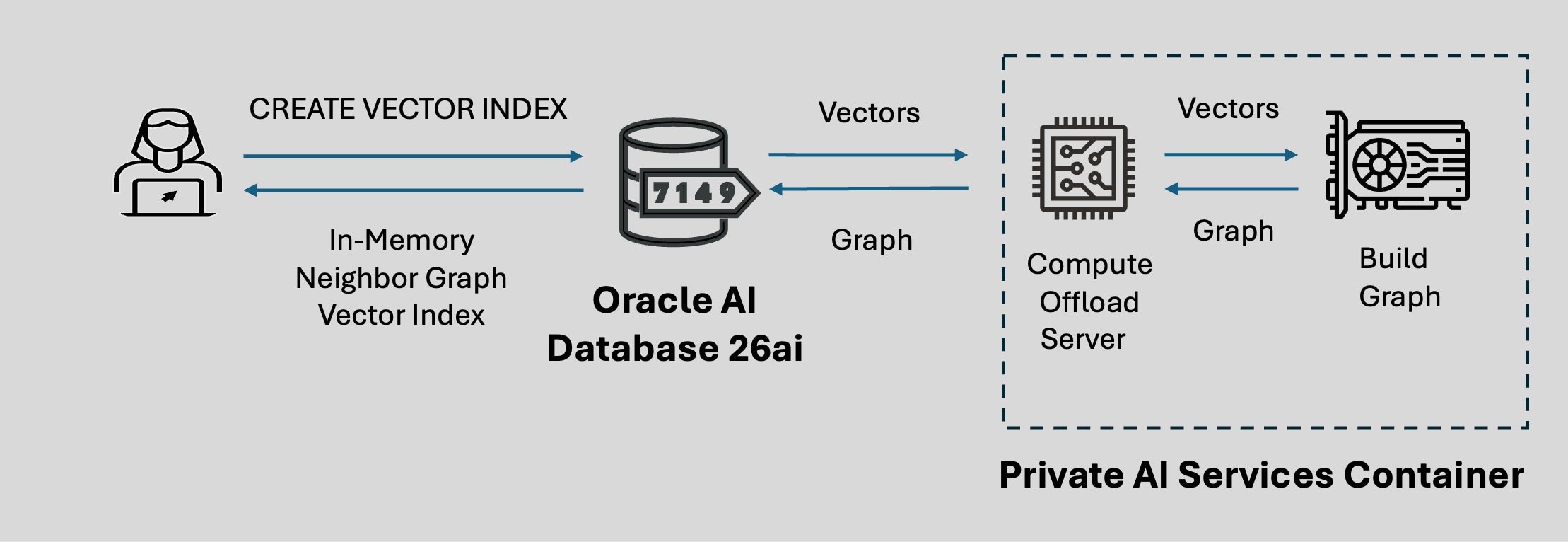
Remote GPU Offload
The Private AI Services Container Vector Index Service enables In-Memory Neighbor Graph Vector Indexes to be created faster by using GPU offload
The vector index is created on a container which runs on a remote Linux machine with a GPU. This architecture offloads the CPU cost of creating vectors from the Oracle AI Database server
The SQL syntax for CREATE VECTOR INDEX can be used to define the REST endpoint and credential for the Private AI Services Container
Most modern NVIDIA GPUs are supported on the Private AI Services Container for vector index offload
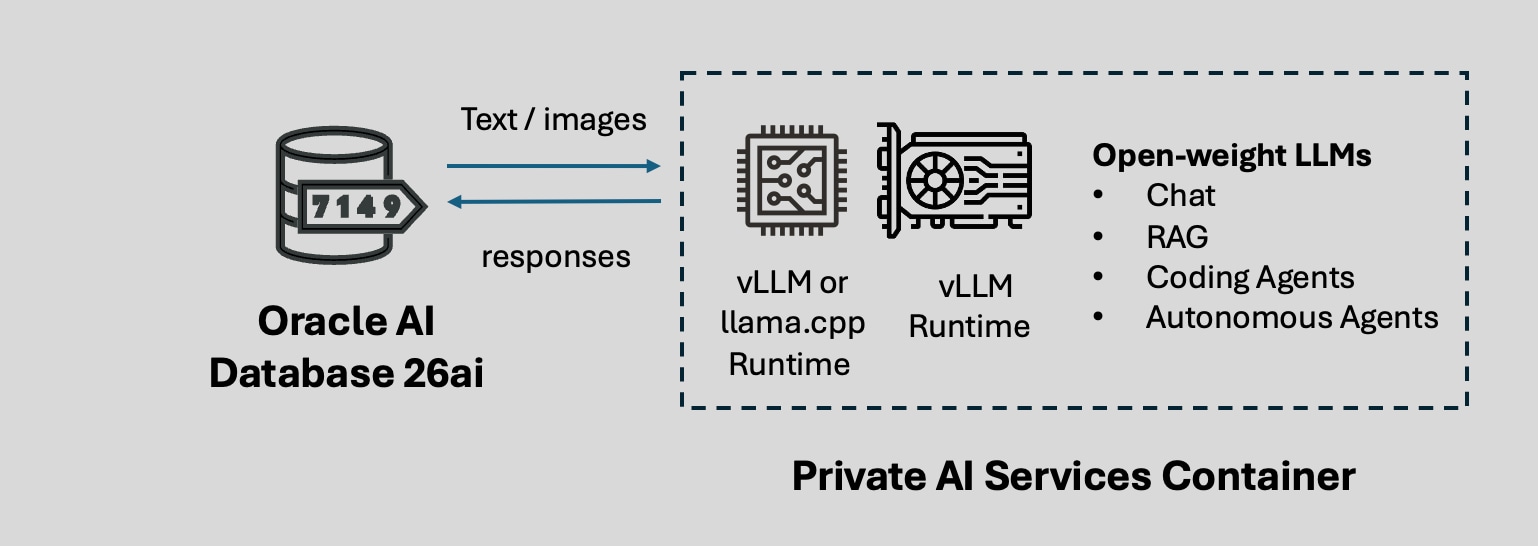
Access Local LLMs
The Large Language Model Service of the Private AI Services Container enables customers to securely and simply host LLMs.
LLM inferencing occurs on the host which the Private AI Services Container runs on. The vLLM or llama.cpp LLM runtime can be used. CPU or GPU can be used for the LLM inferencing.
Oracle AI Database 26ai can use the UTL_TO_GENERATE_TEXT procedure from DBMS_VECTOR or DBMS_VECTOR_CHAIN packages to chat with the LLM.
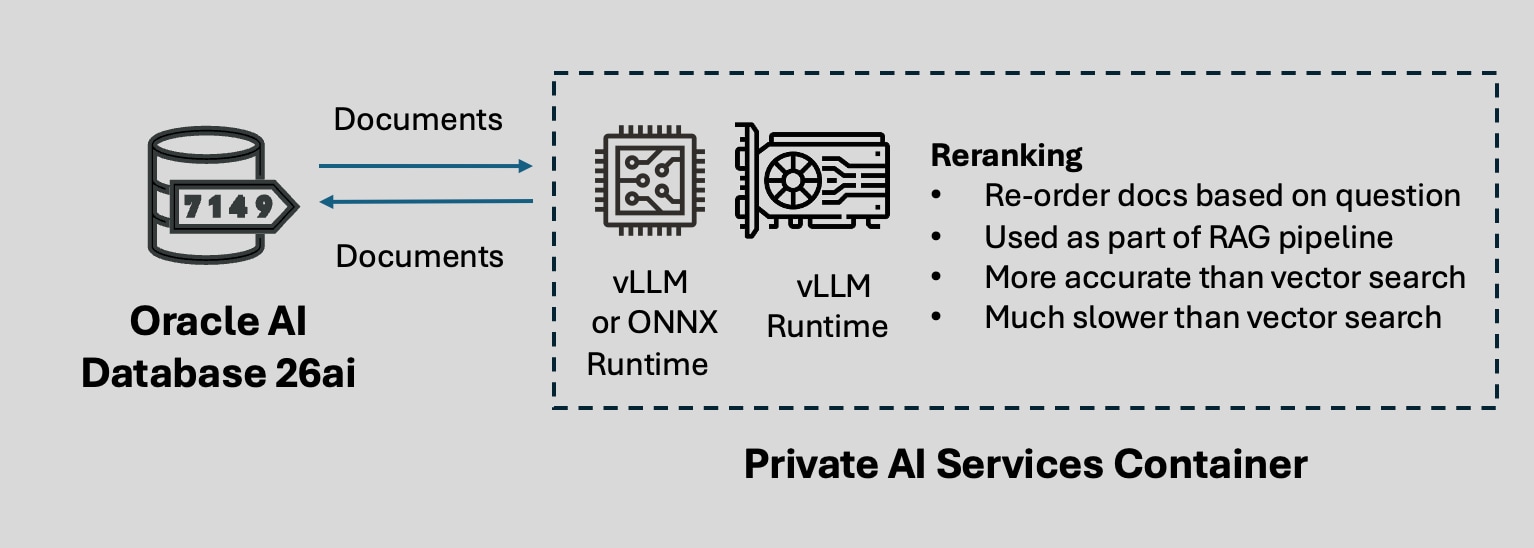
Reorder documents
The Re-ranking Service of the Private AI Services Container re-orders documents based on their relevance .
The output of a similarity search is a list of documents. Re-ranking reorders the list of document based on the query phrase.
Re-ranking tends to be more accurate than vector search, but it is much slower.
The UTL_TO_RERANK procedure of DBMS_VECTOR or DBMS_VECTOR_CHAIN packages are used to perform the reranking.
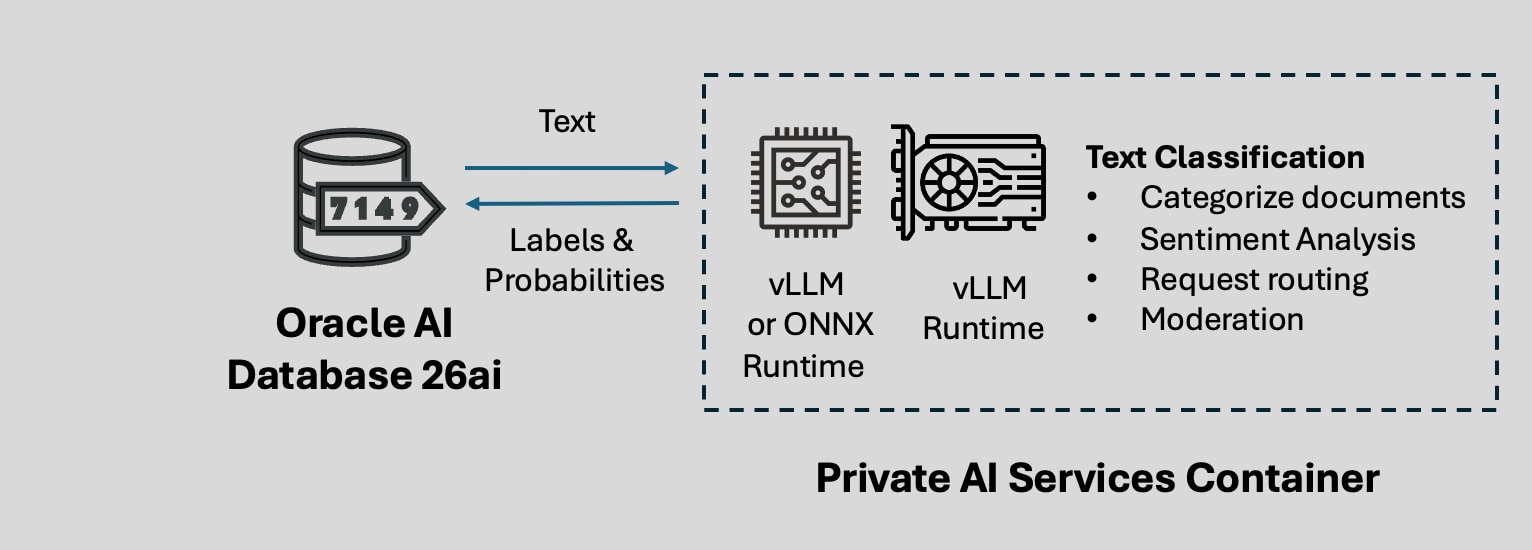
Classify Text
The Text Classification service of the Private AI Services Container helps applications categorize text by using a configured classification model.
Applications can use classification results to support tasks such as sentiment analysis, request routing, moderation, or other label-based decision workflows.
The service returns model-generated labels with associated probabilities, so applications can evaluate both the predicted class and the confidence of the result.
Use the /classify endpoint to do a text classification.
Download, Install and Configure the Container
Download the Container
You need to download the container from the Private AI Services Container page on Oracle Container Registry.
To download the container, you need to:
- Sign-in using your (free) Oracle Account
- Accept the license for the Private AI Services Container
- If needed, create an authentication token for Podman
- Login to Oracle Container Registry using Podman
- Use Podman to pull the container image from Oracle Container Registry
The details of downloading the container are covered in the documentation.

Install and Configure
Once the container is downloaded, the recommended way to install the Private AI Services Container with Podman is via the install scripts embedded in the container.
The steps to extract the install scripts from the container are covered in the documentation.
The install scripts are used to install and configure the container for secure deployments with HTTP/SSL, API Keys and an encrypted Keystore.
If you want to deploy the Embedding Service container to Kubernetes or OpenShift, use the Oracle Database Operator for Kubernetes via YAML rather than the install scripts.

Getting Started with Oracle Private AI Services Container
Doug Hood, Product Manager, OracleFollowing our recent announcement that the Oracle Private AI Services Container is now available on Oracle Container Registry, it’s time to move from “what’s new” to “how it works”. In this post we’ll walk through installing, configuring, and using the container in your own environment.
Featured Private AI Services Container Blogs
- March 27, 2026How to use the Oracle Private Services Container with HTTP in PL/SQL
- March 31, 2026How to use the Oracle Private Services Container with HTTP/SSL in PL/SQL
- April 21, 2026Introducing the Vector Index Service
- April 21, 2026Getting Started with the Vector Index Service - Part 1
- May 18, 2026Getting Started with the Vector Index Service - Part 2