What Is Ransomware? How to Build Resilience
Lorna Garey | Senior Writer | April 22, 2026

When news broke in August 2025 that cybersecurity researchers discovered an AI-powered ransomware proof of concept, which they named PromptLock, few experts were surprised. Criminals have used AI for some time to make their code sneakier and their phishing emails more realistic. And ransomware is profitable for cybercriminals: The FBI’s Internet Crime Report estimates it led to $12.47 million in reported losses in 2024, with multimillion-dollar payment demands becoming more common.
But PromptLock does mark a new front in this war. Its use of an LLM to generate new versions of malicious code on the fly versus using set scripts makes it much more difficult for the security software most companies depend on to block ransomware attacks, the ESET researchers found. PromptLock also uses AI to decide which files to search, copy, or encrypt, ESET says, potentially letting attackers zero in on the most valuable data and quickly lock or copy it before defenders can respond.
What Is Ransomware?
Ransomware is a type of malware, or malicious software, that encrypts files or locks a device, and its creators demand a ransom payment in exchange for a decryption key or unlock code. Ransomware code most commonly infiltrates an organization when someone clicks a link and follows instructions in a phishing email or downloads and installs infected software, but there are other avenues. Once a system is infected, the ransomware quickly begins encrypting files, often using a strong encryption algorithm that makes it difficult or impossible for IT to restore access to data. The malware may then cause a ransom demand to pop up, usually with a countdown timer, demanding money in exchange for the decryption key. Payment is often requested in cryptocurrency to make it difficult for law enforcement to track down the attackers.
Paying the ransom doesn’t guarantee restored access to the encrypted files, and the malware may spread to backup copies. It may even lie in wait and be triggered to launch later, so extensive cleanup is required after a successful attack. In some cases, attackers threaten to publicly release or destroy data if the ransom isn’t paid. Ransomware can have serious consequences beyond data and financial losses, including reputational damage and injury or death if it disrupts operations at targets such as a hospital or public utility.
Key Takeaways
- Attackers are increasingly using AI to make their malware more adaptive and effective.
- Ransomware is available on a subscription or profit-sharing basis, where developers offer their malicious software to other criminals, often called “affiliates,” who then use it to make money.
- Healthcare providers, financial firms, and municipalities are popular ransomware targets.
Ransomware Explained
The main goal of ransomware is to extort money from individuals or organizations, with the sale of stolen data a supplemental revenue stream. Once malicious software is installed, it locks a device or encrypts data, making it inaccessible. The cybercriminals then demand a ransom, typically in cryptocurrency, in exchange for the code or decryption key to undo the damage.
Ransomware can be devastating and generally spreads through phishing emails, infected software, vulnerabilities in operating systems or applications, or what’s called a “drive-by download.” That’s where a device picks up malware simply by visiting a website that’s infected with malicious code. Attackers may or may not provide a decryption or unlock key in exchange for ransom, the FBI says. Nor does paying up keep data from being sold or leaked, and it incentivizes criminal actors.
Many organizations work hard to protect against ransomware, but it’s a difficult task, especially when many files are stored on local networks, where they can be encrypted incredibly quickly. Cloud productivity services typically keep multiple versions of files. Additionally, cloud platforms have sophisticated security and access controls that can be more difficult for ransomware to bypass than a standard local user account.
And now, criminals are using AI to make their attacks more effective.
How Does Ransomware Work?
Ransomware works by inserting malicious code on a system and then locking hardware or data files in a way that’s difficult or impossible to reverse. Once the ransomware is in place, the attacker demands payment in exchange for a decryption or unlock key.
While a successful ransomware attack seems lightning fast to the victim, it’s a carefully orchestrated, multistep process that starts with getting malicious code into the system. That lets the attacker perform internal reconnaissance to identify where data and backups reside. Once the code executes, it unleashes sophisticated encryption algorithms crafted to lock up data or a device and to disable recovery options, such as backups and system restore points.
The ransom payment process is designed to thwart efforts by law enforcement to track cybercriminals and recover funds. Negotiation and communication are conducted over a network that obscures the attacker’s location and identity. If the victim pays, generally using cryptocurrency, the attacker may provide the private key needed to decrypt or unlock. This is far from guaranteed, however, and even successful decryption can be just the start of a long and complex process that often still results in data loss. The attacker may also leave behind other malware or backdoors for future attacks, so cleaning up after a successful attack is a difficult process that demands deep security expertise.
Types of Ransomware Attacks
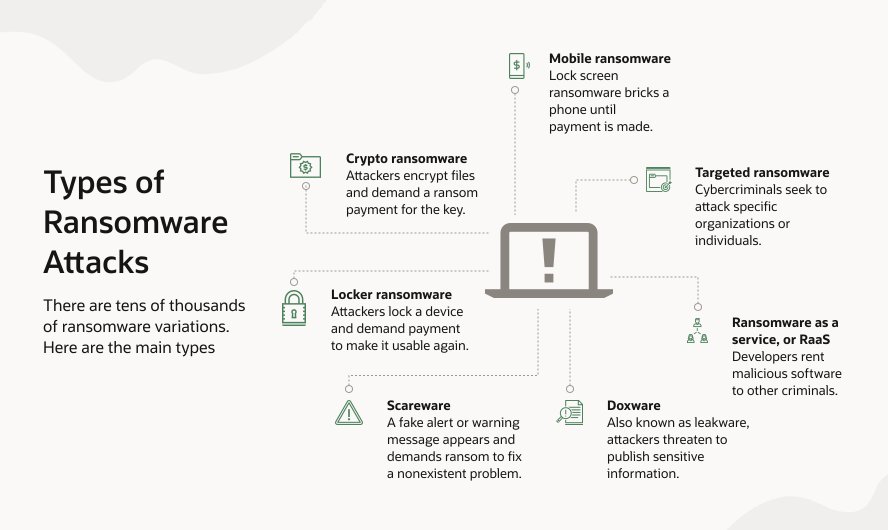
Many of us remember the 2017 WannaCry global ransomware attack that affected more than 200,000 devices in over 150 countries in a matter of days. As one of the most widespread and devastating cyberattacks in history, it made front page—or top of the hour—news in the global media. WannaCry was self-replicating ransomware, also known as a worm, that exploited a vulnerability in unpatched Windows systems to encrypt files. The attackers demanded ransom in Bitcoin to restore access. While WannaCry served as a wake-up call for the need to patch systems and prioritize cybersecurity, the march of ransomware development didn’t slow down. Here are some common attack types.
- Crypto ransomware: This common type of ransomware encrypts files on the victim’s device or network, making the data inaccessible. The attacker demands a ransom paid in cryptocurrency in exchange for the decryption key. The crypto variant is what most people think of when they hear “ransomware.”
- Locker ransomware: As you might guess from the name, this type of ransomware locks devices, preventing owners from accessing their files or using their computers or phones. The attacker demands a ransom to unlock the device.
- Scareware: This type of ransomware displays a fake alert or warning message, claiming to be from a legitimate organization, such as a law enforcement agency or a major technology or security company. The message demands a ransom to fix a nonexistent problem.
- Doxware: Also known as leakware, this type of ransomware threatens to publish sensitive information about the victim, such as personal emails or texts, photos, or confidential business information, unless a ransom is paid. There’s an element of sophistication to doxware as the attacker must discern what files or photos are worth paying to keep confidential.
- Ransomware as a service, or RaaS: The as-a-service business model isn’t just for business or productivity suites. Ransomware is available on a subscription or profit-sharing basis, where developers offer their malicious software to other criminals, often called “affiliates,” who then use it to make money. Ransomware developers may offer a user-friendly platform, much like a legitimate SaaS business, complete with customer support, instructions, and regular code updates to stay ahead of security software.
- Targeted ransomware: Cybercriminals may select and focus on organizations or individuals, rather than spreading ransomware broadly and indiscriminately. These attacks are usually well researched and strategically planned, often with the aim of extracting higher ransom payments from organizations with a perceived greater ability and urgency to pay, such as large enterprises, healthcare organizations, educational institutions, and government entities.
- Mobile ransomware: While most of us think of PCs as the entry points for malware, smartphones and tablets are also vulnerable to attacks. With lock screen ransomware, the device is bricked and payment is demanded in exchange for restoring access. Encryption-based ransomware can also infect mobile devices. The attack vectors are the same as with PCs—malicious apps, infected websites, and SMS or email phishing attacks.
How Does Ransomware Affect Businesses?
The more an organization depends on data, the more devastating a ransomware attack can be. The infamous WannaCry attack in 2017 caused hospitals to send emergency patients elsewhere, left FedEx struggling to run its global operations, and even shut down public transportation in some cities. Worldwide, the damage from WannaCry alone topped $4 billion, according to experts.
The financial stakes are still high. In its 2025 “State of Ransomware” report, cybersecurity vendor Sophos said the median ransom was $1 million for organizations that chose to pay it. But that’s just the beginning—the average cost to recover from a ransomware attack, excluding any ransom paid, is $1.53 million per attack. Those costs come from several factors, including the following:
- Loss of data: Ransomware often goes after primary data and backups. Paying the ransom doesn’t guarantee you’ll get your data back, so it’s extremely common to lose at least some critical information: customer lists, financial records, product designs, and so forth. This risk is much lower when businesses have robust, offline, or immutable backups, which major cloud providers typically offer. Cloud-based SaaS systems are even less likely to experience data loss because frequent automated backups are the norm, and data is spread out across multiple geographically separated data centers.
- Dips in employee morale and downtime: Cyberattacks can cause substantial disruption. When ransomware encrypts essential files, employees can’t access the data they need to do their jobs or serve customers.
Recovery usually involves sorting out which systems were hit, figuring out what was encrypted, restoring data from backups if possible, and scrubbing out any remaining malware. All of this can take time and bring operations to a crawl. If it’s clear how the attack happened—say, someone clicked on a phishing email—it can be used as a learning opportunity, helping boost everyone’s security awareness. Still, it can be quite stressful for the employee involved, even if most organizations avoid disciplinary action unless there’s clear evidence of serious misconduct. - Financial losses: The direct costs of dealing with ransomware are pretty easy to spot: hiring experts, restoring systems, and possibly paying ransoms and handling lawsuits. But there are also less obvious costs. Companies may lose customers, miss contractual obligations, experience supply chain delays, and face damaged reputations or regulatory fines. Even a few hours of outage can be expensive; a multiday or multiweek incident can be catastrophic. In 2024, a ransom attack on a healthcare claims processor derailed prescriptions, claims, and payments nationwide. The company ended up paying a $22 million ransom, and public filings pegged the total cost of the attack at $2.9 billion for that fiscal year.
- Reputational and brand damage: When attackers get access to sensitive files, they may release or sell it on the dark web. Thus, a ransomware attack can seriously damage a company’s reputation and cause it to lose customer trust. Negative news stories and social media chatter can linger, affecting how the business is perceived by the general public as well as partners and investors.
- Legal and compliance issues: If the attack affects sensitive or regulated data, legal trouble is likely to follow. There are strict regulations about protecting data, responding to incidents, and quickly notifying customers of breaches. Not following the rules can result in big fines or lawsuits, and most organizations will need specialized legal advice to figure out their next steps.
- Theft of intellectual property: Ransomware gangs sometimes do more than just encrypt files; they analyze the data and steal intellectual property. This can lead to “double extortion” schemes, where attackers threaten to auction, publish, or sell trade secrets, research, software code, or other confidential information. The loss—or even the threat of loss—can have devastating business and competitive effects.
- Increased security costs: Cleanup is expensive, and so is ongoing prevention down the road. After an attack, organizations often need to invest in new security technologies, system replacements, consulting services, and employee training, and they may face higher cyber insurance premiums.
7 Regulations Relevant to Ransomware
| Regulation | Region/domain | Key ransomware-relevant requirements | Noncompliance penalties |
|---|---|---|---|
| GDPR | EU | Personal data protection, prompt breach notification | Up to €20M or 4% of annual revenue |
| CCPA | US (California) | Personal info protection, consumer notification, data deletion rights | As much as $2,663 to $7,988 per violation |
| HIPAA | US health | Healthcare data protection, breach notification, security rule | Up to $1.5M per violation per year |
| GLBA | US financial | Financial data security, safeguards, incident response | Varies, includes regulatory actions |
| SOX | US corporate | Public company it controls, integrity, reporting | Fines and imprisonment for noncompliance |
| PCI DSS | Global (cardholder) | Payment card security, data protection, breach response | Up to $500K per incident |
| APPI | Japan | Personal data protection, prompt breach notification | Public admonishment and corrective orders, possible further actions |
This table provides a high-level, illustrative overview of selected regulatory frameworks that may be relevant in the context of a ransomware or cybersecurity incident. It is not exhaustive and does not constitute legal advice. Applicability, obligations, and potential penalties depend on the nature of the incident, the data affected, the organization’s role, and regulatory discretion. Penalty figures shown are indicative only and should not be interpreted as fixed or automatic fines.
How Ransomware Affects Databases
Ransomware exploits targeting enterprise databases have evolved from generic file-level encryption to highly specialized attacks. Instead of just locking up files, attackers now zero in on the structure of a database—tampering with logs, control files, and data tables—to bypass normal recovery processes.
Increasingly, these attacks also target backup systems. By destroying backup sets and recovery logs, attackers can leave businesses with no way to restore their data; they may eliminate the option for point-in-time recovery (PITR), for example. If attackers gain control of the underlying storage or the ability to write to it, they can corrupt or encrypt both the active data and any local standby copies. This creates a nasty “double extortion” scenario where, even if you get your data back, your IT environment might be hiding backdoors or malware, requiring an audit.
To defend against these threats, businesses need a robust, layered security approach, often called a defense-in-depth strategy, that assumes the perimeter will be breached. The gold standard is the ability to recover to a clean state via an air-gapped system—ensuring backups are not standard files that can be deleted by an attacker or compromised OS administrator. Comprehensive database security also means more than just strong encryption. It requires immutable backups, constant validation of database integrity, strict separation of duties, and strong key management.
Target Industries for Ransomware
The more an organization depends on data, the more devastating ransomware can be. The flip side is that the more an industry depends on data, the more tempting a target it may be for attackers. And each industry brings unique risks—such as compliance mandates, public trust, or even patient/client safety—that ransomware operators exploit for maximum leverage.
The following industries are frequently targeted by ransomware:
- Healthcare: Sensitive patient and financial data, an urgent need to restore operations, legacy systems that can be vulnerable, and prioritization of patient care over cybersecurity can be factors that may have contributed to some headline ransomware attacks. In addition, criminals know that the primacy of patient lives and safety and HIPAA compliance rules can constrain response to an attack.
- Finance and banking: We’ve all heard the cliché that robbers go where the money is. Finance and banking firms handle massive amounts of transactional data and personally identifiable information with a high monetary value. And, like healthcare providers, they have strict regulatory requirements in the form of the Gramm-Leach-Bliley Act (GLBA), the Sarbanes-Oxley (SOX) Act, and more. The risk of reputational damage and loss of trust may lead to high-value ransoms.
- Government and public sector: Municipalities are often saddled with complex legacy systems that contain caches of critical infrastructure data and citizens’ sensitive personal records. There’s also the risk of geopolitical attacks, where national and state agencies may be targeted by nation-state criminal actors. And, once word of an attack leaks, freedom of information and public disclosure laws can lead to trust and reputational damage.
- Schools and universities: The combination of limited cybersecurity budgets and large collections of valuable personal data may make education a target. The sheer volume of endpoints, many of them personally owned, and difficulty in imposing central security controls can add to the difficulty for information security teams.
- Manufacturing, industrial, energy, and utilities: Arcane operational technology and industrial control systems that are frequent attack targets make ransomware prevention a high priority for manufacturing firms and utilities, as well as energy, transportation, and other industrial sectors. Successful attacks can lead to sky high downtime costs and supply chain disruptions if the exploit halts physical production.
- Retail and ecommerce: Access to customer payment and personal data may make retailers targets. Attackers may launch ransomware during peak seasons when there are high transaction volumes, hoping to exfiltrate valuable customer databases. Because breach response is mandated by Payment Card Industry Data Security Standard (PCI DSS) compliance regulations, costs can skyrocket, magnified by brand reputation damage.
- Cloud providers and customers: Attackers do attempt ransomware and extortion attacks against cloud service providers—CSPs hold vast quantities of customer data. Fortunately, direct ransomware attacks that affect core cloud infrastructure and multiple customers are extremely rare, given providers’ robust and layered security controls, multitenancy, and strong isolation. Attacks on individual cloud tenants are more common and can be devastating for those customers but are unlikely to give attackers full control of the CSP or its wider customer base.
How to Build Resilience and Protect Against Ransomware: 6 Best Practices
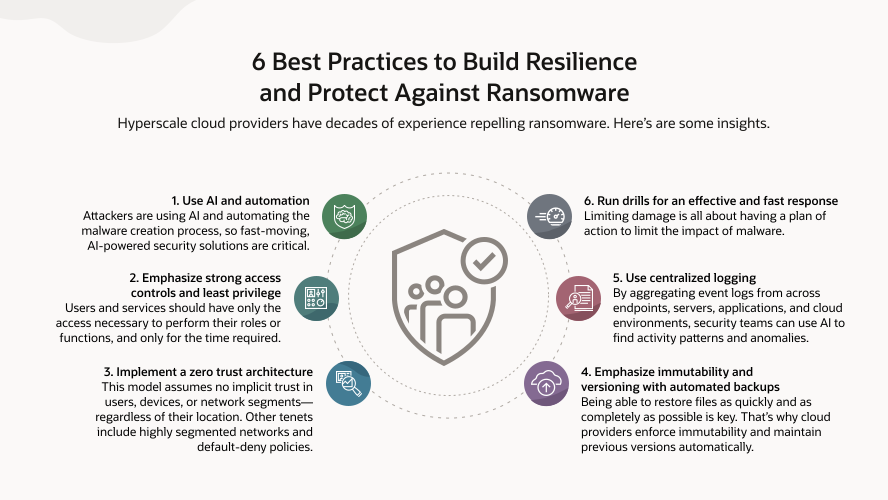
If you’re looking for effective ways to guard against ransomware, take a cue from the world’s top cloud providers. For example, platforms such as Oracle Cloud Infrastructure (OCI) are built to help resist these threats by combining strong layered security, automation, AI, resilience techniques, and continuous monitoring.
Here are six key strategies to boost your resilience.
1. Use AI and automation: Ransomware attacks are only becoming more sophisticated and targeted. That’s why organizations are turning to automation and AI to keep pace. Unlike many traditional security tools, AI-driven systems use advanced machine learning algorithms to detect unusual patterns or anomalies that might indicate a ransomware attack, such as rapid file encryption or suspicious file modifications or network connections. Automating threat detection can help front-line security teams respond faster and head off problems, freeing up time to focus on strategic initiatives and threat investigations. AI's ability to both monitor and analyze massive volumes of network and endpoint data in real time is invaluable.
AI-powered security solutions can help IT teams
- Quickly correlate events from many sources, including emails, endpoints, cloud providers, and network traffic, providing a clear picture of what’s happening.
- Keep up with new threats by analyzing emerging intelligence and automatically adjusting their detection logic.
- Launch automated responses to isolate infected systems, block suspicious activity, and restore compromised files from secure backups.
2. Emphasize strong access controls and least privilege: Not everyone in an organization needs access to everything. Following the least privilege principle—giving users and services only the access necessary to perform their roles or functions, and only for the time required—makes it harder for attackers to cause damage, even if they steal credentials. Identity and access management (IAM) systems help enforce least privilege by allowing organizations to assign highly specific permissions for resources, operations, or data as opposed to relying on broader role-based access controls.
Time-limited access and mandatory multifactor authentication (MFA) add extra layers of protection. Temporary credentials reduce the time a compromised login remains useful to attackers, so they can’t prowl around the network looking for valuable data. With MFA, users must verify their identities in more than one way—for example, a password and a physical token or biometric factor—before gaining access to sensitive data.
3. Embrace zero trust security: The zero trust security model ties the above elements together by assuming no implicit trust in users, devices, or network segments—regardless of their location inside or outside the corporate perimeter. Every request for access is continuously verified based on user identity, device health, context, and behavior. Access policies are dynamic and enforce least privilege by default, using automation to adjust in real time, and there are continuous authentication/authorization checks. Other key pillars of zero trust include microsegmented networks and default-deny policies. Microsegmentation divides networks into smaller zones with the goal of limiting lateral movement, so if an attacker breaches one segment, access to others is restricted. Each segment is protected by its own access controls and monitoring. Default-deny policies, meanwhile, block all inbound traffic unless it’s explicitly allowed, reducing the number of entry points an attacker could exploit. Taken together, these measures help enforce strict boundaries, minimize risk, and help provide continuous verification of identities and devices.
4. Provide immutability and versioning with automated backups: Ransomware protection isn’t just about keeping the bad guys out. It’s also about recovering quickly if anything goes wrong. Immutability and versioning protect backups so they can’t be changed or deleted, even if an administrator account is compromised. Immutability means that once data is saved, it can’t be changed for a set period. That’s typically done through write-once, read-many (WORM) storage, which is designed to prevent tampering by users, applications, or even privileged administrators. Regularly automated snapshots and versioning add more protection by making it easy to “rewind” files, databases, or storage objects to pre-attack versions.
Cloud providers let you set policies that enforce immutability and maintain previous versions automatically. Now, even if an attacker tries to overwrite or delete data, unaltered versions remain accessible, saving the expense and risk of paying a ransom.
5. Use centralized logging: When responding to an attack, knowing what happened, when, and to which data is critical. Centralized logging brings together event logs from endpoints, servers, applications, and cloud environments, helping security teams quickly spot suspicious activity, including failed login attempts, unusual file access, or unauthorized processes. A security information and event management (SIEM) system makes that even easier by providing a consolidated view of security events across the network. SIEM tools collect and analyze these logs, flagging suspicious activity and helping prioritize responses. Think of it like a command center that helps identify and address potential threats in real time.
6. Run drills for an effective and fast response: Limiting damage is all about having a plan of action. Regularly running simulated ransomware attack drills helps prepare employees for real attacks, expose gaps or weak spots in plans so they can be addressed ahead of time, and make sure everyone understands their roles during an emergency.
How to Remove Ransomware
No matter how careful you are, ransomware can still find a way in. After all, as the saying goes, the bad guys only need to be right once while defenders must bat .1000 all the time. When an attack occurs, how you respond can make all the difference in limiting the damage and quickly resuming normal operations.
Here are some steps you may take if you’re hit by ransomware on local systems:
1. Isolate infected systems: Disconnect affected devices from all networks, both wired and wireless, right away. If employees notice something suspicious, they should unplug Ethernet cables, turn off Wi-Fi connections, and let IT know as soon as possible.
2. Identify the ransomware: Use security tools or contact experts to identify the specific type of ransomware involved. Knowing the exact variant makes it easier to find the best path forward.
3. Report the incident: Let your internal stakeholders know about the attack and notify authorities or regulatory bodies as required for compliance. Think about engaging ransomware experts in advance—keep that contact info handy because early intervention can help contain and identify the origins of the breach.
4. Remove the malware: Run reputable antivirus or antimalware programs to find and get rid of the ransomware. Malwarebytes and Microsoft Defender are among the options.
5. Restore files: Once your systems are disinfected, carefully restore your data from secure backups. It’s crucial to verify that these backups weren’t also compromised.
6. Check for leftover threats: Run another scan to confirm there are no pieces of malware, hidden scripts, or rogue accounts still lurking. Attackers sometimes leave doors open for follow-up attacks.
7. Strengthen your security: Patch software, reset passwords, and tighten security to help prevent future attacks. Consider whether some workloads should move to the cloud, where there are built-in protections.
How Can Oracle Help?
Oracle Cloud Infrastructure (OCI) offers a comprehensive set of security features and best practices to help organizations stay ahead of ransomware threats and bounce back if they become victims of an attack.
1. Immutability and data protection: OCI’s automated backup systems use immutable storage with write-once, read-many capabilities, so once your data is saved, it can’t be tampered with—even by someone with admin access.
2. Identity and access management: With detailed IAM settings, OCI lets you decide who gets access to what. Mandatory MFA, single sign-on (SSO), and frequent password changes help keep attackers out.
3. SIEM, logging, and automation: With built-in logging and integration with Oracle Cloud Guard and SIEM solutions, OCI can automatically detect and respond to suspicious activity. Automated workflows can quickly isolate resources.
4. Network security and zero trust: OCI provides tools for network segmentation, micro-segmentation with security lists, and virtual firewalls, enabling customers to restrict lateral movement within their cloud environments. Zero trust principles are supported through continuous verification of users, devices, and resource access.
5. Automated security checks: Oracle Cloud Guard and the OCI Vulnerability Scanning Service continuously check for misconfigurations, vulnerabilities, and unusual behavior.
6. Disaster recovery and restoration: OCI makes it easy to quickly restore clean data and keep operations running with minimal downtime.
In tandem with Oracle’s zero data loss recovery solutions, all these OCI features work together to help organizations quickly spot threats, stop them, and recover smoothly.
Ransomware is a sophisticated, multi-billion-dollar business. The threat goes beyond data loss to operational paralysis, data theft, and brand damage that no ransom payment can undo. Attackers are getting smarter and even embracing AI to make their exploits more effective, so having a proactive defense has never been more important.

Zero trust helps protect against ransomware by shifting from perimeter-based security to a model that verifies every access request and every user, every time. Learn how to get started.
Ransomware FAQs
What happens if you get ransomware?
Ransomware encrypts your files or locks your devices so you can’t use them. The attacker then demands payment, often in cryptocurrency, to unlock them. This kind of attack can disrupt business operations, cause data loss, expose sensitive information, and damage your reputation. Fixing the problem often requires isolating infected systems, investigating the breach, removing the malware, and restoring data from safe backups.
What is ransomware and how can you avoid it?
Ransomware is a type of malicious software that often spreads through phishing emails, hacked websites, or software vulnerabilities. Once it gets in, it can encrypt data or lock systems until a payment is made. To avoid ransomware, be cautious with email links and attachments; keep software up to date; require strong access controls, such as multifactor authentication; train employees on cybersecurity; and regularly back up important data to secure, offline, or immutable storage.
Can you get out of ransomware?
Yes, you can often recover without paying a ransom—especially if you have recent, clean backups and a solid recovery plan. Detecting the attack early, isolating infected devices, and removing the malware are key. Some decryption tools are available for certain types of ransomware, but a smooth recovery more often requires proactive data protection and reliable backups.
Can ransomware be removed?
Yes, reputable antivirus or malware removal tools can get rid of ransomware, but that alone won’t typically bring back your files; you’ll still need to restore them from a clean backup. Always check for remnants of the attack to make sure it doesn’t return, and consider calling in cybersecurity professionals to verify your systems are truly clean.