Parallel task execution in J2EE using the Work Manager specification
by Dmitri Maximovich
05/16/2005
Modifying the servlet to use parallel execution
Below is the code for
ServletParallel, which extends
AbstractServlet. Note how the lookup for the
WorkManager is done in the
init() method. The general structure of the code is pretty similar to
ServletSequential: The
doTranslation() method contains the same loop over the
input list, but instead of executing
Translators directly, we create an instance of
WorkTranslatorWrapper and call the
schedule() method of
WorkManager with the instance. Invocation of the
schedule() method returns immediately, and we need to preserve the resulting
WorkItem (by adding it to
jobs list). After all jobs are scheduled, execution will block on the call to
WorkManager.waitForAll(Collection, long), which takes a collection of
WorkItems for the jobs we want to wait for. The second argument specifies the timeout in milliseconds, and there are two predefined constants we could use:
WorkManager.IMMEDIATE to specify that the method should return immediately (it has the same effect as passing 0), and a second constant that we use, called
WorkManager.INDEFINITE, which indicates that there is no timeout and to wait until all jobs are completed.
public class ServletParallel extends AbstractServlet {
    private WorkManager workManager;

    public void init(ServletConfig servletConfig) throws ServletException {
        try {
            InitialContext ctx = new InitialContext();
            this.workManager = (WorkManager)ctx.lookup("java:comp/env/wm/MyWorkManager");
        }
        catch (Exception e) {
            throw new ServletException(e);
        }
    }

    protected List doTranslation(List input) throws Exception {
        List result = new ArrayList();
        List jobs = new ArrayList();
        // create translators and schedule execution
        for (Iterator iter = input.iterator(); iter.hasNext();) {
            String source = (String) iter.next();
            Translator translator = new DummyTranslator(source, 10 * 1000);

            // schedule


Work work = new WorkTranslatorWrapper(translator);


WorkItem workItem = this.workManager.schedule(work);


jobs.add(workItem);
        }

        logger.info("All jobs scheduled");
        // wait for all jobs to complete


this.workManager.waitForAll(jobs, WorkManager.INDEFINITE);

        // extract results
        for (Iterator iter = jobs.iterator(); iter.hasNext();) {


WorkItem workItem = (WorkItem) iter.next();


Translator translator = (Translator) workItem.getResult();
            result.add(translator.getTranslation());
        }
        return result;
        }
}
Note how results are extracted when the jobs are completed: We loop over the
WorkItems collection with calls to the
getResult() method, which returns instances of the corresponding job. These can be cast to
Translator in our case.
This servlet, if executed with the same input parameters as
ServletSequential, should finish execution significantly faster (recall that it took 50 seconds in the sequential execution case). On my computer it takes approximately 25 to 30 seconds to execute but, of course, results may vary depending on the configuration of the particular
WorkManager used, the server load, and some other factors. WebLogic Server 9 also optimizes the use of threads and shares them between Work Managers. In addition, it makes sure that requests are processed fairly.
The
Work Lifecycle and Lifecycle Events
Let's now look more carefully at the functionality provided by the Work Manager specification. Every instance of
Work has a well-defined lifecycle. The following states are defined:
- ACCEPTED - constant defined as
WorkEvent.WORK_ACCEPTED, indicates thatWorkhas been accepted for dispatching - REJECTED - constant defined as
WorkEvent.WORK_REJECTED, indicates that the already acceptedWorkcannot be started (most likely because of some problem with theWorkManageror application server itself) - STARTED - constant defined as
WorkEvent.WORK_STARTED, indicates thatWorkhas started executing - COMPLETED - constant defined as
WorkEvent.WORK_COMPLETED, indicates thatWorkhas completed execution
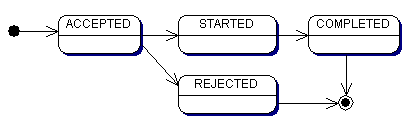
Figure 2. State diagram for Work
You can retrieve the current status of scheduled
Work at any time using the
WorkItem.getStatus() method call. This is especially useful when you don't want to wait for all jobs to complete. (You can use
WorkManager.waitForAny(Collection, timeout) if you are interested in any job completion, or you can call
Thread.sleep(long) in a loop and verify how many jobs are completed by iterating over the
WorkItem collection and checking each individual job status.)
The specification also provides means for applications to be notified when
Work instances change their lifecycle status. A
WorkListener can be specified when work is being scheduled. The
WorkManager will call back on the
WorkListener instance for various work events (for example, accepted, rejected, started, completed). Note that the
WorkListener instances are always executed in the same JVM as the thread that scheduled the
Work with the
WorkManager. A
WorkListener class could be implemented as a standalone class or as part of your
Work class. Here is a simple implementation of such a listener, which just logs a message when different events occur.
public class TranslatorWorkListener implements WorkListener {
    public void workAccepted(WorkEvent workEvent) {
        logger.info("work accepted: "+workEvent.getWorkItem());
    }

    public void workRejected(WorkEvent workEvent) {
        logger.info("work rejected: "+workEvent.getWorkItem());
    }

    public void workStarted(WorkEvent workEvent) {
        logger.info("work started: "+workEvent.getWorkItem());
    }

    public void workCompleted(WorkEvent workEvent) {
        logger.info("work completed: "+workEvent.getWorkItem());
    }
}
Then
doTranslation() implementation in the
ServletParallel code above can be changed to pass a
TranslatorListener to the
WorkManager:
protected List doTranslation(List input) throws Exception {
    ...


TranslatorWorkListener listener = new TranslatorWorkListener();
    for (Iterator iter = input.iterator(); iter.hasNext();) {
        String source = (String) iter.next();
        Translator translator = new DummyTranslator(source, 10 * 1000);

        // schedule
        Work work = new WorkTranslatorWrapper(translator);
        WorkItem workItem = this.workManager.schedule(work,

listener);
        jobs.add(workItem);
    }

    logger.info("All jobs scheduled");
    ...
}
If you run the modified code you should see something similar to the following in your log files (or console depending on WebLogic and your logger configuration):
22:42:12 - begin
22:42:12 - work

accepted: executing: source=one, translation=null
22:42:12 - work

accepted: executing: source=two, translation=null
22:42:12 - work

accepted: executing: source=three, translation=null
22:42:12 - work

accepted: executing: source=four, translation=null
22:42:12 - work

accepted: executing: source=five, translation=null
22:42:12 - All jobs scheduled
22:42:20 - work

started: executing: source=one, translation=null
22:42:24 - work

started: executing: source=two, translation=null
22:42:28 - work

started: executing: source=three, translation=null
22:42:30 - work

started: executing: source=four, translation=null
22:42:30 - work

completed: executing: source=one, translation=one_tr
22:42:30 - work

started: executing: source=five, translation=null
22:42:34 - work

completed: executing: source=two, translation=two_tr
22:42:38 - work

completed: executing: source=three, translation=three_tr
22:42:40 - work

completed: executing: source=four, translation=four_tr
22:42:40 - work

completed: executing: source=five, translation=five_tr
22:42:40 - done in 27641
There is a little trick in the
TranslatorWorkListener defined above; it just prints
WorkItem to the log, and because we have the
toString() method overwritten in
AbstractTranslator, you see all those 'source=one, translation=null' lines, which identify particular jobs. In reality, if you need to correlate
WorkItem to
Work objects in
WorkListener, you have to pass each
WorkItem to the listener and preserve it for matching with the
WorkItem obtained from
WorkEvent. (The
getResult() call on
workEvent.getWorkItem() would return
null until the job reaches the
COMPLETED status.) The following code illustrates this technique:
public class TranslatorWorkListener implements WorkListener {
    protected Map workMap =
        Collections.synchronizedMap(new HashMap());

    public void workAccepted(WorkEvent workEvent) {
        logger.info("work accepted: "
            +getTranslator(we.getWorkItem()).getSource());
    }

    public void workRejected(WorkEvent workEvent) {
        logger.info("work rejected: "
            +removeTranslator(we.getWorkItem()).getSource());
    }

    public void workStarted(WorkEvent workEvent) {
        logger.info("work started: "
            +getTranslator(we.getWorkItem()).getSource());
    }

    public void workCompleted(WorkEvent workEvent) {
        logger.info("work completed: "
            +removeTranslator(we.WorkItem()).getSource());
    }

    public void

addTranslator(WorkItem wi, Translator t) {
        workMap.put(wi, t);
    }

    public Work

getTransaltor(WorkItem wi) {
        return (Translator)workMap.get(wi);
    }

    public Work

removeTranslator(WorkItem wi) {
        return (Translator)workMap.remove(wi);
    }
}
To use this, the servlet code should be modified to call
TranslatorWorkListener.addTranslator(WorkItem, Translator) right after the call to
schedule().