
Intelligent Customer Assistant
When a bill changes, customers want a clear answer—not a generic response, long portal search, or a transfer that requires them to repeat their question. Oracle Utilities Intelligent Customer Assistant gives authenticated residential customers a personalized AI chat experience that explains why their bill changed, shows the supporting evidence, and guides them to the next step.
Customer-centered bill explanations
A bill change can frustrate customers. Chatbots that rely on predefined intents, scripts, and generic FAQs can direct customers to information, but explaining a specific bill requires customer-specific bill and usage context. Intelligent Customer Assistant is designed to help utilities answer the question “Why did my bill change?”
Make bill changes easier to understand
Intelligent Customer Assistant turns confusion about a bill into a straightforward conversation. Customers can ask a question such as “Why is my bill higher?” and get a clear, personalized answer with supporting details. Intelligent Customer Assistant helps customers understand what changed and guides them to the next step or customer support if needed.
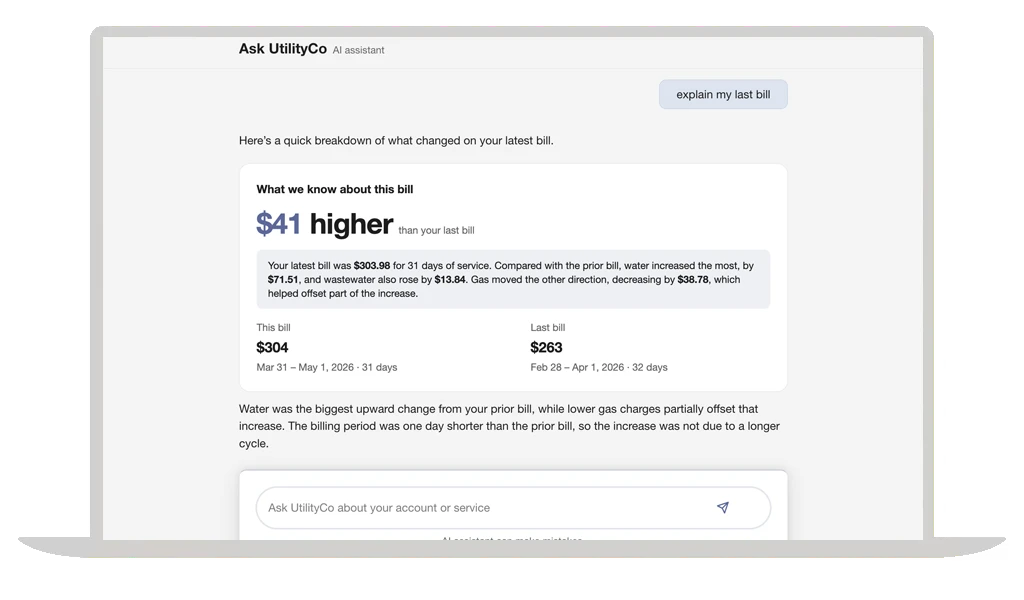
Start with the question customers ask
When customers ask a question such as “Why did my bill change?” Intelligent Customer Assistant is designed to respond with a clear, personalized explanation.
Make the answer easy to follow
Intelligent Customer Assistant organizes the answer into easy-to-scan sections, helping customers quickly see what changed and explore the supporting details.
Guide customers to the next step
If customers need more help, Intelligent Customer Assistant directs them to relevant information or customer support.
Show what’s driving the bill and why
Intelligent Customer Assistant looks for the account and bill details that explain a change, such as usage, rates, weather, billing dates, credits, charges, or a carried-over balance. It presents the evidence behind the answer, so customers can see the difference between a fact from their bill and helpful context. If customers seek more information, Intelligent Customer Assistant is designed to explain what’s known and guide them to customer support if needed.
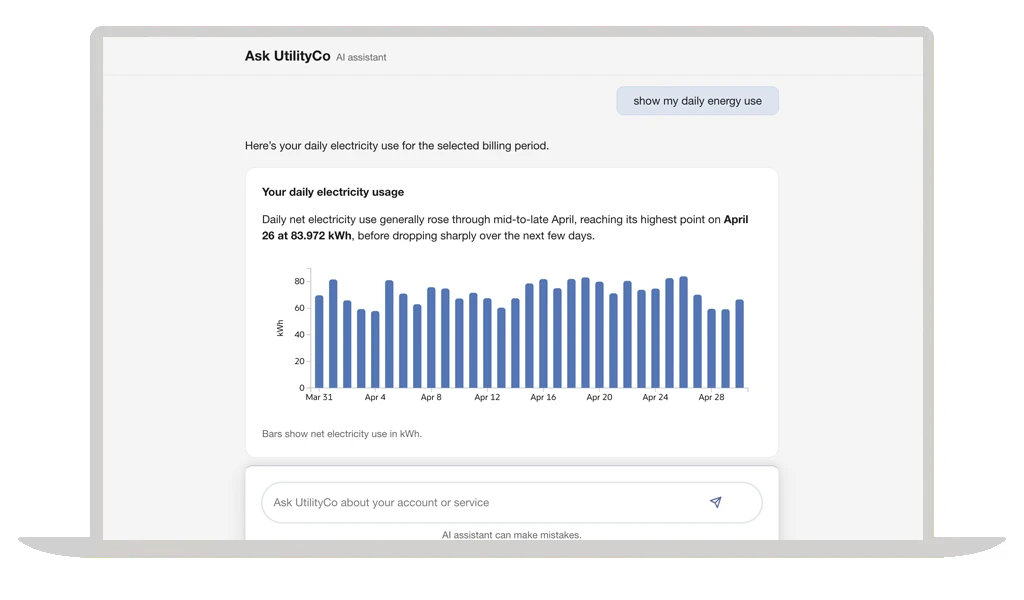
Identify the bill drivers
Intelligent Customer Assistant can explain a rate update, higher usage, a different billing period, a credit or charge, a balance carried forward, and other changes.
Make the evidence easy to see
Customers see the information behind the explanation and can tell which details come directly from their bill versus context such as weather or usage patterns.
Offer support when information is incomplete
When there isn’t enough data for a complete answer, Intelligent Customer Assistant says so and offers a clear route to customer support.
Deploy the assistant with confidence
Intelligent Customer Assistant gives utility teams an administration portal to review customer conversations, manage approved configurations, test changes, and monitor how the assistant performs. Teams can release improvements in a controlled way, investigate where customers need more help, and roll back a change when additional review is needed.
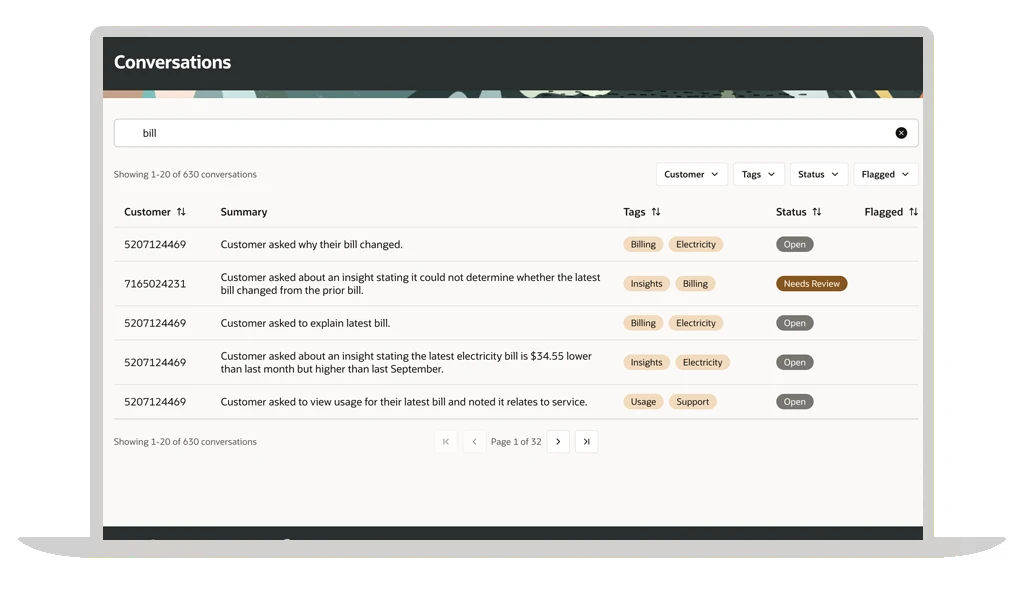
Review what customers experience
Utility teams can review conversations to see where Intelligent Customer Assistant helps, where customers still have questions, and where the experience may need attention.
Test and release with control
Teams can use test cases and controlled releases before making an updated experience available to customers.
Improve continuously and roll back when needed
Monitoring and rollback controls help teams keep improving the customer experience and respond when a change needs correction or review.
Key benefits of Intelligent Customer Assistant
-
Reduce routine billing inquiries
Give customers a personalized digital path to resolve common bill questions before they call for help.
-
Improve bill understanding
Make bill details and customer support options easier to understand and act on.
-
Focus service teams where they’re needed most
Address routine bill questions through self-service so customer service agents can spend more time on complex or sensitive issues.
-
Advance responsible AI
Use controls to review, test, monitor, and improve the customer experience with confidence.
Resources for Intelligent Customer Assistant