What Is Document Understanding? AI Document Processing Explained
Jeffrey Erickson | Senior Writer | July 31, 2025

“I want to spend time reading information on a paper document or PDF and typing it into an accounting application,” said no one ever. That’s why AI-driven document understanding is so useful—it takes on the kind of busywork people are happy to hand over. And as it does, it can speed up document processing and help lower costs while improving accuracy. You’ll often find document understanding technology blended into your SaaS application workflows and, more recently, it’s been tasked with labeling text for AI training data and providing the information that AI agents need to complete their multistep tasks. That way, people can get back to the thinking, building, and communicating work they enjoy doing.
What Is Document Understanding?
Document understanding is an automated process that draws information out of a text file, such as a PDF or scan of a paper document, and passes it into a business application. It helps minimize—and potentially even eliminate—manual data entry while improving accuracy. Document understanding is made possible by sophisticated machine learning (ML) algorithms. ML is key to several steps, beginning with image processing, where relevant information, such as price, name, and invoice or purchase order (PO) number, is discovered, extracted, and stored in a database for integration into relevant business systems.
For example, a manufacturer might use document understanding to extract information out of POs and automatically enter it into an accounting ledger and inventory control system, vastly increasing the speed and accuracy of a sales process. Similarly, a company might deploy an expense reimbursement system to pull relevant information from images of receipts and then automatically build an expense report for an employee.
Document understanding has been an early and successful use case of AI and ML. You’ll find it integrated into business applications to automate workflows, giving time back to professionals who would otherwise be sweating these manual data entry and document processing steps. When combined with natural language processing (NLP) and retrieval-augmented generation (RAG), document understanding can be an integral part of a system that helps understand the semantic meaning of documents, assisting with document classification and information discovery.
Key Takeaways
- Document understanding is an AI-driven process that extracts data from a variety of text files to help automate data entry and document processing.
- Structured fields, such as prices, dates, names, signatures, and order numbers, can be accurately made available for integration into business workflows.
- Document recognition capabilities are often integrated into popular business applications, including ERP, CRM, and industry-specific systems.
- AI uses of document understanding include helping automate the data collection and labeling of training data sets and providing information that AI agents need to perform complex tasks.
Document Processing Explained
Document processing is a core component of document understanding: Extract data from a variety of file types, put it in a structured format, and categorize it in a database where it can be used to populate fields in online forms and be pulled into business functions, such as invoice handling, payroll, sales, and expense accounting.
To do this, a document processing system needs predefined rules. ML algorithms can then identify and extract data from text blocks, tables, and fields that hold prices, dates, names, addresses, relevant notes, account numbers, and other business data. By automating manual data entry processes, organizations can dramatically speed up business functions while reducing errors.
How Document Understanding Works
Document understanding software and cloud services use advanced ML and AI to extract data from various document types, such as invoices and receipts, and provide it to applications and workflows that inform business processes. This automation brings new efficiency and accuracy to tasks such as document classification and data entry.
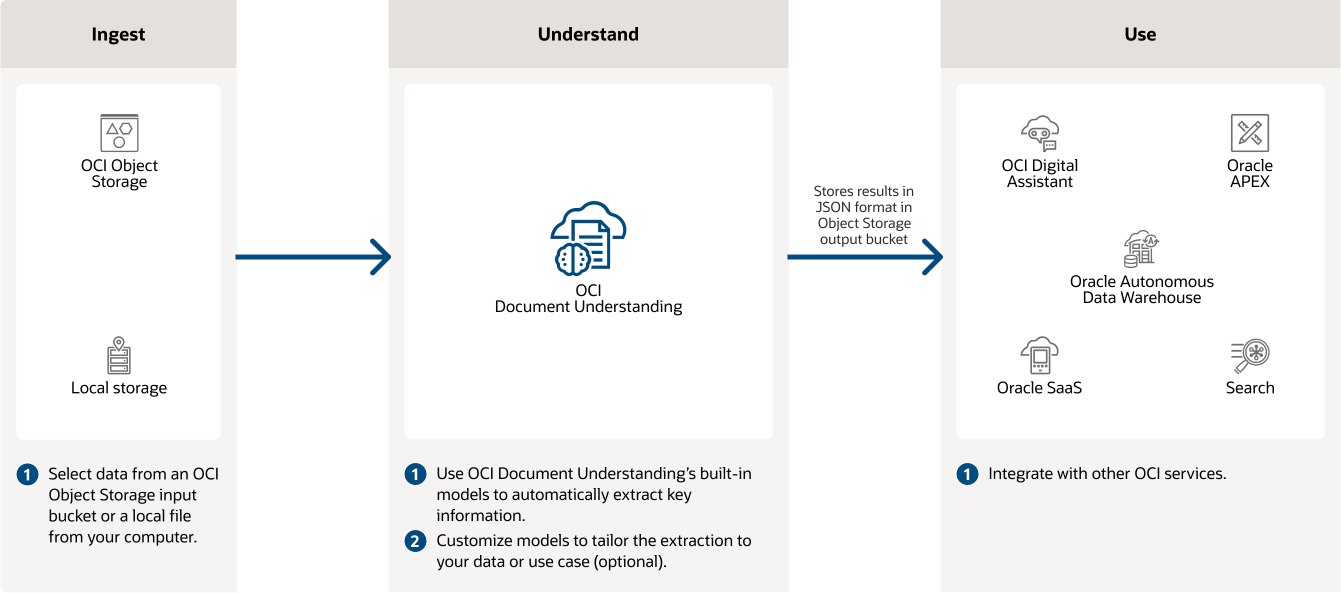
A document understanding process can identify and extract text, tables, and signatures from different formats, including PDFs, scans, and JPEGs. The extracted data is then returned in a structured format, such as a JSON payload, which includes the field type and value, making it easy to integrate into applications and workflows. Document understanding has become important in generative AI services and for AI agents because it turns documents into machine-readable and -editable text that those AI systems can use for their outputs.
AI agents are software entities that can be assigned tasks, examine their environments, take actions as prescribed by their roles, and adjust based on their experiences. Those tasks can be complex, with multiple steps, and often depend on having access to text-based data. A supply chain management agent, for example, might be tasked with helping optimize logistics by analyzing purchase orders from a variety of sources and in multiple formats, including scanned paper forms.
Document understanding services can also feed a data labeling tool, which lets users visually highlight and label specific fields directly on document samples—a vital step for creating a training data set that can be used to fine-tune custom large language models (LLMs). This is a virtuous circle that improves the model’s ability to understand and extract information from similar documents in the future.
Document understanding is generally accessed via ERP, supply chain, CRM, and other business applications, particularly SaaS systems, and is a key way to drive efficiency for users. Application builders can access document understanding cloud services through APIs, such as a text extraction API, table identification API, and document classification API, letting them automate document processing tasks within the applications they build.
Benefits of Document Understanding for Businesses
Businesses implement document understanding to lower costs and minimize the risk of human error while speeding processing. Here’s a look at how these benefits are realized.
- Process automation enablement: With the right strategies and tools, including document understanding, teams are empowered to build, deploy, and manage automated workflows. Easy access to data is one key to creating an environment where automation can be applied across the business.
- Improved efficiency and reduced manual work: Letting businesses automatically extract and classify data from a range of documents, such as invoices, contracts, and forms, reduces the need for manual data entry and frees employees to focus on more strategic tasks.
- Enhanced data accuracy and reliability: By automating the tedious and error-prone process of data extraction and classification, document understanding helps speed up operations and can lead to more consistent and reliable data. When an automated document understanding system has been proven to process text with a high degree of precision, business leaders are more apt to use it for decision-making.
- Faster processing times: One of the chief benefits of an automated document system is that it handles documents much more quickly than human workers, helping accelerate many business processes, such as invoice entry, expenses, and claims processing.
- Cost savings from automation: The chief cost savings from automation come from efficiency, though reducing errors also helps save money. Automated document handling allows employees to avoid manual data entry and processing, leading to lower labor costs. Automation helps lead to smoother, faster, and more effective and accurate operations, which can improve profitability.
- Better compliance and risk management: Document understanding can lead to increased accuracy in the documents that flow through it, minimizing potential legal and financial risks and the risk of falling into noncompliance with regulatory requirements.
- System integration: Document understanding is most often used within a business application to enhance document workflows. By integrating with ERP systems, CRM platforms, and other business tools, document understanding solutions help keep various systems all working from the same accurate and up-to-date data. This application integration, which developers can enact through APIs to an existing cloud service, helps ensure that extracted and processed information is immediately available within the business’s existing infrastructure.
- Flexible deployment: Document understanding can be implemented in cloud, on-premises, or hybrid setups to fit different business needs. Cloud deployments offer scalability and broad accessibility, while on-premises setups offer greater control and fewer security concerns for industries with strict data privacy regulations. Hybrid models let businesses leverage the scalability of the cloud while maintaining control over sensitive data.
- Real-time processing: By setting up document understanding as part of a real-time process, businesses can immediately access and act on extracted information, helping reduce delays and improve responsiveness. This can be invaluable in environments where time is money, such as logistics, manufacturing, and finance.
Key Technologies Involved
Generative AI has advanced document understanding—significantly—by supplementing traditional methods, such as optical character recognition (OCR) and rule-based systems. But it’s not the only new technology making waves in this space.
- Generative AI: GenAI helps document understanding go beyond extracting text from fields to feeding a database. It allows for the creation of new, contextually relevant content based on the data extracted and can generate summaries, reports, and even entirely new documents. This expanded ability to automate the creation of derivative content is finding uses in many fields. In addition, RAG provides a way to retrieve relevant information from a document collection based on a query, rather than pulling it from a particular field to plug into a set process. RAG lets an LLM go beyond simple key word extraction to provide a richer context and semantic understanding of the text in a document or a collection of documents.
- Natural language processing for text analysis: NLP lets the system comprehend and interpret the content of documents in a way that mirrors human understanding. NLP techniques can identify the key information; extract data such as numbers, dates, and names; and even understand the context and sentiment of the text. This helps the system categorize documents for storage and retrieval, extract relevant data, and summarize content.
- Machine learning for data extraction: ML allows systems to learn and improve over time. ML algorithms can be trained to recognize patterns and extract specific types of information from documents with high accuracy—even where the format and content vary widely. This uncanny data extraction capability, a core competency of document understanding, can reduce the need for manual intervention over time, speeding up processing while presenting extracted data that’s reliable and consistent.
- Optical character recognition for converting text: OCR is another foundational technology in document understanding, having long been used to convert scanned images of text into machine-readable text. For example, it can take a physical document that has been digitized and make the text within it searchable and editable. OCR has allowed many businesses to transition to digital workflows and integrate the extracted text into a wide variety of other automated processes. AI-driven advances in OCR include better handwriting recognition, faster processing, and multilingual support.
Key Uses of Document Understanding
As GenAI and NLP make document understanding systems more capable—supporting images within documents, understanding complex layouts, extracting information with good accuracy, even from unstructured data—this more human-like comprehension is expanding the range of use cases significantly. Below are some areas in which we see greater use of document understanding systems.
- Document classification: Categorizing documents into predefined classes or categories helps manage large volumes of documents efficiently. By automatically identifying and sorting documents, an organization can quickly get them to the appropriate person, department, or business process, saving time and effort on manual sorting and improving the overall workflow.
- Information extraction: This is where a document understanding process identifies and extracts specific data points from documents—pulling out important information, such as names, dates, addresses, prices, and other relevant details, and plugging them into the appropriate business processes. This helps reduce the risk of errors, speed up data processing, and pass along accurate and reliable information.
- Semantic analysis: This is a more sophisticated application of document understanding. It involves interpreting the meaning and context of text within documents and involves extra steps, such as RAG, and the use of more sophisticated LLMs to go beyond simple keyword recognition to understand the nuances and implications of the content. This is useful when, for example, an organization wants to determine the emotional tone of a document or identify complex relationships and patterns to arrive at a more accurate interpretation of a document’s contents.
Common Use Cases and Applications of Document Understanding
Whatever the industry, when a company can accurately process and comprehend document content, that improves business functions via more informed decision-making, efficient workflows, enhanced customer service, and the ability to tease out valuable insights hidden within textual data. Ultimately, effective document understanding translates to time and cost savings, reduced errors, and a more data-driven and competitive organization.
- Automating Invoice Processing and Financial Reporting in Finance
Document understanding is used to automate the extraction and validation of data from statements, invoices, and other financial documents to reduce the time and errors associated with manual data entry. This can speed up approval and payment processes and help keep financial reports accurate and up-to-date. By integrating with existing financial systems, document understanding can enhance compliance and provide real-time insights into financial performance. - Streamlining Patient Records and Billing in Healthcare
An automated document understanding process helps hospitals and clinics manage and process patient records, medical forms, and billing documents. It does this by extracting and organizing patient data so it’s accurately recorded and easily accessible for a patient’s team of providers—ultimately leading to more efficient and effective healthcare delivery. - Managing Contracts and Regulatory Documents in Legal
A document understanding process can help law firms and legal departments analyze, categorize, and extract key information in documents, such as contracts, agreements, and regulatory filings. By automating these processes, legal teams can reduce the risk of errors, improve document management, and give legal practitioners more time for client-facing tasks and strategic thinking. - Optimizing Inventory and Supply Chain Documents in Retail
Logistics and retail organizations use document understanding to process and analyze inventory lists, purchase orders, and supply chain documents. This lets retailers automatically track inventory levels, monitor supply chain activities, and help ensure that orders are processed quickly and accurately—leading to improved customer satisfaction and operational efficiency.
Improve Document Processing Efficiency with Oracle’s Advanced Solutions
If you’re looking to build document understanding into your application, Oracle Cloud Infrastructure (OCI) Document Understanding can give you a powerful yet cost-effective solution. Through simple APIs and command-line interface tools, your application can extract text, tables, and other key data from documents across multiple languages with prebuilt AI models, and more customizable document extraction tools are available to fit your needs.

OCI Document Understanding is built on Oracle computer vision and natural language processing technologies used for core enterprise tasks, such as accounts payable processing, expensing, and content management. To help your organization take advantage of it, Oracle Cloud provides an intuitive interface for you to upload and label, data to train custom models in a cutting-edge AI service. Document Understanding is just one offering a suite of AI services available on OCI, which are competitively priced so all your application users can use it.
Document understanding was an early success of using machine learning to automate business processes. As the volume of information in all sectors of the economy continues to grow, it will help businesses by efficiently processing and acting on data and freeing up people to do more valuable work. And it will continue to play a vital role in making GenAI more useful, both as part of its training regimen and by improving outputs, especially as AI agents take on more tasks.
GenAI can transform how teams access insights, automate workflows, and make decisions—but the infrastructure behind it matters. In this free ebook, we outline seven key questions to help organizations support RAG, fine-tuning, vector search, AI agents, and secure data access. Get the guide to start building a practical foundation for AI innovation.
Document Understanding FAQs
How does document understanding differ from traditional OCR?
OCR is a core capability that makes a document understanding process possible—it’s what converts text in an image or PDF into editable text. From there, document understanding processing makes the text available to business applications.
What types of documents can be processed using document understanding?
A document understanding process scans documents, such as PDFs or image files such as .jpg or .png files and turns the text it finds into an editable form. It scans fields in documents, such as receipts, invoices, or loan applications; recognizes names, amounts, dates, and other important details; and makes that information available to business applications.
How secure is the data processed with document understanding solutions?
The security of the data in a document understanding process comes down to the architecture and the data security measures taken as part of the process. Is the data encrypted at rest and in transit? Is it backed up? Are adequate access controls in place? All these can make any data process more secure.