Oracle Cloud Migrations for VMs
Move workloads to Oracle Cloud Infrastructure (OCI) on your terms. Keep familiar VMware operations with Oracle Cloud VMware Solution or replatform to native OCI Compute to reduce VMware dependency.
Join us this November to learn how to move VMware workloads to OCI while keeping the tools and processes your teams already know.
Choose your VMware migration path
Your VMware strategy can include different migration paths. Choose the one that fits your priorities today and where you want to go next.
Path 1: Keep VMware operations with Oracle Cloud VMware Solution
Move VMware workloads as they are to Oracle Cloud VMware Solution with minimal operational change while maintaining familiar VMware tools, skills, and processes.
Path 2: Replatform to native OCI Compute
Move eligible workloads off VMware and onto the OCI services that best fit them—from OCI Compute for virtual machines to containers and Kubernetes with OCI Kubernetes Engine. Reduce VMware dependency while modernizing at your own pace.
Not sure which path is right for you? Talk with an Oracle expert to assess your VMware environment and determine the right approach.
Why use Oracle Cloud Migrations?
-
Migrate VMs from AWS and VMware environments
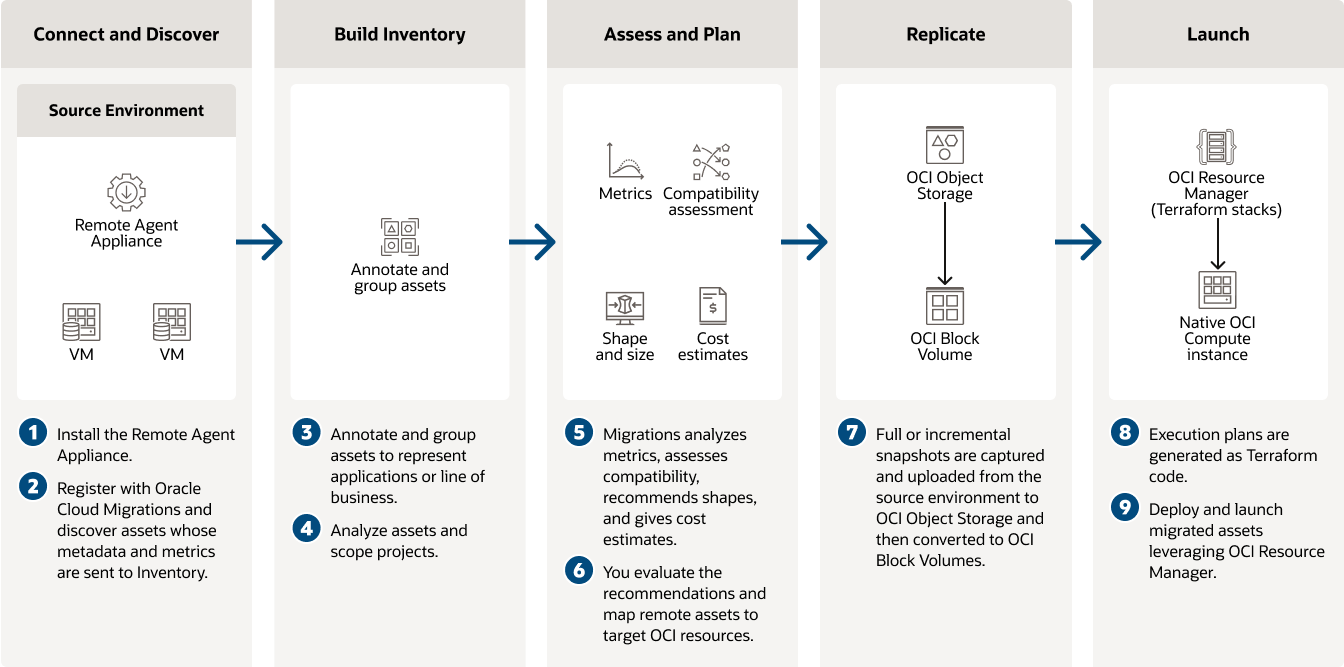
Oracle Cloud Migrations supports migrations from both on-premises VMware estates and AWS EC2 VMs in the cloud to OCI Compute virtual machines.
-
Discover and organize VMs for migration
Automatically discover virtual machines external to OCI. Organize the virtual machines for migration and replicate their data to OCI Compute.
-
Assess compatibility and plan cost scenarios
Assess compatibility with OCI Compute shapes and sizes, estimate cost, and explore price and performance for different deployment scenarios.
-
Migrate with end-to-end visibility and control
Migrate workloads with supported guest operating systems to OCI. Autogenerate execution plans. Deploy and launch OCI resources leveraging OCI Resource Manager.
How Oracle Cloud Migrations works
More flexibility for your VMware strategy
-
01Keep what works
Move VMware workloads to Oracle Cloud VMware Solution with minimal operational change while maintaining familiar VMware tools, skills, and processes. Keep control of your environment today while creating room to evolve your cloud strategy over time.
-
02Reduce VMware dependency
Replatform eligible VMware workloads to native OCI Compute when you’re ready to move away from VMware licensing. Run workloads on OCI while reducing the licensing requirements associated with maintaining a VMware environment.
-
03Modernize on your timeline
Your migration strategy can vary by workload. Choose the approach that fits each workload and your priorities today, with the flexibility to adopt native OCI services over time as your application and business requirements evolve.
Find the right path for your VMware estate
Every VMware environment is different. Talk with an Oracle expert about your workloads, operational priorities, and modernization goals to determine the migration approach that fits your business.
Oracle Cloud Migrations resources
-
Plan your next step
Get started with a VMware migration
Assessment
Understand your migration options
Assess your VMware environment, migration requirements, and potential paths to OCI.
Talk with an expert
Find the right path for your VMware estate
Talk with an Oracle expert about the right approach for your VMware workloads and goals.
Explore your TCO
Build the business case for OCI
Compare migration approaches and explore the potential economics of moving VMware workloads to OCI.