
OCI IAM Identity Assurance
Gain a higher level of protection against identity-based attacks, such as stolen or phished credentials, deepfakes, and spoofing attempts with Oracle Cloud Infrastructure Identity and Access Management (OCI IAM) Identity Assurance. This feature uses biometrics—facial, fingerprint, and voice verification—to help confirm that users are who they claim to be. Apply it at sign-in to protect sensitive resources with greater confidence than credentials alone.
Why use biometrics-powered Identity Assurance?
-
Tie digital identity to a real-world human identity
Gain stronger proof of identity that the right person is accessing sensitive information through facial or fingerprint verification, with voice matching as an additional signal in supported workflows.
-
Make impersonation harder
Check the person behind the account to reduce the risk that stolen credentials, deepfakes, or spoofing attempts expose sensitive data.
-
Match identity checks to the moment
Verify users periodically and before sensitive actions. Match checks to the risk and choose methods that fit remote or in-person workflows so users aren’t disrupted.
More ways to be sure it’s really them
Announced at Oracle AI World: Fingerprint and voice matching join facial verification in OCI IAM Identity Assurance.
OCI IAM Identity Assurance features
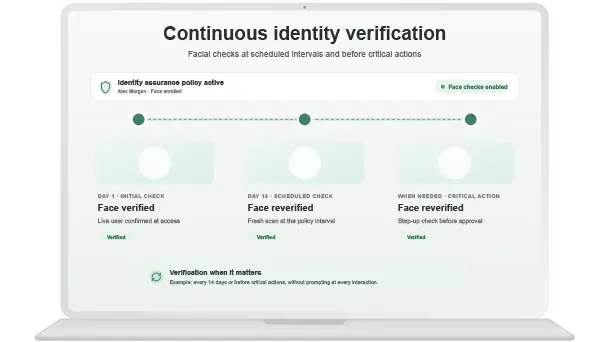
Continuous identity verification
Is the person using the account still a legitimate user? Conduct periodic checks through facial or fingerprint verification, with voice matching in supported speech workflows.
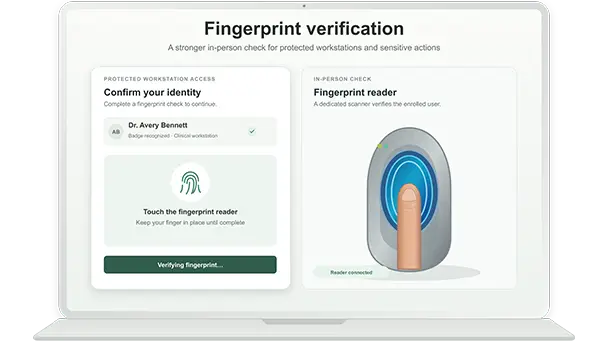
Choose from face, fingerprint, or voice
Use facial verification for remote actions and fingerprint scanners for in-person workstations checks. Voice matching adds an identity signal in workflows already capturing speech.
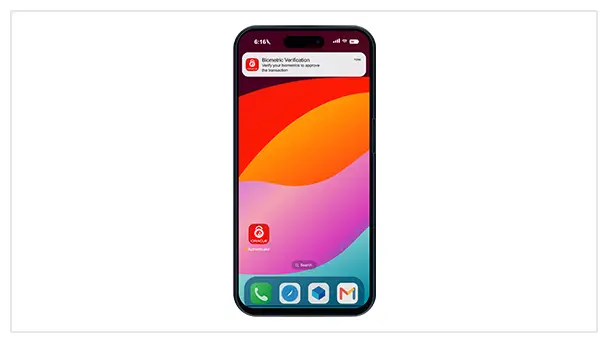
Privacy-focused mobile verification
Mobile facial verification combines liveness checks, depth and infrared sensing on supported devices, and app attestation to help guard against spoofing and injected media.
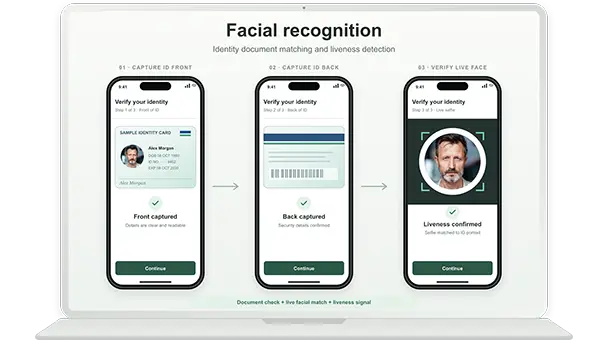
Counter deepfakes and spoofing with liveness detection
Facial verification checks that a live person is present, helping detect photos, replay attempts, and basic deepfakes.

OCI IAM Identity Assurance use cases
Is That Really You? Verify the Human Behind Sensitive Actions and AI Agent Approvals with Identity Assurance
Meghana Vyakaranam, Senior Product Manager
Oracle Identity Assurance uses biometrics to verify the person behind an account. It connects hard-to-spoof biometrics, like a faceprint, fingerprint, or voiceprint, with real-world government ID documents to confirm that the person is indeed who they claim to be. This gives organizations evidence of the expected person’s participation, helping applications address impersonation and in future, require a verified human before sensitive actions, including requests initiated by AI agents.

-
September 29, 2026
Turn OCI IAM Identity Assurance Signals into Risk Insights
-
March 3, 2026
Announcing biometrics-powered Identity Assurance feature from OCI IAM
General
How do I enable OCI IAM Identity Assurance?
Start with an OCI IAM Premium identity domain and the required administrator permissions. Configure an Identity Assurance policy, select the user groups it applies to, and enable facial biometrics. If your enrollment process includes government-ID verification, configure a supported identity verification provider using your subscription with that provider. Users then enroll and complete identity checks according to your policy.
The documented facial setup also requires a configured passkey and compatible capture devices. See Getting Started with Identity Assurance.
How is OCI IAM Identity Assurance different from multifactor authentication?
Multifactor authentication (MFA) verifies authentication factors, such as a password, security key, or authenticator app. Identity Assurance adds a biometric comparison with an enrolled identity reference to help establish that the intended person is present.
The controls work together. For example, an employee can complete MFA and then undergo a facial check when an Identity Assurance policy requires fresh identity verification. See Managing Identity Assurance.
How is OCI IAM Identity Assurance different from face ID or fingerprint unlock on my device?
Device biometrics typically unlock a device or activate an authenticator. Identity Assurance supplies a person-verification result to an enterprise workflow, using a reference enrolled for that purpose. Where government-ID verification is included, enrollment also links the person to a verified real-world identity. Unlocking a phone does not, by itself, provide that enterprise verification result.
How does OCI IAM Identity Assurance help protect against credential theft, deepfakes, and spoofing?
OCI IAM Identity Assurance adds a check of the person using the account. Facial verification compares a fresh capture with the enrolled user’s biometric reference, while liveness detection helps identify attempts to use photos, replayed videos, or other spoofed presentations. It also matches with the government-ID data. Learn more about how OCI IAM Identity Assurance works.
How does OCI IAM Identity Assurance distinguish a human from an AI agent?
At a biometric checkpoint, Identity Assurance evaluates evidence about an enrolled person, including applicable liveness or anti-spoofing checks. This can help require human presence before a protected action.
Can OCI IAM Identity Assurance verify the person authorizing an AI agent to act?
A supported application could request fresh person verification before granting an agent permission to perform a sensitive action. The application must bind that result to the specific delegation or approval and enforce its scope, duration, and audit record. Verifying the person alone does not establish what they authorized the agent to do.
How much does OCI IAM Identity Assurance cost?
The offering requires OCI IAM Premium subscription. Government-ID verification requires a separate subscription with a supported identity verification provider.
Contact your Oracle account team for pricing based on your existing subscription and selected capabilities. For fingerprint deployments, you will need to also account for compatible readers and application integration. See the OCI price list.
When should I use facial, fingerprint, or voice biometrics?
Choose the method that fits the interaction, available hardware, and decision you need to support.
| Method | When it fits | What it contributes |
|---|---|---|
| Desktop facial | Browser-based workforce checks with a webcam/laptop camera | Facial verification at configured checkpoints |
| Mobile facial | Remote or mobile journeys where a supported phone is the appropriate verification device | Complements desktop facial verification |
| Fingerprint | Supervised, in-person interactions, such as branch transactions or controlled shared workstations | Compares a fresh fingerprint with the selected user’s enrolled reference using a supported reader |
| Voice | Authenticated, consented workflows that already capture speech | Additional speaker attribution and audit evidence |
Voice is an additional, nonblocking signal in the proposed scope. It should not be presented as a voice password or standalone approval for a sensitive transaction.
Do I have to enable OCI IAM Identity Assurance for everyone?
No. You can scope an Identity Assurance policy to selected user groups. This lets you begin with a defined population, assess the enrollment and verification experience, and expand your rollout. See the policy configuration guidance.
How often are users verified?
For the documented facial capability, administrators configure the verification frequency in the Identity Assurance policy. Checks occur at policy-defined checkpoints. For application-triggered checks before sensitive actions, the timing and response depend on the supported integration and the application’s policy.
How is biometric data protected?
Protecting user’s biometric data is central to our approach to identity assurance. Oracle combines encryption, controlled access, and protections tailored to how each modality captures, processes, and stores that data.
- Protected facial embeddings: Desktop facial biometrics retain encrypted embeddings of facial features, rather than original enrollment images. Embeddings are encrypted in transit and at rest, stored separately from OCI Identity and Access Management (IAM) data, and isolated by identity domain. Oracle operator access is tightly restricted.
- Local storage for mobile: The mobile app protects the enrolled facial embedding on the user’s bound device. During verification, it securely submits that embedding and a fresh facial sample for cloud-based liveness evaluation and matching. Raw depth maps remain on the device, while device binding, app attestation (iOS App Attest and Android Play Integrity), and signed requests help protect the verification flow. The embeddings are saved with Secure Enclave-backed keys in iOS and hardware-backed keys in Android.
- Fingerprint template protection: Fingerprint verification uses a protected digital template rather than storing raw fingerprint images. Fingerprint reader will be checked against BTP and PAD compatibility. Biometric template protection (BTP) helps safeguard that template against reverse engineering, reducing the risk that exposed data could be used to reconstruct a person’s fingerprint. Presentation attack detection (PAD) helps detect attempts to fool a biometric sensor, such as presenting a fake finger or a photo of a face.
- Explicit, consented voice processing: After a user enrolls their voiceprint with consent, verification uses speech from an active interaction the user can see. The voiceprint is stored securely; the speech recording is not retained. This helps attribute actions and support audits without passive background listening or replacing initial authentication.
- No data sale: Oracle does not sell biometric data to third parties.
- User control: Customers can collect consent during facial biometric enrollment, and users can unenroll to delete their enrolled biometric data.
What happens if a biometric check fails?
The configured IAM policy or consuming application determines the next step. Your deployment can define retries, support, review, and permitted alternatives for users who cannot complete a check.
Can OCI IAM Identity Assurance approve a transaction automatically?
A biometric result provides evidence about the person. The consuming application determines whether to allow an action using that evidence alongside permissions, transaction limits, risk checks, and business approvals. For example, a successful fingerprint comparison can support a branch transaction, while the bank’s application still makes the transaction decision.
What capabilities does a fingerprint reader need to support?
The reader and its capture software must support Oracle’s fingerprint integration, capture samples of sufficient quality, and meet the applicable requirements for presentation attack detection (PAD) and biometric template protection (BTP).
Presentation attack detection helps detect attempts to fool a biometric capture system—for example, presenting an artificial finger to a reader or a photograph to a camera. Biometric template protection helps safeguard the digital reference used for biometric comparison, including protection against reconstructing the original biometric from that reference.
Can I use my existing fingerprint readers?
Possibly, if the reader and capture software meet the supported integration, PAD, and template-protection requirements. A reader’s ability to capture a fingerprint does not automatically make it compatible with Identity Assurance. Provide the reader model and capture-software details so Oracle can assess compatibility.
Can I use facial, fingerprint, and voice biometrics together?
A customer application can be designed to use multiple supported modalities at the same or different checkpoints. For example, facial verification could support a remote interaction, fingerprint verification could support an in-person action, or both facial and fingerprint verification might be needed for a sensitive operation.
What happens if a user loses or replaces their phone?
For the proposed mobile model, the user re-enrolls on the replacement device, and the old device binding is revoked.
What if a user cannot or does not want to use biometrics?
Define appropriate exceptions or alternative process before rollout. This should address accessibility needs, capture difficulties, unsupported hardware, and consent requirements.