
Vulnerability Scanning
Eliminate risk from new, unpatched vulnerabilities and open ports by assessing and monitoring cloud instances. Oracle Cloud Infrastructure (OCI) Vulnerability Scanning Service gives development teams the confidence to develop their code on instances with the latest security patches and helps ensure a smooth transition to building production code. Used with Oracle Cloud Guard, operations teams gain a unified view of all instances to quickly remediate any open ports or patch unsafe packages discovered by the Vulnerability Scanning Service.
Adopt OCI Vulnerability Scanning Service
Monitor and track new vulnerabilities with OCI Vulnerability Scanning Service.
IDC Lab Validation of OCI Security
Putting tenant data safety and privacy first with automated operations in Oracle Cloud Infrastructure.

Vulnerability Scanning Service pricing
Oracle Cloud Infrastructure Vulnerability Scanning Service features
Discover new workload vulnerabilities before they are exploited
Increase security confidence with the up-to-date vulnerability findings that are always available from daily instance scans.
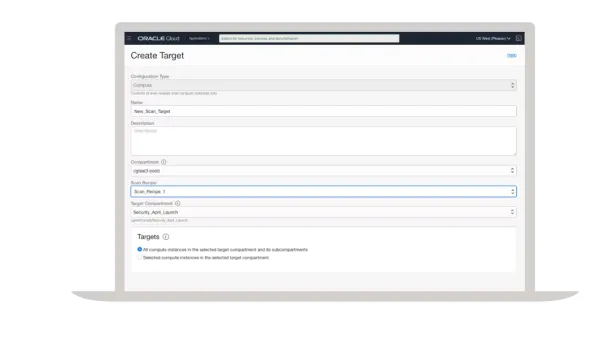
Proactively identify any vulnerability risks on instances or in container images
Prioritize the most vulnerable instances or images for immediate remediation.
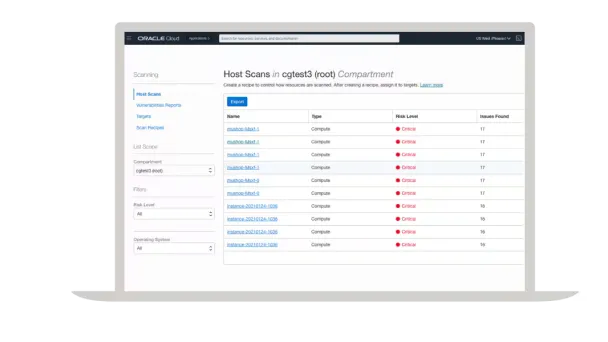
Gain security insights using regional and global reports
Assess and view the latest security posture of instances and container images through Oracle Cloud Guard, and drill down into regional reports using the Vulnerability Scanning Service.
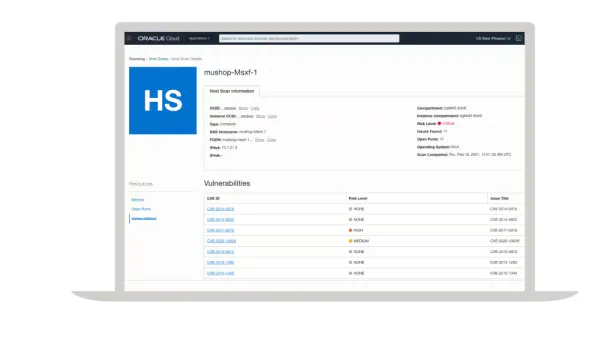
Vulnerability Scanning Service resources
Oracle Cloud Free Tier
Build, test, and deploy applications on Oracle Cloud for free. Sign up once, get access to two free offers.

Oracle Cloud Infrastructure Vulnerability Scanning Service
Get the latest documentation for Oracle Cloud Infrastructure Vulnerability Scanning Service.

Join a community of peers
Cloud Customer Connect is Oracle's premier online cloud community. With more than 200,000 members, it's designed to promote peer-to-peer collaboration and sharing of best practices, product updates, and feedback.

Develop Oracle Cloud security skills
Oracle University provides the training and certification to ensure an organization’s success, all delivered in a variety of formats.


Additional areas of interest
-
Oracle Cloud Guard
See how Oracle Infrastructure Vulnerability Scanning Service works with Oracle Cloud Guard to gain a better view of the organization’s cloud risk posture
-
Autonomous Linux
Learn more about the world’s first autonomous OS
-
Compliance
Learn how Oracle Cloud Infrastructure is addressing global compliance concerns
-
Oracle Cloud Infrastructure Regions
See Oracle Cloud Infrastructure Data Center Regions
General questions
What is Oracle Cloud Infrastructure Vulnerability Scanning?
Oracle Cloud Infrastructure (OCI) Vulnerability Scanning Service eliminates risk from new, unpatched vulnerabilities and open ports by assessing and monitoring cloud hosts. The service gives development teams the confidence to develop their code on hosts with the latest security patches and helps ensure a smooth transition to build production code. Used with Oracle Cloud Guard, operations teams gain a unified view of all hosts to quickly remediate any open ports or patch unsafe packages discovered by Vulnerability Scanning Service.
OCI Vulnerability Scanning is a service that scans virtual machines (VMs) and bare metal (BMs) machines created from the OCI base compute images. We also offer detectors in Oracle Cloud Guard that allow customers to fine tune what findings should become problems in Oracle Cloud Guard.
How is scanning enabled?
Scanning is available within an OCI tenancy and can be accessed from the OCI security console. Here are the steps for enabling scanning for the first time:
- Add the required policies to Oracle Identity and Access Management policies
- From the navigation menu, go to Security -> Scanning
- Click on Scan Recipes
- Click on the Create button
- Specify the number of ports to scan and enable agent-based scanning
- Click on Targets
- Click on the Create button
- Specify the compartment in which to store the scan results, and the target compartment that contains the hosts to be scanned. Make sure that to select the scan recipe that was just created
- After a few minutes scan results will start to appear. Click on Host Scans, Port Scans, or Vulnerabilities Reports
What cloud resources are scanned?
OCI Vulnerability Scanning Service monitors compute instances for open ports and other potential vulnerabilities, such as vulnerable OS packages, missed CIS benchmarks, and endpoint protection in place and running.
How often are resources scanned?
Resources defined in a target are scanned on a daily or weekly basis as detailed in the target’s recipe.
How much does scanning cost?
OCI Vulnerability Scanning Service is offered at no cost for all paying customers. Customers can later choose the option of integrating with optional third-party scanning vendors to see findings in those platforms, as well as in OCI.
Is Vulnerability Scanning Service a regional or global service?
OCI Vulnerability Scanning Service is a regional service, but results are forwarded to the global Oracle Cloud Guard reporting region. This allows the customer to view the scanning reports in the local region while others can see findings from all regions in the central global Oracle Cloud Guard reporting view.
Which regions are scanned as part of OCI Vulnerability Scanning Service?
All commercial regions for the tenancy will be monitored as part of the OCI Vulnerability Scanning Service. For a list of currently supported regions, see Regions and Availability Domains.
Why are there no scan results in the reporting sections?
Make sure that the correct region and compartment were selected when OCI Vulnerability Scanning Service is configured. Next, make sure that the target compartment is pointing to the correct compartment with the hosts. Finally, check that the OS on these hosts are currently supported: Oracle Linux, CentOS, Ubuntu, and Windows Server.
I did not allow the host agent in my compute scanning recipe, what data can I still get?
If the host agent is not allowed to be used, the Vulnerability Scanning Service will still scan all public facing IPs and report on the top 1000 or 100 most common ports and how those ports are typically used.
Why do I get CVEs on an Oracle Autonomous Linux System or other OSes, but OS Management Service has no patches for me to install?
This can happen while there are older kernel files still in the file system. Our service will look for everything on these instances, and we will see that these older kernels are still there. We match that information up to the older CVEs. You can remove the old kernel files if you want or ignore these CVEs. Autonomous Linux is always on top of getting patches to your systems in a timely manner while OSMS will give you the latest patches to install to keep your instances up to date.