 test
test
如何使用 JDeveloper 10.1.3 中的“检查更新”支持
Oracle JDeveloper 方法文档
作者:Olivier Le Diouris,Oracle Corporation
2005 年 1 月
目录
简介 | 返回页首 |
像 JDeveloper 这样的 IDE 的扩展主要由两种类型的组件组成:
- 所需的类
- XML 清单文件
这些组件被捆绑成一个 JAR 文件,然后放在一个特定目录中。“更新中心”管理该 JAR 文件及其位置。JDeveloper 知道 Oracle 管理着几个更新中心站点。
在 JDeveloper 10.1.3 中,更新中心机制得到了增强,通过提供包含 Web 上所有必需信息的“更新中心 XML 文件”的位置,任何希望编写扩展的人都可以受益于该功能。然后,JDeveloper 将在需要的时间和地点自动升级已安装的扩展。
对此进一步解释之前,应当注意的是,每个扩展都由一个名为 id 的属性唯一标识,该属性属于名为 extension 的扩展清单的的根元素。
如果由 JDeveloper 更新中心功能管理您的扩展,我们需要引用这个唯一的 id。
您首先需要创建一个更新中心。更新中心是一个特定的 XML 文档,可通过 http 访问。该 XML 文档使用我们在上面讨论的唯一的 id 将一个扩展与一个 ZIP 文件相关联,该 ZIP 文件包含:
- 扩展的 JAR 文件
- META-INF 目录中另一个名为 bundle.xml 的 xml 文件
bundle.xml | 返回页首 |
让我们举个例子:
<?xml version = '1.0' encoding = 'UTF-8'?>
<update-bundle version="1.0"
               xmlns="http://xmlns.oracle.com/jdeveloper/updatebundle"
               xmlns:u="http://xmlns.oracle.com/jdeveloper/update">
  <u:update id="oracle.jdeveloper.extensions.sdk.installer">
    <u:name>JDeveloper Extensions SDK Installer</u:name>
    <u:version>0.1</u:version>
    <u:author>Olivier Le Diouris</u:author>
    <u:author-url>http://jroller.com/page/oliv</u:author-url>
    <u:description>
      Install the Extension SDK in your instance of JDeveloper
    </u:description>
    <u:requirements>
      <u:requires-extension id="oracle.jdeveloper"
                            minVersion="10.1.3"
                            maxVersion="10.1.4" />
    </u:requirements>
  </u:update>
</update-bundle>
粗体的文本指的是扩展的 id,它存储在扩展 JAR 文件的 META-INF 目录中的名为 extension.xml 的扩展清单文件中,如以下 XML 片断所示:
<?xml version="1.0" encoding="windows-1252" ?>
<ex:extension xmlns:ex="http://jcp.org/jsr/198/extension-manifest"
              xmlns="http://xmlns.oracle.com/jdeveloper/1013/extension"
              id="oracle.jdeveloper.extensions.sdk.installer">
  <ex:name>JDeveloper Extensions SDK Installer</ex:name>
  <ex:version>0.1</ex:version>
    ...
</ex:extension>
您可能会想到,让您编写的扩展有一个唯一的标识符是至关重要的。
为包含扩展的 JAR 文件赋予一个由扩展 id 后跟版本组成的名称也是一种不错的做法。
此类文件的名称将为 oracle.jdeveloper.extensions.sdk.installer.0.1.jar。
更新中心的 zip 文件 | 返回页首 |
上面所述的绑定和包含了扩展的 JAR 文件必须存档到一个具有以下结构的 zip 中:
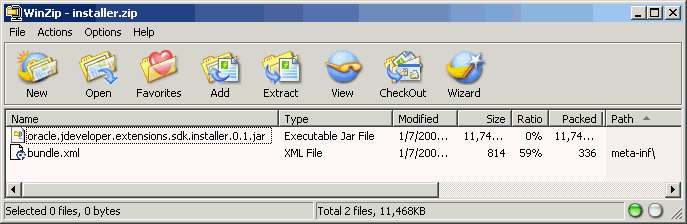
在上面的示例中,installer.zip 是将放在更新中心中的文件,oracle.jdeveloper.extensions.sdk.installer.0.1.jar 是包含了扩展的 JAR 文件。
如果扩展需要其他存档才能工作,则这些存档也可存储在该 zip 中。应按照它们在 zip 中的原样对其进行解压缩,因此最好让它们位于一个子目录中,这样扩展目录才不会被过多文件占用。
为该子目录取一个基于扩展 id 的名称是一个不错的做法。

更新中心 XML 文档 | 返回页首 |
最后一步是从更新中心引用上面描述的 zip。
我们说过,更新中心是一个可在 Web 上访问的 XML 文档。
再举一个例子,我们将调用我们的 XML 文档 center.xml:
<?xml version="1.0" encoding="windows-1252" ?>
<updates version="1.0"
  xmlns="http://xmlns.oracle.com/jdeveloper/updatecenter"
  xmlns:u="http://xmlns.oracle.com/jdeveloper/update">
  <u:update id="oracle.jdeveloper.extensions.sdk.installer">
    <u:name>JDeveloper Extensions SDK Installer</u:name>
    <u:version>0.1</u:version>
    <u:author>JDeveloper Team</u:author>
    <u:author-url>http://otn.oracle.com/products/jdev</u:author-url>
    <u:description>Install the Extension SDK in your instance of JDeveloper</u:description>
    <u:bundle-url>http://olediour-pc.us.oracle.com/ESDKInstaller/installer.zip</u:bundle-url>
  </u:update>
  <u:update id="...">
    ...
  </u:update>
</updates>
再次注意对扩展唯一 id 的引用。
另外,注意名为 bundle-url 的元素,它引用上一部分中描述的 ZIP 文件。您将看到它不需要与该 XML 文档位于一台计算机上。
从 JDeveloper | 返回页首 |
从 JDeveloper 中,您可以通过菜单 Help | Check for Updates 访问任何更新中心。
在弹出的向导中,您可以参考我们在上一部分中描述的文档:
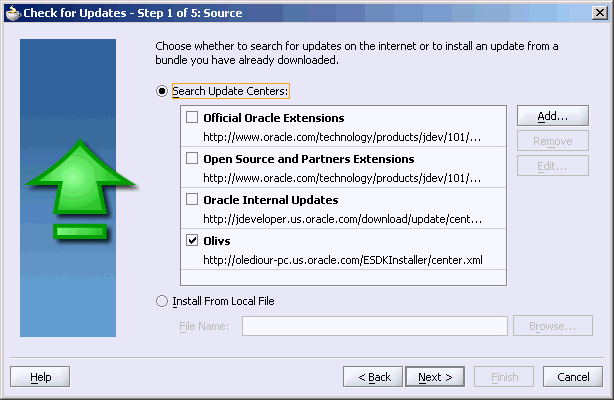
然后,使用向导完成该过程,您可以在需要的时候更新任何扩展。
在上面的图像中,前三个更新中心随 JDeveloper 一起提供,第四行的更新中心是专为本文档添加的。
您可能还会注意到该操作可从本地文件上进行,在本例中,这个本地文件可以是上面提到的 ZIP 文件、包含 bundle.xml 的文件以及扩展 JAR 文件。
自动化 | 返回页首 |
通过 JDeveloper 以及现在提供的 Ant 支持,扩展项目可以非常轻松地生成扩展所需的 JAR 文件和包含绑定和 jar 的 zip,以及更新中心的 XML 文档。下面是此类 Ant 构建文件的一个示例,您可能希望通过它了解“绑定”目标:
<?xml version="1.0" encoding="windows-1252" ?>

<project name="ExtensionSDKInstaller"
         default="all"
         basedir=".">

  <property file="build.properties"/>

  <path id="library.JDeveloper.Extension.SDK">
    <pathelement location="${oracle.home}/ide/lib/javatools.jar"/>
    <pathelement location="${oracle.home}/ide/lib/ide.jar"/>
    <pathelement location="${oracle.home}/jdev/lib/jdev.jar"/>
    <pathelement location="${oracle.home}/jdev/lib/xmleditor.jar"/>
    <pathelement location="${oracle.home}/jdev/lib/xmladdin.jar"/>
    <pathelement location="${oracle.home}/jlib/jewt4.jar"/>
    <pathelement location="${oracle.home}/jlib/inspect4.jar"/>
    <pathelement location="${oracle.home}/lib/xmlparserv2.jar"/>
  </path>
  <path id="classpath">
    <path refid="library.JDeveloper.Extension.SDK"/>
  </path>
  <target name="init">
    <tstamp/>
    <mkdir dir="${output.dir}"/>
  </target>

  <target name="all"
          description="Build the project"
          depends="clean,compile,copy,deploy,bundle"/>

  <target name="clean" description="Clean the project">
    <delete includeemptydirs="true" quiet="true">
      <fileset dir="${output.dir}" includes="**/*"/>
    </delete>
    <delete dir="update-center-bundle"/>
  </target>

  <target name="compile" description="Compile Java source files" depends="init">
    <javac destdir="${output.dir}" classpathref="classpath"
           debug="${javac.debug}" nowarn="${javac.nowarn}"
           deprecation="${javac.deprecation}" encoding="Cp1252">
      <src path="src"/>
    </javac>
  </target>
  <target name="copy" description="Copy files to output directory"
          depends="init">
    <patternset id="copy.patterns">
      <include name="**/*.gif"/>
      <include name="**/*.jpg"/>
      <include name="**/*.jpeg"/>
      <include name="**/*.png"/>
      <include name="**/*.properties"/>
      <include name="**/*.xml"/>
      <include name="**/*-apf.xml"/>
      <include name="**/*.ejx"/>
      <include name="**/*.xcfg"/>
      <include name="**/*.cpx"/>
      <include name="**/*.wsdl"/>
      <include name="**/*.ini"/>
      <include name="**/*.tld"/>
      <include name="**/*.tag"/>
      <include name="**/*.zip"/>
    </patternset>
    <copy todir="${output.dir}">
      <fileset dir="src">
        <patternset refid="copy.patterns"/>
      </fileset>
    </copy>
  </target>

  <target name="deploy" description="Deploy the extension where it belongs" depends="copy">
    <jar
destfile="${jdev.home}/jdev/extensions/oracle.jdeveloper.extensions.sdk.installer.0.1.jar"
         basedir="${output.dir}"
         compress="yes">
      <exclude name="**/*.cdi"/>
      <exclude name="**/connections.xml"/>
    </jar>
  </target>

  <target name="bundle" depends="deploy"
description="Prepare whatever's required for the update center.">
    <echo message="Preparing the Update Center Material"/>
    <echo message="------------------------------------"/>
    <mkdir dir="update-center-bundle"/>
    <mkdir dir="update-center-bundle/META-INF"/>
    <copy file="update-center/center.xml" tofile="update-center-bundle/center.xml"/>
    <copy
file="${jdev.home}/jdev/extensions/oracle.jdeveloper.extensions.sdk.installer.0.1.jar"
          tofile="update-center-bundle/oracle.jdeveloper.extensions.sdk.installer.0.1.jar"/>
    <copy file="update-center/META-INF/bundle.xml"
tofile="update-center-bundle/META-INF/bundle.xml"/>
    <zip destfile="update-center-bundle/installer.zip"
         basedir="update-center-bundle">
      <exclude name="center.xml"/>
      <exclude name="*.zip"/>
    </zip>
    <delete file="update-center-bundle/oracle.jdeveloper.extensions.sdk.installer.0.1.jar"/>
    <delete dir="update-center-bundle/META-INF"/>
    <echo message="+----------------------------------------------+"/>
    <echo message="| Check out the update-center-bundle directory |"/>
    <echo message="+----------------------------------------------+"/>
  </target>

</project>
该构建文件指的是一个属性文件:
javac.debug=on
oracle.home=../../../../../JDev223/
jdev.home=C:/JDev223
output.dir=classes
javac.deprecation=on
javac.nowarn=off
您会看到,运行完“绑定”目标之后,您具有:
- 扩展 JAR 文件
- 更新中心 ZIP 文件
- 更新中心 XML 文档
所有这些文档都是可以立即使用的,只需放到适当的位置即可。
热门下载 | ||

 Printer View