How-To Document
Control Page Sizes in Result Sets
Based on Oracle Application Express (formerly called HTML DB) version 1.5
After completing this How-To, you should be able to understand:
- Setting maximum number of rows for a report
- Setting a fixed number of rows per page
- Dynamically setting the number of rows per page
Table of Contents
Introduction
In Oracle HTML DB a report is simply the formatted result of a SQL query. You can generate reports by:
- Selecting and running a built-in wizard
- Defining a report region based on a SQL query
- Defining a report region based on a PL/SQL function returning a SQL query
The HTML DB Application Builder offers a great deal of flexibility in defining report attributes. Using the Report Attributes page, you can specify the report template, column display sequence, display report headings, column and heading alignments, column formatting, sort order, pagination, number of rows per page and total number of rows.
Prerequisites
- Oracle HTML DB
Setting a fixed number of rows per page and the maximum number of rows for a report.
The number of rows attribute determines how many rows are shown on each page. You can either type in a static value into the "Number of Rows" field or you can use an item to dynamically set the number of rows. The field labeled "Max Row Count" can be used to define the maximum number of rows you want to retrieve from the database. The default value is 500. When defining a higher total number of rows, consider using the simplified pagination style "Row Ranges x-y". For this style the engine does not need to process the entire result set for rendering the pagination controls.
- To modify the number of rows and the max. row count, navigate to the report attributes page:
- Navigate to the page definition by clicking on "edit page" in the developer toolbar, or by clicking on the page name from the Application Builder home page.
- Navigate to the report attributes page by clicking on the region name of your report region or on the "Q" link. (see Fig. 1).
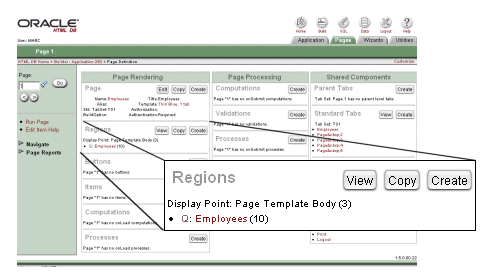
Fig. 1: Page Definition, Regions
- To set a static number of rows, follow the steps below:
- On the report attributes page, scroll down to the region titled "Layout and Pagination".
- Type in the number of rows you want to display on each page into the field labeled "Number of Rows" (See Fig. 2).
- If you want to limit the total number of rows retrieved from the database or if you want to retrieve more then the default number of 500 rows per report, you can use the field labeled "Max. Row Count" to overwrite the defaults.
- Click on apply changes to save the changes to your report.
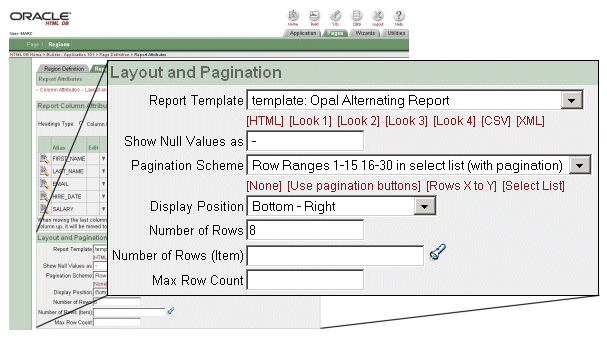
Fig. 2: Report Attributes, Layout and Pagination
- Figure 3 shows a report with eight rows per page, the pagination style used in this example is called "row ranges with set pagination", clicking on "next set" takes you to the next set of row ranges, in this example you would see rows starting at row 41.
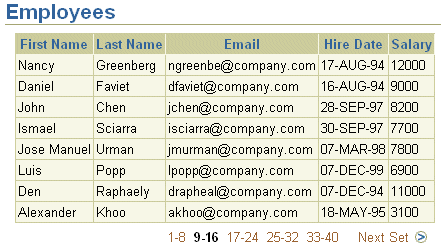
Fig. 3: Report with 8 rows per page
Dynamically setting the number of rows per page.
- Instead of showing a fixed number of rows, you can set the number of rows while running your application. You could use a select list or a text field to enter the number of rows you wish to have displayed (see Fig. 4). After submitting your page with this value, the report will be shown with number of rows you selected.
- To set a dynamic number of rows, follow the steps below:
- Create an item which you will use to store the number of rows, on the page definition page, press the "create" button in the item region
- Name the item, e.g. P1_NUMBER_OF_ROWS, the prefix P1 refers to page 1 (see Fig. 5)
- Set the item type, to initiate an instant page submit after selecting a new value you can pick "Select List with Submit". Alternatively you could also create a simple text field that allows you to enter any number to be used for the number of rows in your report
- For your select list item, you need to define a list of values from which the user can pick a new number of rows value. You can define
- In this example we will use a static list of values with the values 3, 5 and 10 (see Fig. 6), to use a static LOV, prefix your list of values with STATIC: or STATIC2:. You could also query a table or pick a pre-defined LOV from the Named LOV select list
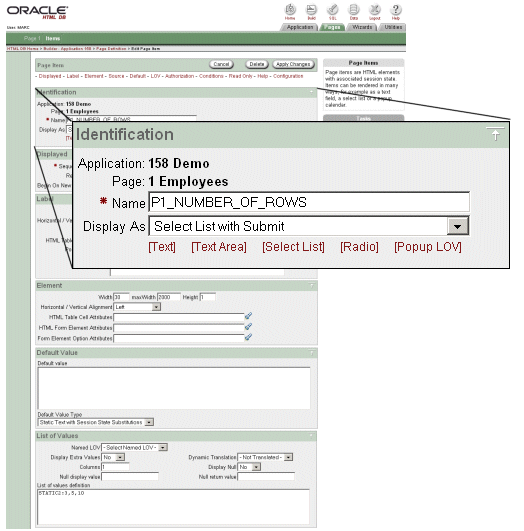
Fig. 5: Page Item, Identificationn
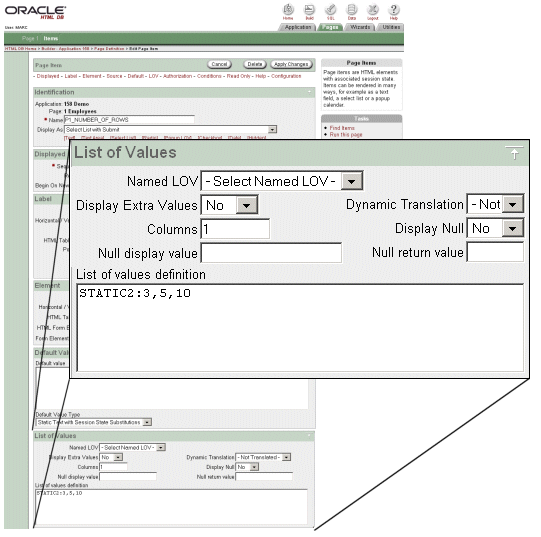
Fig. 6: Page Item, List of Values
- To use your number of rows item for your report, you need to reference the item using the "number of rows (item)" report attribute, to do this follow the steps below:
- Open the report attributes page, scroll down to the region titled "Layout and Pagination".
- Type in the name of the item that you want to use to derive the number of rows value into the field labeled "Number of Rows (item)", you can also use the popup item finder to pick the item name when clicking on the flash light right next to the text field. (See Fig. 7).
- If you want to limit the total number of rows retrieved from the database or if you want to retrieve more then the default number of 500 rows per report, you can use the field labeled "Max. Row Count" to overwrite the defaults.
- Click on apply changes to save the changes to your report.

Fig. 7: Report Attributes, Number of Rows and Max. Row Count
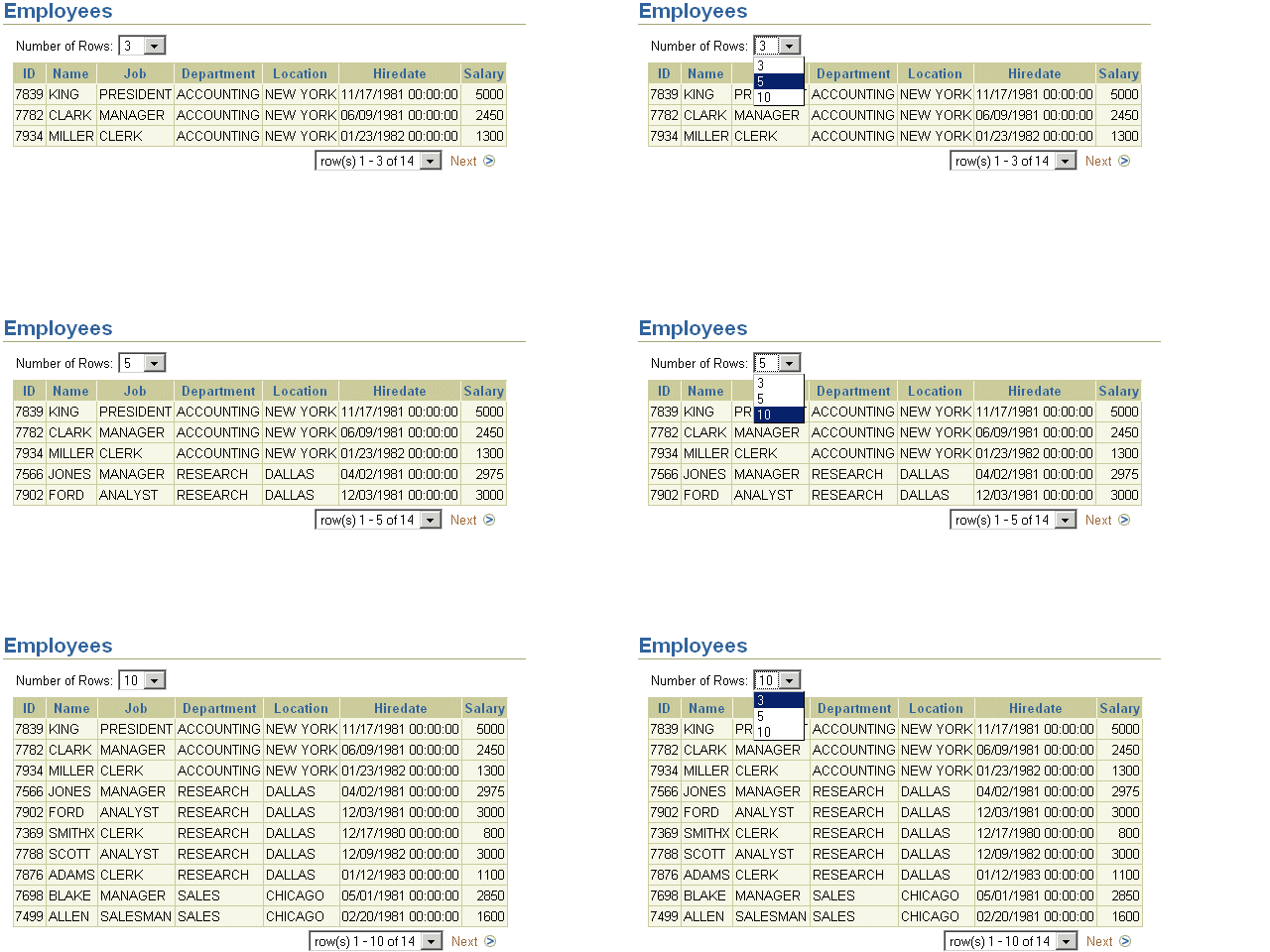
Fig. 4: Report with dynamic number of rows