Generate External Tables from an Excel Spreadsheet Using Apache Jakarta POI
DBA: Data Warehousing & Integration
by Casimir Saternos
Take advantage of open source technology and external tables to load data into Oracle from an Excel spreadsheet.
Downloads for this article:
The scenario: You receive an email with an attached Excel spreadsheet from your manager. Your task? Get the data in the spreadsheet loaded into the company Oracle 9i/10g database. How will you proceed? Will you write a custom application to load the data? Will you use the SQL*Loader utility? But wait a minutethe spreadsheet contains several sheets of data. First you will have to save each sheet in a delimited format. This is beginning to get more complicated than it seemed at first glance....
DBAs and application developers frequently face the task of loading data from Excel spreadsheets into Oracle databases. With the advent of Oracle 10g's spreadsheet-like model capabilities, it is likely that more data that is currently stored and viewed in spreadsheets will be loaded into Oracle databases for manipulation and processing.
Oracle provides a variety of methods for loading data from a spreadsheet into a database. Most Oracle DBAs and developers are familiar with the capabilities of SQL*Loader. Oracle HTML DB can be used to load Excel data in batch as well. This article presents and alternative method for loading data from an Excel spreadsheet that takes advantage of open source technology and external tables.
In this article you will learn how to use the Apache Jakarta POI open-source project to create external tables referencing data contained in an Excel spreadsheet with multiple sheets of data. During this process you will create a custom utility named ExternalTableGenerator to accomplish this goal.
Given an Excel spreadsheet containing one or more sheets with data, the ExternalTableGenerator utility generates flat datafiles and a DDL script that users can run to view the data as an external table. This project can also help clarify external table concepts for those who are new to the feature.
The article includes the source code for the ExternalTableGenerator, which can be used as a standalone application or as a basis for a more sophisticated and robust solution, and a sample spreadsheet for testing the process.
Jakarta POI
Jakarta POI FileSystem APIs implement the OLE 2 Compound Document format in pure Java, and HSSF APIs allow for the reading and writing of Excel files using Java POI is included in the sample code file and is referenced in the Java CLASSPATH when you are running the ExternalTableGenerator.
The ExternalTableGenerator The ExternalTableGenerator uses three classes that utilize the POI APIs to process a spreadsheet.
ExternalTable.java-This class represents the external table. An ExternalTable object has a name, references a directory and files on the file system, and has a list of columns with appropriate column types. The class also has attributes that describe the badfile name, logfile name, directory location, and constants for the various filename extensions. The class is populated with these attribute values and is then used to generate the DDL for an external table that corresponds to the structure of a given sheet of a spreadsheet.The constructor takes a parameter that is used to derive the table name (all spaces in the name are replaced with underscores. The
ExternalTableGeneratorclass uses the name of a particular sheet for setting thenameis used for the table name as well as the badfile and the logfile. When all the columns and other attributes of theExternalTableclass have been populated (based on the first two rows in the spreadsheet), a call can be made togetDdl() ,which returns the DDL for creating the external table. The structure of this DDL is described in the "DDL Script" section of this article.ExternalTableColumn.java-This class represents a single column of an external table. Its attributes include the name of the column and its type. For the purposes of the current application, the type is limited to VARCHAR2 or NUMBER, and you use the constants POI provides for these types. The VARCHAR2 length is determined by the values of the second row in a sheet. When called by theExternalTableGeneratorclass, column names are determined by the first row in a sheet. This class replaces any spaces in column names with underscores to ensure valid DDL.ExternalTableGenerator.java-This is the class that does the actual work. It reads a spreadsheet passed to it as an argument. For every sheet in the spreadsheet, it generates a comma-separated-value file (.csv extension) in the current directory. It also creates the DDL for creating a directory and the external tables.
The POI-specific calls required for processing are as follows:
In the execute() method, the following two lines access the spreadsheet from the file system and create a new workbook object
that allows you to manipulate the spreadsheet.
 POIFSFileSystem fs = new POIFSFileSystem(new FileInputStream(spreadsheet));

 HSSFWorkbook wb = new HSSFWorkbook(fs);
have access to the HSSFWorkbook object, you can process it by iterating through all of the
sheets, rows, and columns. The processWorkbook() method iterates through each of the sheets in the workbook,
creates ExternalTable objects using the sheet name, processes each sheet, and extracts the relevant data for populating the ExternalTable objects.
 private void processWorkbook(HSSFWorkbook wb) {
 for (int i = 0; i < wb.getNumberOfSheets(); i++)
 {
 HSSFSheet sheet = wb.getSheetAt(i);
 ExternalTable table = new ExternalTable(wb.getSheetName(i));
 processSheet(sheet, table);
 System.out.println("...Table "+ table.getName()+ " processed." );
 }
 }
The processSheet() method gets that table information from the sheet, writes a .csv file that will be the actual data
the ExternalTable references, and continues to append to the string that holds the contents of the DDL.
The getColumns() method contains relevant calls to the POI API for retrieving data about
particular cells. Different method calls are required, depending on the type of cell being accessed. Note that cells with no
data ( SSFCell.CELL_TYPE_BLANK ) have to be accounted for when the data in our example is being processed.
To write the data in a particular sheet, writeCsv() iterates through relevant rows and
columns and creates a string that contains the data in comma-delimited format. It does not write out the column names or
the row that contains the data that indicates VARCHAR2 size. The write() method contains the code that writes the data to a file on the file system.
You must run the DDL script (named ExternalTables.sql ) separately through SQL*Plus to actually create the directory and external tables.
External Tables
Beginning with Oracle 9i, external tables were implemented as an alternative to SQL*Loader. Unlike traditional database tables, external tables are read-only tables that reference data stored outside of the database. These tables can be queried in the same manner that standard Oracle tables can and often serve as an early stage in a larger ETL (extract/transform/load) process. External tables are of great assistance in referencing data outside of the database, but creating them requires a fairly large amount of DDL code to create the table that references the datafile, its column definition, and other files (badfiles and logfiles).
Creating external tables requires knowledge of the file format and record format of the datafiles as well as an understanding of SQL. The ExternalTableGenerator automates this process and provides some insight into the syntax for creating external tables that access delimited files.
DDL Script
Here is a brief description of the DDL script generated by the ExternalTableGenerator when you run it with the sample spreadsheet as an argument:
 CREATE OR REPLACE DIRECTORY load_dir AS 'C:\workspaces\test\XL2ExternalTables'
 ;
The CREATE OR REPLACE DIRECTORY statement creates a directory object that allows Oracle to access an operating system directory. This directory contains the datafile referenced by the external table as well as the badfiles and logfiles. The ExternalTableGenerator uses the current working directory as the operating system directory to reference.
 CREATE TABLE PA_Zip_Code_Locations
 (
 ZIP VARCHAR2(10),
 AREANAME VARCHAR2(30),
 LATITUDE NUMBER,
 LONGITUDE NUMBER,
 POPULATION NUMBER
 )
 ORGANIZATION EXTERNAL
 (
 TYPE oracle_loader
 DEFAULT DIRECTORY load_dir
 ACCESS PARAMETERS
 (
 RECORDS DELIMITED BY NEWLINE
 badfile load_dir:'PA_Zip_Code_Locations.bad'
 logfile load_dir:'PA_Zip_Code_Locations.log'
 FIELDS TERMINATED BY ','
 MISSING FIELD VALUES ARE NULL
 (
 ZIP,
 AREANAME,
 LATITUDE,
 LONGITUDE,
 POPULATION
 ))
 LOCATION ('PA_Zip_Code_Locations.csv')
 )REJECT LIMIT UNLIMITED;
The CREATE TABLE syntax and column definitions look like a typical DDL statement
for creating a regular Oracle table. ORGANIZATION EXTERNAL identifies this table as an external table.
The TYPE clause is for specifying the driver type. Subsequent clauses describe the structure
of the file and the location of the logfile, badfile, and datafile. For more information on EXTERNAL TABLE
syntax, see the Oracle Documentation .
The ExternalTableGenerator generates this portion of the DDL according to the following rules:
- The name of the table is based on the name of a given sheet. The name of the sheet is also used to determine the name of the badfile, logfile, and datafile the external table references.
- The name of the column is based on the values in the first row of a sheet. These names are also used in the FIELDS definition section of the external table.
- The length of a VARCHAR2 is dictated by the second row in the spreadsheet.
- A column type is defined as either a VARCHAR2 or a NUMBER, depending on the cell in the subsequent spreadsheet row.
- Because each .xls sheet is exported as comma-separated-value (.csv) file, you include the RECORDS DELIMITED BY NEWLINE and FIELDS TERMINATED BY ',' information.
The new_departments and new_employees tables have the same basic
structure as the pa_zip_code_locations table shown above.
Excel Spreadsheets
Data that needs loading comes frequently in a simple format of comma-, pipe-, or tab-delimited values, and loading it is a relatively straightforward task. However, data can also be provided in an Excel spreadsheet, which can contain multiple sheets. A spreadsheet is stored in a binary format that is not accessible directly with SQL*Loader or external tables. One benefit of Excel spreadsheets over traditional flat files is that the data can be typed (as numeric, string, and so on). As mentioned above, you can take advantage of this fact in the ExternalTableGenerator to determine column types.
There are a few requirements for spreadsheets the ExternalTableGenerator processes:
- They can contain one or more spreadsheets.
- The name of the spreadsheet is used for table name definition . The external table name, datafile name, logfile name, and badfile name are dictated by the name of the spreadsheet.
- Each sheet in a spreadsheet is used to generate one block of the external table DDL and one .csv datafile.
- The first row in each spreadsheet is the column name definition row . The name of a column is used in the column name and field name sections of the EXTERNAL TABLE block. This row is not included in the .csv datafile.
- The second row in each spreadsheet is used to determine the length of a VARCHAR2 field. This row is also not included in the .csv datafile.
Because you use parts of the spreadsheet to determine table and column names, take care to choose names that will allow generation of valid SQL. In other words, avoid illegal characters, SQL keywords, existing table names, and the like in spreadsheets to be processed by the ExternalTableGenerator.
Excel is not required for running the project, but it is necessary for viewing the .xls file. Screen shots of the sample data appear below:
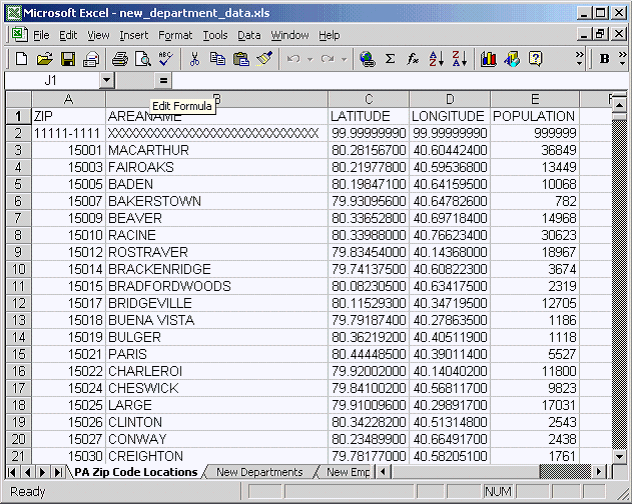
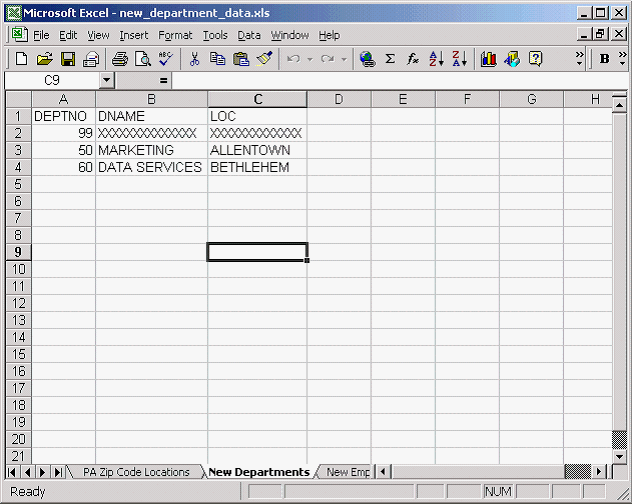
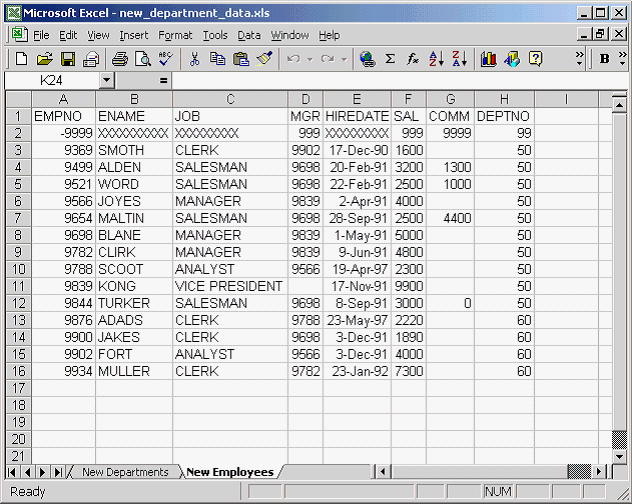
The data in the example represents two new departments, their employees, and a list of relevant zip codes that need to be added to the database. The employee and department data is based on the tables in the scott/tiger schema and can be imported there for experimentation, provided you grant all necessary permissions to scott. The zip code information demonstrates the ability of the ExternalTableGenerator to handle a bit more data.
Running the Project
The project was tested with Java Runtime Environment (JRE) 1.4.2_03 but should work with any JRE that can run POI. You can run the ExternalTableGenerator by executing runSample.bat. This batch file includes the relevant jars in the classpath (XL2ExternalTables.jar;jakarta-poi-1.5.1-final-20020615.jar;jakarta-poi-contrib-1.5.1-final-20020615.jar) and runs the appropriate Java class, com.saternos.database.utilities.ExternalTableGenerator, using the Excel worksheet specified in the argument.
Sample output from a successful run should resemble the following (with the paths based on your working directory.
 C:\Documents and Settings\Administrator\Desktop\XL2ETB>runExample
 C:\Documents and Settings\Administrator\Desktop\XL2ETB>
 java -cp XL2ExternalTables.jar;jakarta-poi-1.5.1-final-20020615.jar;
 jakarta-poi-contrib-1.5.1-final-20020
 615.jar com.saternos.database.utilities.ExternalTableGenerator new_department_data.xls
 Begin processing.
 Using working directory C:\Documents and Settings\Administrator\Desktop\XL2ETB
 ...File PA_Zip_Code_Locations.csv created.
 ...Table PA_Zip_Code_Locations processed.
 ...File New_Departments.csv created.
 ...Table New_Departments processed.
 ...File New_Employees.csv created.
 ...Table New_Employees processed.
 ...File ExternalTables.sql created.
 Processing complete.
This code creates three datafiles (designated with the .csv extension) and generates a single SQL script that contains the DDL for creating the external tables.
Here is a sample of running the DDL script and testing the results. Begin by connecting to the database via SQL*Plus from the directory where the
ExternalTables.sql script was created.
 C:\XL2ETB>SQL*Plus testuser/mypassword@orcladm
 SQL*Plus: Release 10.1.0.2.0 - Production on Tue Dec 21 09:36:25 2004
 Copyright (c) 1982, 2004, Oracle. All rights reserved.
 Connected to:
 Oracle9i Enterprise Edition Release 9.2.0.1.0 - Production
 With the Partitioning, OLAP and Oracle Data Mining options
 JServer Release 9.2.0.1.0 - Production
 SQL> select * from tab;
 no rows selected
Although this example is an empty schema, the script can be run in any schema, providing that the user has appropriate permissions and that there are no name collisions.
 SQL> @ExternalTables
 Directory created.
 Table created.
 Table created.
 Table created.
 The script is executed, and the directory object and three external tables are created.
 SQL> select * from tab;
 TNAME TABTYPE CLUSTERID
 ------------------------------ ------- ----------
 NEW_DEPARTMENTS TABLE
 NEW_EMPLOYEES TABLE
 PA_ZIP_CODE_LOCATIONS TABLE
 SQL> select count(*) from new_departments;
 COUNT(*)
 ----------
 2
 SQL> select count(*) from new_employees;
 COUNT(*)
 ----------
 14
 SQL> select count(*) from pa_zip_code_locations;

 COUNT(*)
 ----------
 1458
 SQL> select * from new_employees;


 EMPNO ENAME JOB MGR HIREDATE SAL COMM DEPTNO
 ------ ---------- --------- ---------- ------------ -------- ---------- ----------
 9499 ALDEN SALESMAN 9698 33289.0 3200 1300 50

 9521 WORD SALESMAN 9698 33291.0 2500 1000 50

 9654 MALTIN SALESMAN 9698 33509.0 2500 4400 50

 EMPNO ENAME JOB MGR HIREDATE SAL COMM DEPTNO
 ------ ---------- --------- ---------- ------------- -------- ---------- ----------
 9844 TURKER SALESMAN 9698 33489.0 3000 0 50


 SQL>
Conclusion
This article introduced POI but has only scratched the surface of the functionality available through this API. There are a number of ways the ExternalTableGenerator utility described in this article could be enhanced:
- A JDBC connection could be made within the utility allowing the External Table DDL to be executed within the utility itself.
- Additional column types and precisions based on the spreadsheet types could be added.
- The utility could add functionality to manipulate other attributes of External Tables (PARALLEL, etc).
- Alternative methods of translating spreadsheet types to Oracle data types could be devised.
Hopefully this article has whetted your appetite to explore the possibilities of using POI and Oracle together to facilitate data manipulation between Excel and Oracle.
Casimir Saternos is an Oracle Certified DBA, IBM Certified Enterprise Developer and Sun Certified Java Programmer based in Allentown, Pa.