- Overview
- Implicit Saves to Transient Store
- Explicit Saves to Persistent Store
- Explicit Saves to Transient Store
Overview
A save model should support commonly-held user expectations as to when data is saved. Sometimes users expect to save their data by explicitly pressing the Save button. Sometimes they expect that their data is implicitly saved when they exit a page, such as when moving from tab to tab.
Data is saved to one of two types of store: transient or persistent.
- A transient store is one that holds user data, generally in memory, for the duration of a page or browser session, for example.
- A persistent store is one that holds user data, generally to a database. Therefore the data is available across browser sessions.
- Whether a save is implicit or explicit can dictate where the data is saved, to a transient store or to a persistent one.
Implicit Saves to Transient Store
An an implicit save is generally to a transient store. An implicit save assumes the user's expectation is that data is automatically saved after an action is completed. With an implicit save, for example, the user would not need to click a Save button.
- Therefore, implicit saves should not overwrite an explicit save, because an explicit save makes no such prior assumption.
Implicit Save scenarios
Following are four scenarios for choosing an implicit save model.
- Use an implicit
save of user data to a transient store when the user navigates between tabbed pages, whether those "tabs" are expressed as a link list, infoTiles, finger tabs, or tabs.
- The cloud service must warn the user of any potential loss of user data when the service cannot perform an implicit save upon navigation.
- Additionally, users must be warned of potential loss of user data when they explicitly attempt to close a page that has unsaved data changes — that is, when the save is only to a transient store.
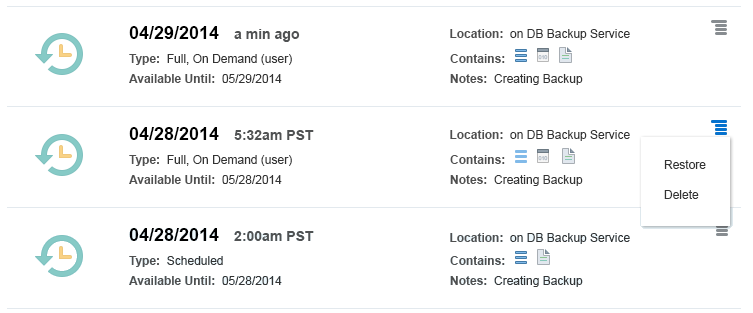
- Implicitly save the state to a transient store when a user changes the state (Start, Enable, Publish) of a primary object (user, file, resource). The only subsequent action a user may perform is to confirm an action that is not easily reversed, such as a delete or overwrite.
The following image is an example of a state change on a primary object.
- When the user allows for a browser session time-out, consider an implicit save of user data entered up to that point to a transient store, such as to a temporary database table.
- The UI should allow the user to elect to restore the data from the temporary store when the session is re-established. After the user elects to recover the data or abandon it, the temporary store is open to overwrites.
- When the user allows for a security sign out, consider an implicit save of user data entered up to that point to a transient store, such as to a temporary database table.
- Auto sign outs are often imposed by cloud services as a security measure when no input has occurred for a period of time. The service restores user data from the temporary store upon sign in. After the data is recovered, the temporary store is open to overwrites.
Explicit Saves to Persistent Store
An explicit save provides an obvious outcome directed by a specific, unambiguous user action, such as clicking a Save button.
- Because the action is triggered by clear user intent, explicit saves write to a persistent store such as a database or file and can overwrite any previous explicit save.
- An explicit saves generally acts on an entire page: all user data displayed on the page is saved together to a persistent store (barring any runtime exception) .
It is very important to use clear, consistent, and unambiguous UI labels on explicit Save buttons.
Button Labels For Explicit Saves to a Persistent Store
Use the following button labels for the interactions listed when saving explicitly to a persistent store.
- Cancel:
- To discard changes since the last save.
- To return the user to the place from which the page flow initiated.
- Done, Complete, Finish, Submit:
- When all validation is done.
- As the final action on a page.
- When data is committed to a persistent store, such as a database.
- To return the user to the place from which a page flow initiated, if it is not the same page.
- Save:
- When the user action is not the final action on a page (such as, an Apply).
- When data is committed to a persistent store, such as a database.
- Any time stamp used is associated with the Save button action.
- When the user's action is not a mandatory page-level action.
- Revert:
- When the user action is not the final action on a page.
- To roll back changes since the last save.
- When the user action is not a mandatory page-level action.
- May only appear with Done, Submit, or Save.
- Placed between Save and Cancel.
- Restore:
- Must be a clear and distinct label referencing its function.
- For example, labels for a restore to factory defaults or a restore to the last saved state are Restore to Default or Revert, respectively.
Do not use Cancel in the absence of, or as a substitute for Done, Submit, Complete or Finish.
The use of a label such as Done, Submit, Complete or Finish is not interchangeable with Cancel. This helps avoid any confusion as to whether Cancel, when presented in isolation, could result in some write or overwrite of user data. We do not recommend the use of Close in isolation for that same reason.
Other Write Actions to a Persistent Store
Other, often-used labels that write to a persistent store include Create, Create Like, New, and Register. Use Submit, rather than Create or Finish, in step-by-step task flows (such as wizards and guided processes), or two-step Create dialogs that initiate a work flow.
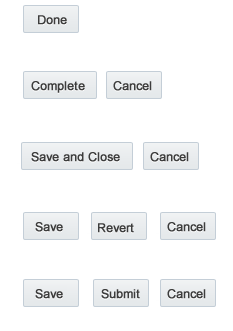
The following image depicts save button labels, and the order of Save and Cancel buttons in addition to others.
Explicit Saves to Transient Store
There are some scenarios in which an explicit save writes to a transient store. Sometimes, attribute values are best presented in an "interim" step, such as a drill-down or popup. For example, the user initiates an action in a field and gets a popup; after selecting an option in the popup, the user clicks OK to dismiss the popup and commit the data to its corresponding field in the calling page. At that point, any user data entered in the popup is written to a transient store, along with all other user data that was on the calling page when the user clicked OK.
Rarely does the user have the expectation that user data provided in a popup, for example, should precede all other user data for that page to any persistent store. Once the user has completed the transaction with all the attributes of objects represented in the page and executed an explicit save, then all attribute values are written together to a persistent store.
Button Labels for Explicit Saves to a Transient Store
Use clear, consistent, and unambiguous labels for buttons that both write any user data to a transient store and dismiss that UI, and return the user to the calling page. Use the labels in the following circumstances:
- OK:
- As the final action in that UI.
- When data is committed to a transient store.
- To return the user to the calling page.
- Apply:
- When the action is not the final action in that UI.
- When data is committed to a transient store.
- Cancel:
- To discard changes since the last commit to transient store.
- To return the user to the calling page.
Avoid the ambiguous use of Close in this UI as it would initiate a write, which may not be consistent with every user's expectation.