A Quick Overview of JSTL, EL and how it's used in Oracle ADF
Written by Chris Schalk, Oracle Corporation
July 2004
Contents
Introduction
An interesting fact about JDeveloper 10g and it's Application Development Framework (ADF) is that it relies exclusively on Expression Language (EL) for rendering and formatting data in Web clients. Working with EL in JDeveloper 10g is extremely easy, you can either drag and drop JSTL tags (which use EL) from the Component Palette or you can simply drag and drop databound components which also use EL from the Data Control Palette.
The following document provides an overview of both EL and JSTL and how they are used in JDeveloper 10g and ADF.
What is Expression Language (EL)?
Simply put, Expression Language was invented to simplify Web development. EL is not a programming language nor a scripting language but instead allows for simple access to J2EE web application data. Instead of having to write lot's of code to extract , interpret and present application data in a Web application, EL provides a short hand, way of working with Web application data by providing operators for retrieving and manipulating application data resident in a J2EE Web container. All EL expressions are encapsulated in the characters "${" and "}" and typically come in the form ${object.data} where "object" represent any Java objects placed in the J2EE Web container's page, request, session or application's scope.
Consider the following EL examples.
| Accessing data from a JavaBean in a JSP | ||
|---|---|---|
| Before EL | Using JSP 1.2 and JSTL | Using JSP 2.0 |
| <jsp:useBean id="employee" scope="session" type="com.oracle.Employee" /> <jsp:getProperty name="employee" property="firstName" /> |
<c:out value="${customer.firstName}" /> | ${customer.firstName} |
| Accessing request data in a JSP | ||
| Before EL | Using JSP 1.2 and JSTL | Using JSP 2.0 |
|
Hello, <%= request.getParameter("name") %> |
Hello, <c:out value="${param.name}" /> | Hello, ${param.name} |
As you can see, EL simplifies Web application development by reducing the amount of code necessary to display application data. As you can also see, EL is also usable in both JSP 1.2, using JSTL, and natively in JSP 2.0. (JSP 2.0 can use EL expressions directly in the page without requiring a JSP tag.)
Since at the time of the publishing of this article, JSP 2.0 is still only available as a preview technology, this article will primarily review JSTL and EL which is how it is used today with JSP 1.2.
What is JSTL?
JSTL, which stands for JavaServer Pages Standard Tag Library, is a collection of custom JSP tag libraries that provide common Web development functionality. It was originally developed as the open source Apache Jakarta Taglib project but is now managed by the Java Community Process (JCP) under JSR-52. JSTL's key goal was to remove the need for J2EE Web developers having to build their own proprietary tag libraries for common Web development processes. For example instead of having to write a custom taglib which allows for iterating over data in a Java object, JSTL provides the standard iterator, "foreach", in it's Core tag library. One of the most important aspects of JSTL is it's predominant use of Expression Language which as you've seen, greatly simplifies J2EE Web application data presentation and manipulation.
The common Web development areas which JSTL covers include:
- Conditionals
- Iterators
- Text formatting
- Database access (SQL)
- XML processing
- Internationalization
- Accessing URL resources
These common Web development areas are covered in the handful of JSTL tag lib libraries. Here is a breakdown of the JSTL 1.0 tag libraries along with some simple examples.
| Tag Library Name | Functional Area | URI | Prefix | Examples |
|---|---|---|---|---|
| Core | Iteration, conditionals, data access, output etc. | c |
<c:forEach items="${states.rows}" var=“state"> <c:out value="${param.name} /> |
|
| XML | XML processing | x | <x:parse var="a"> | |
| Formatting | Internationalization | fmt | <fmt:setLocale value="${locale}" /> | |
| SQL | Database access, update | sql | <sql:setDataSource var="example" driver="oracle.jdbc.driver.OracleDriver" url="jdbc:oracle:thin:@jdevdemo:1521:ORCL" user="scott" password="tiger" /> |
JSTL 1.0 is the initial release and is targeted for J2EE 1.3/JSP 1.2 containers. It is also integrated into JDeveloper 10g.
The next release, JSTL 1.1, is targeted for J2EE 1.4 containers and a reference implementation can also downloadable from the jakarta.apache.org website. JSTL 1.1 will also be integrated into the next version of JDeveloper.
Let's drill down a little more on how the current JDeveloper 10g uses JSTL, EL and ADF together.
Using JSTL, EL and ADF in JDeveloper 10g
One of the biggest features of the new JDeveloper 10g is it's Application Development Framework (ADF) which allows developers to build J2EE applications with a choice of J2EE middle-tier technologies including Enterprise Javabeans, Oracle Toplink, Oracle Business Components and Web Services in a consistent and completely visual manner. Oracle ADF makes data from any of the supported middle-tier technologies available on the session scope from which EL can access and present data from. This is why JDeveloper uses of JSTL and EL for all of it's ADF data presentation.
For further material on Oracle ADF see:
https://www.oracle.com/docs/tech/developer-tools/adf-overview.pdf (PDF)
or other ADF related documents from:
Before jumping into some ADF examples, let's look at how to use basic JSTL from the palette in some JSP examples.
Basic JSTL development with JDeveloper 10g
First we'll show how to use the JSTL "out" tag to display the current value of a request parameter. After creating a new JSP (File->New->Web-Tier->JavaServer Pages->JSP), select the Component Palette page: "JSTL Core", then drag and drop the "out" tag onto the page.

As you drop the tag, a property dialog will appear. (This appears automatically when dropping tags with required attributes.) As the dialog appears, you can enter an EL expression in the "value" attribute. Notice that the Tag Editor has an EL code completion features as you start typing the beginning of an EL expression.
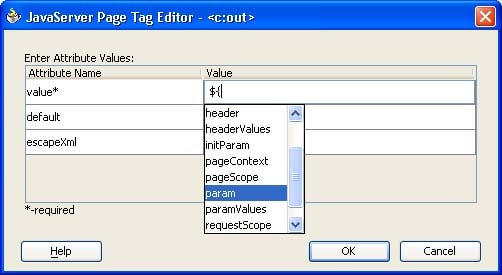
To display a request parameter we select the "param" object and then complete the expression with ${param .name}. (The request parameter we'll use is "name".)
Notice how the out tag renders in the JSP visual editor with the "value" attribute being displayed.

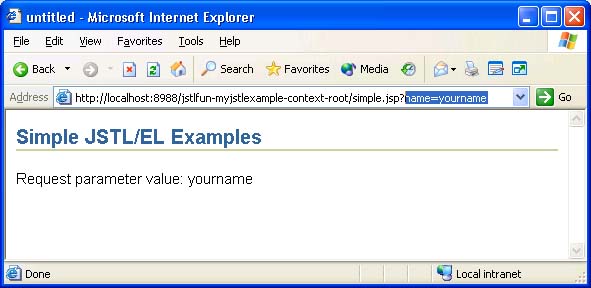
Now if you run the page, and add " ?name= yourname " onto the url string you'll see the value returned.
For a whole set comprehensive set of JSTL demos, you can observe the JSTL "standard-examples" which are included in the full JSTL reference implementation by creating a new project from the standard-examples.war file (File->New->General->Projects-> Project from War file). The standard example contain examples for iterators, conditionals, xml, formatting etc.
JSTL, EL and ADF in JDeveloper 10g
Now that we have an understanding of EL, JSTL and how to use it form scratch in JDeveloper 10g, let's observe how ADF uses EL (and JSTL) in databinding ADF Web applications.
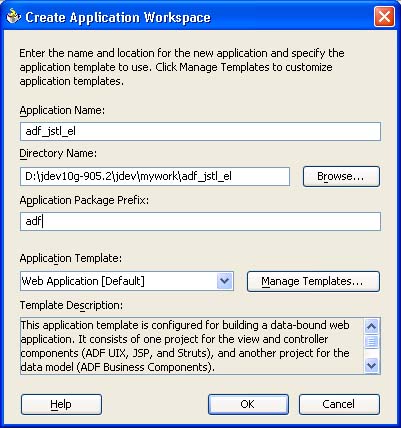
As a start, we'll create a new Application Workspace...
In the Model.jpr project we'll build a simple Business Components middle-tier using the standard emp and dept tables. (Save and compile the Model project.)
In the View-Controller project create a new empty JSP. As the JSP appears in the visual editor, notice that the ADF Data Control Palette appears on the right side. This window will allow us to drag and drop databound components onto the page.
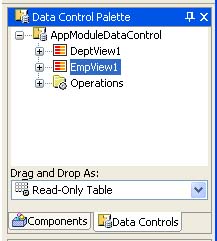
Notice the Data Control Palette has both a tree of items representing our middle-tier data along with a dropdown list with a set of "Drag and Drop As" options. Let's use the default, "Read-Only Table" and drag and drop "EmpView1" onto the JSP page.
Notice the code that gets generated:
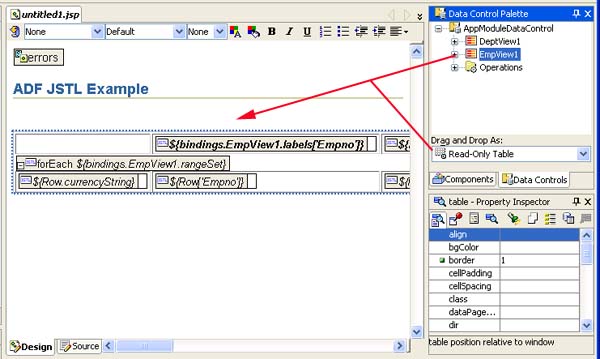
Yep.. it's JSTL with EL expressions. The code generated is a "Foreach" iterator along with "out" tags to render the data. Since the ADF makes all middle-tier data available to EL, databinding pages with ADF data is very easy.
Notice that we can also drag and drop single values from the Data Control Palette onto the page as well.
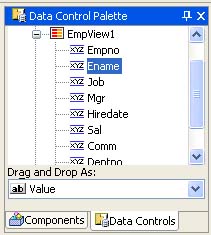
This will insert a single "out" tag with an expression for Ename.
In addition to using the Data Control Palette, it's possible to databind pages with JSTL manually. In this example we start by dropping another "out" tag from the Component Palette and then databind it using the Tag Editor dialog again. Notice that this time, it is aware of the ADF data present in the application.

Databinding an HTML tag
You may surprise to find out that it is even possible to databind attributes of HTML tags using JSTL and EL. Here's an example of databinding an HTML input field with JSTL and EL.
First we'll drag and drop an HTML "Text Field" onto a JSP page.
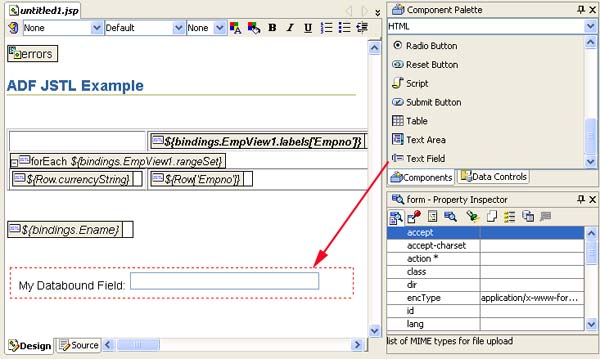
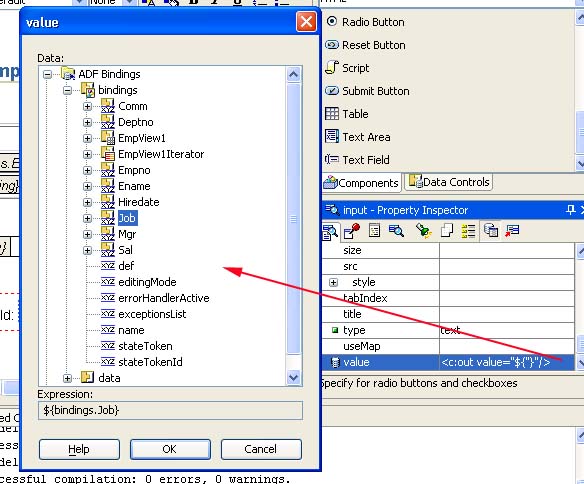
Then click on the input field and locate the value attribute in the Property Inspector. the default value is empty but notice if you click on the  button in the Property Inspector's toolbar, you'll then notice that you'll be able to databind the value attribute with an EL expression encapsulated in a JSTL out tag.
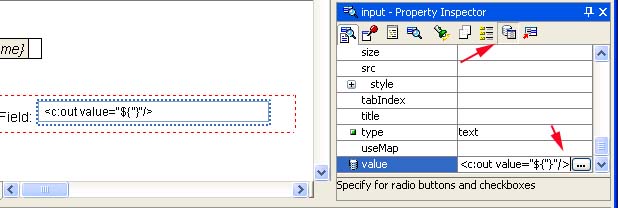
Notice the  button on the right side of the text entry field for the value attribute. Click on it to databind the value attribute. This will bring up the databinding dialog again from where we can select either generic JSP data or ADF data.
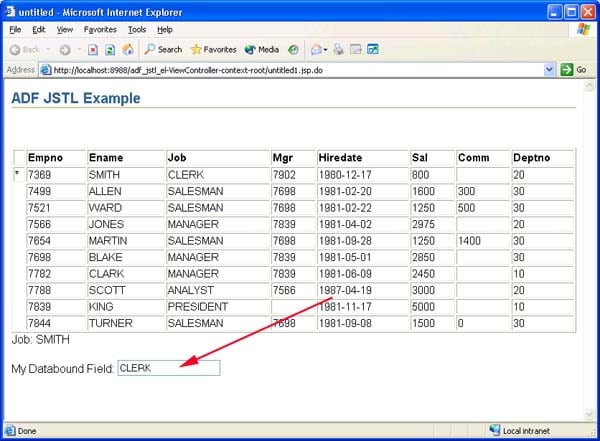
Here's a final image of the databound page. Notice the HTML input field is also databound to ADF data using JSTL and EL.
How UIX uses EL and ADF
And finally, so far the examples shown have been with JSP and JSTL. If you happen to use UIX for your User Interface technology you can also use EL to databind your applications.
Let's drop a Read-Only table onto an empty UIX page and observe how EL is used.
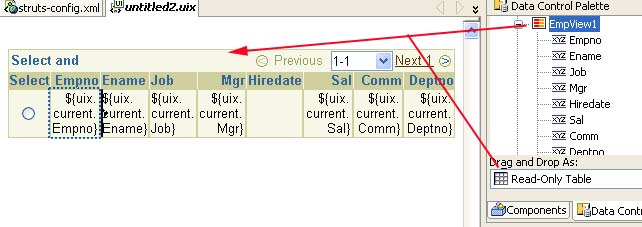
Notice in this case a UIX object is used, but EL is still the mechanism by which data is rendered.Feel free to experiment further with EL and UIX. You'll find that you can use the Property Inspector in the same manner as you used it for binding attributes of tags in a JSP file.
Summary
This document described what Expression Language and how the JavaServer Pages Standard Tag Library uses EL in rendering and manipulating data. It also showed how it is possible to use EL and JSTL to databind JSP pages using either the Data Control Palette for dropping ready made components onto your page or databinding manually by using the Property Inspector and EL databinder dialog.
For further info on JSTL see:
- "JSTL In Action" Book/Website: http://www.manning.com/books/jstl-in-action (One of the best sources of information on JSTL.)
For further info on ADF, and JDeveloper 10g see:
- JDeveloper 10g's OTN Home Page: http://www.oracle.com/application-development/technologies/jdeveloper.html