Troubleshooting Connection Issues Caused By Network Configuration Files
This page describes how network config files such as SQLNET.ORA may impact a connection made in Oracle Developer Tools for VS Code. Parameters in these files, such as SQLNET.AUTHENTICATION_SERVICES or WALLET_LOCATION may result in unexpected errors. For additional help, view walkthroughs of common connection scenarios or visit the Oracle Developer Tools for VS Code Quickstart.
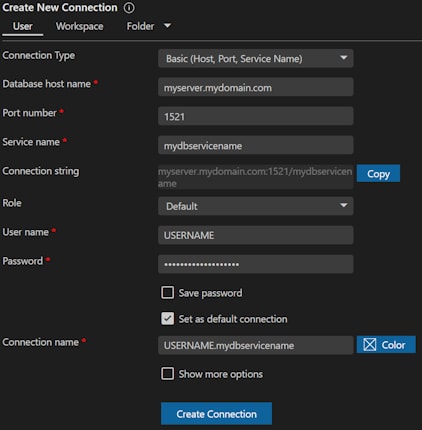
Connection Type: Basic (Host, Port, Service Name)
If a SQLNET.ORA file is found, settings in that file may impact your connection -- for example, SQLNET.AUTHENTICATION_SERVICES (e.g. if you use "/" as your username) or WALLET_LOCATION .
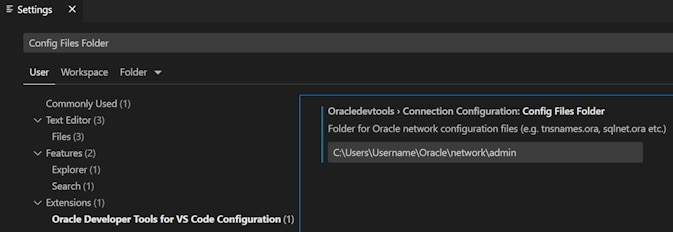
For the Basic connection type, the directory set in the Oracle Developer Tools for VS Code extension setting Connection Configuration: Config Files Folder is used to find the SQLNET.ORA. If this file is not found in that location, other default locations will be searched. If you do not wish to use a SQLNET.ORA file, you can place an empty file named SQLNET.ORA in the location provided by the Config Files Folder extension settings.
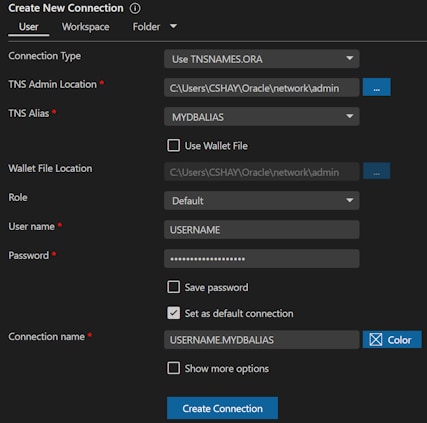
Connection Type: Use TNSNAMES.ORA
Network config files TNSNAMES.ORA and SQLNET.ORA are used if found in the directory specified in the "TNS Admin Location" field in the connection dialog. If an LDAP directory server is used, the LDAP.ORA file is also used from this location.
If the "TNS Admin Location" field in the connection dialog is empty, the directory set in the Oracle Developer Tools for VS Code extension setting Connection Configuration: Config Files Folder is used. If a networking config file is not found in either location, other default locations will be searched.
If a SQLNET.ORA file is found, settings in that file may impact your connection -- for example, SQLNET.AUTHENTICATION_SERVICES (e.g. if you use "/" as your username) or WALLET_LOCATION .
If you do not wish to use a SQLNET.ORA file, you can place an empty file named SQLNET.ORA in the "TNS Admin Location" field in the connection dialog "TNS Admin Location" field in the connection dialog, or (if that field is empty), in the location provided by the Config Files Folder extension settings.
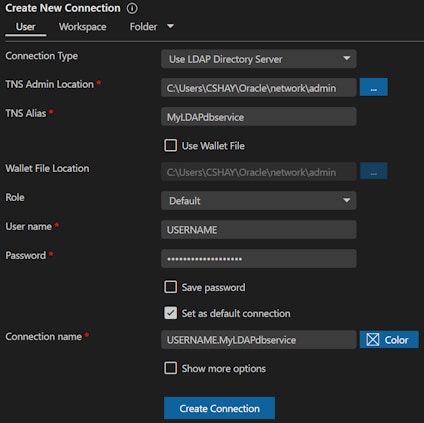
Connection Type: Use LDAP Directory Server
Network config files LDAP.ORA and SQLNET.ORA are used if found in the directory specified in the "TNS Admin Location" field in the connection dialog.
If the "TNS Admin Location" field in the connection dialog is empty, the directory set in the Oracle Developer Tools for VS Code extension setting Connection Configuration: Config Files Folder is used. If a networking config file is not found in either location, other default locations will be searched.
If a SQLNET.ORA file is found, settings in that file may impact your connection -- for example, SQLNET.AUTHENTICATION_SERVICES (e.g. if you use "/" as your username) or WALLET_LOCATION .
If you do not wish to use a SQLNET.ORA file, you can place an empty file named SQLNET.ORA in the "TNS Admin Location" field in the connection dialog "TNS Admin Location" field in the connection dialog, or (if that field is empty), in the location provided by the Config Files Folder extension settings.
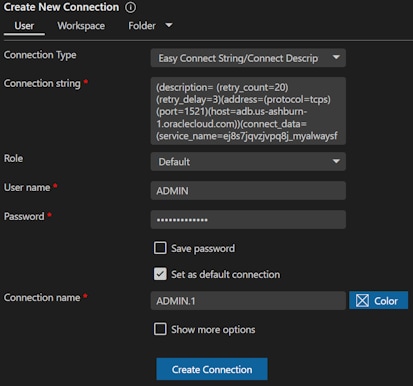
Connection Type: Easy Connect String/Connect Descriptor
If a SQLNET.ORA file is found, settings in that file may impact your connection -- for example, SQLNET.AUTHENTICATION_SERVICES (e.g. if you use "/" as your username) or WALLET_LOCATION .
For the Easy Connect String/Connect Descriptor connection type, the directory set in the Oracle Developer Tools for VS Code extension setting Connection Configuration: Config Files Folder is used to find the SQLNET.ORA. If this file is not found in that location, other default locations will be searched. If you do not wish to use a SQLNET.ORA file, you can place an empty file named SQLNET.ORA in the location provided by the Config Files Folder extension settings.
Connection Type: ODP.NET Connection String
If a SQLNET.ORA file is found, settings in that file may impact your connection -- for example, SQLNET.AUTHENTICATION_SERVICES (e.g. if you use "/" as your username) or WALLET_LOCATION .
For the ODP.NET Connection String connection type, the directory provided in the TNS_ADMIN parameter in the connection string is used to find the SQLNET.ORA file.
If that parameter is not set, or the SQLNET.ORA file is not found in that location, the directory set in the Oracle Developer Tools for VS Code extension setting Connection Configuration: Config Files Folder is used. If a networking config file is not found in either location, other default locations will be searched.
If you do not wish to use a SQLNET.ORA file, you can place an empty file named SQLNET.ORA in the location provided by the TNS_ADMIN parameter or Config Files Folder extension settings.

