Oracle JDeveloper and Application Development Framework 11g Release 1 (11.1.1.1.0) New Features
Updated July 1, 2009
Introduction
Oracle JDeveloper and Oracle Application Development Framework (ADF) 11g Release 1 (11.1.1.1.0) include many new features and also serves as a stabilization and performance update to their previous 11g releases (11.1.1.0.x). This document provides an overview of the features that are new in this release. The major feature areas in 11g Release 1 are:
- Customizations and Personalization: Oracle Metadata Services (MDS) provides the backbone for new customization capabilities of ADF. With MDS and ADF, developers can build in runtime personalization (user customizations) features into applications often without having to write any code. Developers can also leverage the customization features at design-time (seeded customizations) to build applications that can be tailored to the needs of many user groups or implementation sites.
- Oracle ADF Desktop Integration: With ADF Desktop Integration, you can bring the power of ADF to Microsoft Office. Users can leverage the trusted Microsoft Excel client and familiar user interface to perform bulk data manipulations and even work offline while not connected to a network. For developers, extending an ADF application to Excel uses the same familiar programming model and can leverage shared business services for improved reusability and data integrity.
- Oracle SOA Suite extenion: This release re-introduces the popular design time for Oracle SOA Suite with many new features. Available from Help > Check for Updates.
- Oracle WebCenter Framework and Services extension: This release re-introduces the Oracle WebCenter design time, now ready for 11g. Available from Help > Check for Updates.
- Oracle Team Productivity Center: Oracle Team Productivity Center (TPC) is a brand new product bundled with JDeveloper. TPC brings application lifecycle management (ALM) tools directly where developers need it: in the IDE. TPC includes an extensible server component with bre-built connectors to popular products used in the software development lifecycle (for example, JIRA, Microsoft Projects, and Rally Software). TPC also provides a JDeveloper extension to integrate the various lifecycle management and collaboration tools into the IDE.
If you are not familiar with the previous 11g releases of JDeveloper and ADF, you can look here to read more about the new features in those.
New In This Release
- JDeveloper Core IDE
- Java Coding and Agile Development
- Debugging and Profiling
- Database Development
- Java EE Application Server Integration and Deployment
- UML Development
- Web Services Development
- Web and Ajax Development
- XML Development
- Oracle Toplink Development
- ADF Framework
- ADF Faces
- ADF Business Components
- ADF Controller (Task Flow)
- Customization and Personalization
- ADF Desktop Integration
- ADF Mobile
- Oracle Team Productivity Center
JDeveloper Core IDE
| Feature Area | Feature | Description | Screenshot |
|---|---|---|---|
| Compare | Archive compare | Two-way compare is now possible for archive files (for example jar, zip, war). The view representing the compare archive is similar to the view used by the directory compare. | |
| Keymaps | Keymap import/export | The UI for working with accelerators (also known as keymaps) has been redesigned for improved usability. Export and import your keymap definitions. |  |
| Projects and Applications | Applications menu | A new Application menu in the main menu provides access to common commands performed on or with JDeveloper applications. | |
| Projects and Applictions | Delete project/application deletes contents | When deleting a project or application, you can choose to also delete the contents of the project or application.
Where appropriate, the Delete command performs a "safe delete" (checks for uses of the selected objects. |
|
| Docking and Layouts | Reset to default | Ability to reset the IDE window layout to the original settings with a simple menu item. | |
| Property Inspector | UI Improvements |
|
|
| Resource Bundles | Resource bundles in ADF libraries | Users can explicitly pick the ADF library and resource bundle they want to use. They do this from the Resource Picker Dialog, which has been enhanced to show and browse ADF Library contents. | |
| Resource Bundles | Search improvements | Ability to search multiple resource bundles for a key or string | |
| Help System | Search by phrase | The search engine in the Help system now considers the proximity of search terms in addition to the number of occurrences when producing the rankings, providing much more accurate search results. | |
| Editor | Last change indicator | A marker in the left gutter of code editors provides a quick visual indicator of changes to a file since the last save, hover over the marker for details of the change |  |
| Code Navigation | Go to File works on entire application | Go to Class and Go to File now work on the entire application, rather than only the current project and its dependencies | |
| Working Sets | Run working set (Java EE applications only) | New option in the Run menu to run the currently selected working set, limiting the files that are packaged and deployed to the integrated WLS. |
Java Coding and Agile Development
| Feature Area | Feature | Description | Screenshot |
|---|---|---|---|
| Java Editor | Create Enum | New dialog to assist with the creation of Enums | 
|
| Java Editor | Class/Interface dialog improvements | Implement interface in new Java class dialog
Specify modifiers in new Java class dialog Extends when creating an interface Specify modifiers in new Java interface dialog |
 |
| Java Editor | Breadcrumb navigation | Allow quick navigation to any child node |

|
| Java Editor | Join lines | Join Lines with one command/keystroke (as in VI, Emacs, ...) | |
| Java Editor | Method-only mode | Toggle this mode to restrict the code editor to show only the current member | |
| SVN | Upgrade | Upgraded 1.5 repository support using SVNKit 1.2.2 | |
| SVN | View Settings | Versioning Navigator Properties menu displays SVN file/folder information such as revision info, lock status, SVN properties |  |
| CVS | Annotate and .cvsignore | Support for .cvsignore through preview page in import wizard and using CVS Annotate command | |
| Serena | Upgrade | Downloadable Serena Dimensions extension upgraded to use Java API | |
| SCM Framework | Check-in Templates | Create, edit and import SVN and CVS templates through Preferences |  |
| SCM Integration | TPC Integration | Set up and use Oracle Team Productivity Center to manage collaboration and versioning through JDeveloper (see below) |
Debugging and Profiling
| Feature Area | Feature | Description | Screenshot |
|---|---|---|---|
| Debugger | Auto-complete inspection | Right-click and choose "Inspect" will add an inspection for the element at the cursor | |
| Debugger | JDK 6 Classes Window | Provides the class window view including loaded class names and instance count | 
|
| Debugger | JDK 6 Heap Window | View and walk Java objects including who points at the objects | |
| Debugger | Breakpoints window toolbar | Toolbar in Breakpoints window for performing common commands | |
| Debugger | JDK 6 Return Value | Ability to see the return value of a method call in the data window | |
| CPU Profiler | Input/Output time in Snapshots | Allow the user to specify a list of methods whose runnable time is to be counted as I/O time to allow user to distinguish threads blocked on file or socket read/write from real CPU time. A default list of methods in Java SE and Java EE will be provided; the user will be able to replace or add to this list. | |
| Memory Profiler | Agent Support for JRockit | The agent is a 'C' code based component that talks directly to the JRockit JVM. |
Database Development
| Feature Area | Feature | Description | Screenshot |
|---|---|---|---|
| Offline Database | Reporting | Query offline database objects using a SQL-style interface. The queries can be output to the log window and saved on file as reports (HTML, CSV) to be run any time | 
|
| Oracle Warehouse Builder Integration | Generate Oracle MetaBase (OMB) scripts for Oracle Warehouse Builder | ||
| SQL Server 2005 | Emulate and generate SQL for SQL Server 2005 | ||
| 2-pane Compare | For comparing SCM versioned offline DB objects: 2-pane hierarchical DB object compare editor replaces interpreting raw XML data files |  |
|
| Diagrammer | Iconic Constraints | Viewed constraints as icons through switching of the 'Show Icons' visual property | |
| ESDK | Pluggable Property Validation | For advanced users the ESDK provides a mechanism for property level validation of offline database object properties and user defined properties. See the ESDK for samples on using this feature. | |
| Database Navigator | SQL Developer 1.5.4 | Database Navigator functionality has been upgraded through integration with SQL Developer 1.5.4 |
Java EE Application Server Integration and Deployment
| Feature Area | Feature | Description |
|---|---|---|
| Connections | Oracle Application Server 10.1.3 Connection Support | Ability to connect to an Oracle Application Server 10.1.3. Note, use of Oracle AS 10.1.3 connections is limited to browsing deployed artifacts. |
| JNDI connection | Provides a JNDI connection for WLS 10.3 for browsing JMS queues and topics. | |
| Extend Domain Extension template registration | Ability to add a domain extension template to an existing Integrated WLS domain. Allows JDeveloper extensions to provide extensions to the Integrated WLS domain. | |
| Encrypt JDBC connection password for integrated WLS | Passwords for application scoped JDBC connections are now encrypted or use password indirection for Integrated WLS. | |
| Deployment Plans/Profiles | Deployment profiles in custom settings | Support the ability to create deployment profiles in project's custom settings which allows the user to create a deployment profile without modifying the source controlled part of the project |
| Profile type indicated in list of profiles | Display deployment profile list in a table and add a column to display the profile type. | |
| Oracle Descriptor Deploy Plan customization | UI for customizing adf-config.xml (for MDS) and connections.xml properties at deployment time. | |
| Security | Policy migrationConditional Migration of Policies during deployment/one button run | Conditionally migrate policies during deployment/one button run only during initial deployment or when policy changes occurred.
Selectively overwrite security configuration during deployment User and group migration to WLS is optional at deployment time |
| ojdeploy | Enhancements |
New options to control the following:
|
| EJB | JUnit and EJB 3.0 testing | Auto-generation of JUnit tests for testing outside container |
UML Development
| Feature Area | Feature | Description | Screenshot |
|---|---|---|---|
| Class Diagrammer | UML2 | The UML Class diagrammer supports UML2 notation and meta model properties | 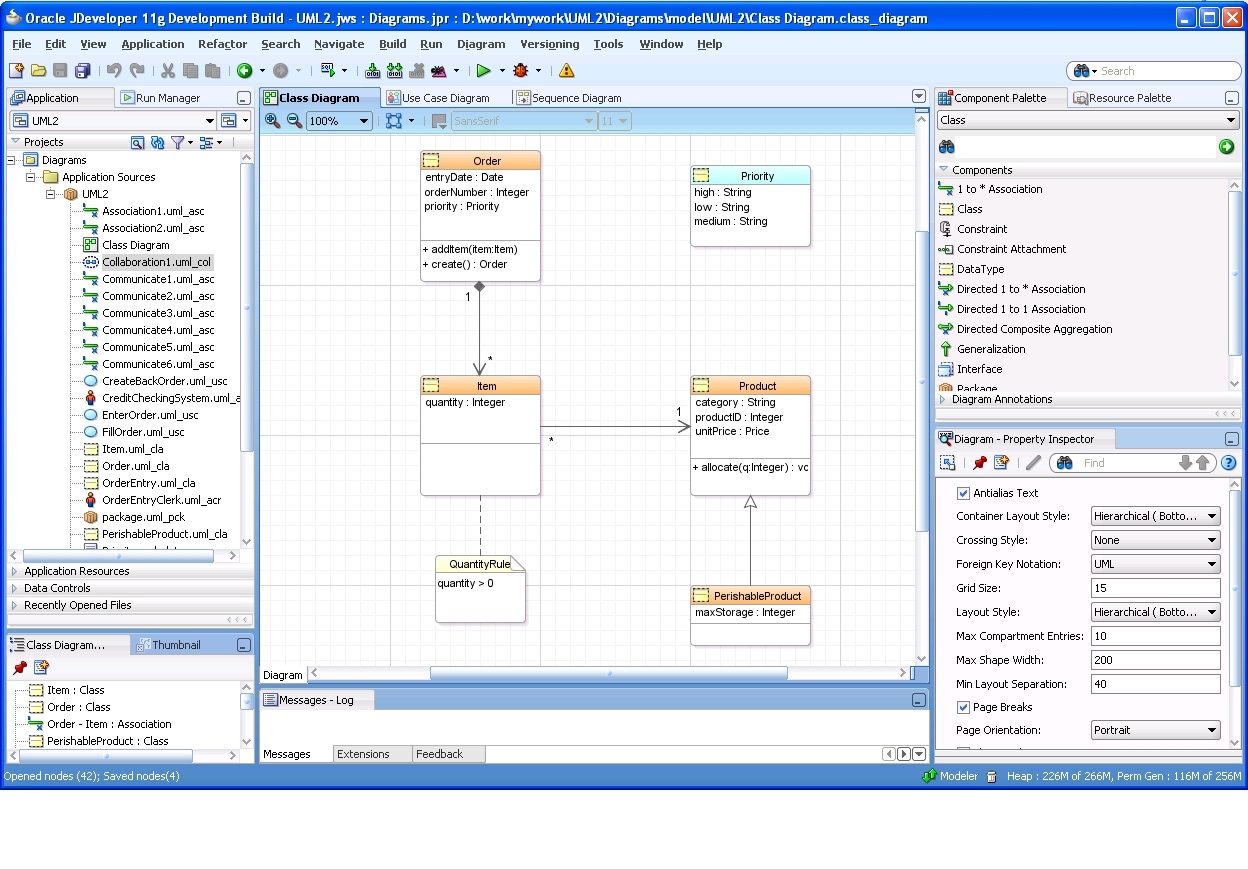
|
| Sequence Diagrammer | UML2 | The UML Sequence diagrammer supports UML2 notation and meta model properties | |
| Use Case Diagrammer | UML2 | The UML Use Case diagrammer supports UML2 notation and meta model properties |
Web Services Development
| Feature Area | Feature | Description | Screenshot |
|---|---|---|---|
| Database Web Services | PL/SQL Web Services | The PL/SQL Web Services wizard that was removed from the JDeveloper 11g (Boxer) release due to incompatibilities with the WLS server have been fully restored. | |
| Policy | OWSM Policy on JRF services | Web services used in ADF applications that use the proprietary @PortableWebService annotation now have Property Inspector support for configuring the necessary OWSM policies to these services for security, reliability and management purposes. | |
| OWSM Policy on WebLogic Server | OWSM Policies are now also available on WebLogic Server, in addition to the native WLS WS policy support. | ||
| Policy store support | The default policy store supported for development purposes is the installed ADRS policy store (rather than the zip file in the install). One advantage of this is that it enables the use case of developer hand-authored custom policies. |
Web and Ajax Development
| Feature Area | Feature | Description | Screenshot |
|---|---|---|---|
| Visual Editor | User Interaction polish | Improved visual editor feedback and appearance, and improved interaction with "Design this Container" feature | |
| Performance | Many performance optimizations | ||
| Option to Suppress EL Display | Ability to hide the sometimes distracting EL expressions in the visual editor | ||
| Editing multi level menus | Ability to view and edit/design multi level menu hierarchy in visual editor (menus inside popup or menubar) | ||
| Faces Config | Performance | Several performance and memory usage optimizations | |
| Rename resource bundle | Ability to refactor (rename, move, delete) resource bundles reference in faces-config. | ||
| Editor | Audit For High Availability | Audit managed bean assignments with pageFlow or view scope to warn that dirty must be called to propagate change in High-Availability environment | |
| Editor | HTML/JSP Comment Out | Toggles a comment around a selected word or block in the HTML/JSP editor | |
| CSS | Performance | Performance improvements on large CSS files | |
| Code insight for @page | Code insight is available for @page at-rule pseudo-classes. | ||
| JavaScript | JavaScript Inside JSP fragments | JavaScript editing features are available for JavaScript embedded in JSP fragments | |
| Extract Embedded JavaScript Snippet | Users can select a snippet of JavaScript inside a <script> of HTML/JSP, and extract it to a separate .js file. This automatically updates the <script> to point to the standalone .js file through the "src" attribute. | ||
| Breadcrumbs | Added breadcrumb support for the JavaScript code editor | ||
| Show File Names in Code Insight | The code insight list shows the file name from where the global objects/properties (i.e top level) are being referenced | ||
| web.xml editor | JSP Property Groups | Ability to define JSP Property groups in the web.xml flat editor's Pages tab | |
| Security Constraints | Ability to define security constraints in the web.xml flat editor's Security tab | 
|
|
| Enhancements | Several minor user interface enhancements to the web.xml flat editor | ||
| EL Picker | Method picker | EL method binding picker for actions |
XML Development
| Feature Area | Feature | Description | Screenshot |
|---|---|---|---|
| Schema Editor | Publish XSD diagram | Save XSD schema graphical view as .png, .jpg, .svg, .svgz file | 
|
| XSD from XML document | Create XML schema document from given XML instance | ||
| Attribute Editing | Create attributes and set their properties/facets from within Schema Visual Editor |  |
|
| XML Validation | Validation | Instance level validations on XML/XSD documents |
Oracle Toplink Development
| Feature Area | Feature | Description | Screenshot |
|---|---|---|---|
| JAXB | JaxB 1.0 content model and schema generation persistence provider specification | Allow the user to choose either EclipseLink or TopLink as the persistence provider and create a jaxb.properties file with the specified provider | 
|
| ORM | Support for Stored Procedures in TopLink ORM |
Allow the designation of stored procedures as the selection criteria on queries in the mappings plug-in. Specifically, this will allow:
|
 
|
| JDeveloper Integration | Bi-direction editing support in the sessions.xml editor | User can now edit the XML directly in the source view and see changes in the editor UI. Similar to the support provided in our JPA tooling |
ADF Framework
| Feature Area | Feature | Description | Screenshot |
|---|---|---|---|
| ADF Debugger | Lifecycle phase breakpoints | Set a declarative breakpoint before or after any of the phases in the fusion page lifecycle. | 
|
| Context variable information | While debugging an ADF application, view memory scope variables and ADF context information in the ADF data window. |

|
ADF Faces
| Feature Area | Feature | Description | Screenshot |
|---|---|---|---|
| af:calendar | New component | Unlike a simple date picker, the new ADF Calendar component allows users to see their activities, and depending on how application developers configure the component, they can also modify, add and delete appointments. The Calendar component allows drag and drop, and views for Day, Week, Month and List. Multiple calendar sources can be shown at one time, for example, pulling in your personal calendar, team vacation calendar and work calendar all into one view, with color coding for the different calendar sources. The calendar component is fully integrated with ADFm, so if you drop an appropriate type of data control from the data control palette, it will drop as a calendar component. | 
|
| af:panelDashboard | New component |
Ever needed to display a grid of content to your users? There is a new ADF Faces Dashboard component that can do just that. It is called af:panelDashboard and has these features:
|
 |
| Layouts | Quick Start Layouts | A new, extensive gallery of quick start layouts simplify creating new pages (or templates) that achieve the desired layout. These one, two and three column layouts have been created so that users don't have to be burdened with understanding which layout components stretch their children or how to achieve a right side bar that collapses. |  |
| af:popup | Help | Help support for popup dialogs | |
| af:panelAccordion | Panel resize | Users can change the size of accordion panels at runtime | |
| af:panelTabbed | Removable tabs | Ability for users to remove tabs at runtime | |
| af:tree | Performance improvement | Improved performance of expanding and collapsing tree branches | |
| af:table | Runtime navigation enhancements |
|
|
| af:query | IN operator | Support for 'IN' operation | |
| af:document | Uncommitted data warning | The uncommittedDataWarning property of the <af:document> tag specifies whether users should be warned about uncommitted data when navigating away from the page or region. | |
| Declarative Components | Lightweight declarative components | Implement new dynamic declarative component | |
| LOV (Lists of Values) | Smart LOV | Added support for Smart LOV to show recommended "top choices" rows in the drop-down and the complete set in the dialog | |
| Active Data | Active data | Active data refers to the concept of maintaining an open connection to the server and "pushing" data to clients when it changes on the server. For many applications, this technique can be more efficient and offer a richer user experience than traditional polling/pulling approaches used in web applications. |
ADF Visualization
| Feature Area | Feature | Description | Screenshot |
|---|---|---|---|
| dvt:hierarchy | New component | ADF DVT Hierarchy Viewer is a new visualization used to display hierarchical data. Hierarchy Viewer is most commonly used to display org charts, but can be used for any hierarchical data display.
Zooming in/out Different views at different zoom levels Expanding/collapsing nodes Rendering simple ADF components inside the nodes Panel cards, which allow the user to switch between multiple sets of content within the same node Control panel |

|
| dvt:graph | Graph Enhancements | Variably sized human-shaped markers and arrow connectors in scatter and bubble charts
Clickable labels on the graphs Support for standalone SWF file generation Non-rich JSF graph tag for use in Mobile apps |
|
| dvt:guage | Guage Enhancements | LED arrow-type gauge is now available in the Gauge component gallery at design time
Support for new Beveled Circle style on the Gauge |
|
| dvt:geomap | Geographic Map Enhancements | New built-in Point Styles are now available on the Geographic Map
Improved info window and info panel visual design Improved theme dialog alignment and padding Improved Map type button visual design |
|
| dvt:gantt | Gantt Chart Enhancements | Developers can now pick optional task properties in design time
Gantt chart auto-scrolls when dragging task off-screen (horizontal scrolling only) Users can interactively change percent complete on a task New label align attribute Ability to remove filter combo box and properties menu from Gantt toolbar and menus Ability to separate Gantt information panel from legend |
|
| dvt:pivotTable | Pivot Table Enhancements | Keyboard support for pivoting, sorting and column/row resizing
Ability to add a listener to the PivotTable to listen for the pivot events |
ADF Business Components
| Feature Area | Feature | Description | Screenshot |
|---|---|---|---|
| SOA Integration | Business Events | Define entity object business events that can notify external business processes using standard Service Component Architecture (SCA) |  |
| Services | Simplify application integration by declaratively enabling a Service Interface that allows clients to work with an application module's data and custom methods over web services |  |
ADF Controller (Task Flow)
| Feature Area | Feature | Descriptio | Screenshot |
|---|---|---|---|
| Memory Scopes | Backing Bean Scope | Backing bean scope has a lifespan of a single request and provides an isolated instance of
memory for backing beans. |
|
| View Scope | View scope variables exist until the current browser window or region changes. | ||
| Task Flow Activities | Parent Action Activity | A parent action activity is used in a region to trigger navigation of the parent page or region. | 
|
Customization and Personalization
Meta data services (MDS) provides a framework to support both user and design time customizations of ADF metadata. While MDS has been an integral, but hidden part of the ADF framework for the last several releases, with this release it provides some key features bringing it front and center.
| Feature Area | Feature | Description |
|---|---|---|
| Customization and Personalization | User Customizations | Many ADF Faces Rich Client components allow the user to customize the look and feel of the component at runtime. Users can drag a column and reorder it, they can change the splitter position of a panel splitter, and make various other changes to their components. The change persistence framework and MDS allow for the persistence of these user customizations across sessions. For example, a user may remove columns, freeze columns, or reorder columns of a table. The next time they visit the page, their changes will be retained. What customizations are persisted is completely configurable at the application, page, component, and attribute levels. |
| Seeded Customizations |
ADF metadata can be customized when JDeveloper is in customization role. Customization is a mechanism through which metadata can be modified to tailor it to different target audiences and business domains. Customizations are stored in separate XML files, and thus these customization changes do not update the "base" definition of the application. An application can be configured to use multiple layers of such customizations, with a precedence of how to apply the layers, and each layer with a set of possible values (ex: verticalization and site layers, each with relevant list of values). One can select the customization context in JDeveloper and create/edit the customizations at a specific layer/value. All these customizations can be deployed with the application. The following metadata can be customized in JDeveloper :
|
|
| Deployment | A new deployment profile type (MAR) allows for packaging the metadata (especially customizations), that needs to be deployed to MDS reposiotry, inside the EAR. | |
| Customization Developer Role | The visual editor, Structure Pane and Property Inspector is used to update the metadata as usual in JDeveloper, and in this customization role, these updates get saved as customizations. |
ADF Desktop Integration
ADF Desktop Integration brings the power of ADF data binding to one of the most popular clients for editing data; Microsoft Excel. Some key advantages of extending ADF applications to Microsoft Excel workbooks include:
- Providing end users with access to data and functionality hosted by amn ADF web application through a desktop interface (Microsoft Excel) that may be more familiar to them.
- Users can access data hosted by a Fusion web application while not connected to the application. They must log on to the ADF web application in order to download data. Once data is downloaded to an Excel workbook, they can modify it while disconnected from the Fusion web application.
- Bulk entry and update of data may be easier to accomplish through a spreadsheet-style interface.
| Feature Area | Feature | Description | Screenshot |
|---|---|---|---|
| Excel Integration | Runtime |
Leverage familiar Excel functionality (calculated fields, multi-select copy/paste, cell styles, etc)
Reuse same page definition as an ADF web application for declarative binding to ADF model layer
|

|
| Design time | Rich design time tools through an Excel add in | ||
| Deployment | Streamlined configuration for clients |
ADF Mobile
| Feature Area | Feature | Description |
|---|---|---|
| Browser Support | Plain HTML Browser Support | Support for plain HTML browsers found in feature or consumer mobile phones that may have no or limited JavaScript or CSS support. Developer can build one set of views using ADF Mobile (Trinidad) components, and the same view would degrade gracefully when rendering on a plain HTML Browser. For example, JavaScripts are not delivered to HTML browsers, and therefore page navigation does not require JavaScript Support. Minimal requirement is WAP 2.0 browser. |
| Performance Enhancements | Mobile CSS Optimization | Default stylesheets delivered to mobile browsers have been optimized for performance. |
Oracle Team Productivity Center
Oracle Team Productivity Center is an Application Lifecycle Management (ALM) tool that allows software development teams to collaborate and work productively together through the development of software code applications using JDeveloper. It provides a Connector Framework to enable third party Application Lifecycle Management (ALM) repositories (such as task and project management, version control, document management, software bug reporting and management systems, build systems etc) to be integrated with JDeveloper enabling users to directly interact with their existing ALM artifacts whilst working in Oracle JDeveloper.
| Feature Area | Feature | Description | Screenshot |
|---|---|---|---|
| User and Teams | Hierarchy | Maintain hierarchical team structures | |
| Multiple teams | Attach users to multiple teams | 
|
|
| Roles | Create/edit roles and permissions for users per team | ||
| Repositories | Integrate | Integrate with third party ALM repositories (task, defect, issues etc) |  |
| Work Items | Query | Query ALM Repositories artifacts as work items |  |
| Update | Create and update work items and save to ALM repository | ||
| Tags | Manage, apply, query tags on work items across ALM repositories, private or visible to team members | ||
| Relationships | Relate ALM artifacts from the same or another repository, visible to all users | ||
| Attachments | Upload/link documents to workitems visible to all users, read and edit documents in JDeveloper | ||
| Context | Save/Restore IDE file and layout context against a work item | ||
| Collaboration | Chat | Connect/use XMPP chat system through JDeveloper IDE | |
| Versioning | Team SCM | Access to SCM repositories via Team Productivity Center UI | |
| Connectors | JIRA | Shipped connector enabling integration with JIRA repositories |  |
| MS Project Server | Shipped connector enabling integration with MS Project Server repositories | ||
| Framework | Development kit and sample enabling connectors to be developed for other ALM repositories | ||
| Rally | Rally Software developed connector available from Partner Extension center |